Week 4.1 - Solving second order ODEs
AIM
To Solve second order ODEs
Objective
To write a program that solves the following ODE. This ODE represents the equation of motion of a simple pendulum with damping.
Introduction
MATLAB® combines a desktop environment tuned for iterative analysis and design processes with a programming language that expresses matrix and array mathematics directly. It includes the Live Editor for creating scripts that combine code, output, and formatted text in an executable notebook.
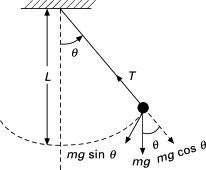
The simple pendulum is another mechanical system that moves in an oscillatory motion. It consists of a point mass ‘m’ suspended by means of light inextensible string of length L from a fixed support. The motion occurs in a vertical plane and is driven by a gravitational force. The forces which are acting on the mass are shown in the figure. The tangential component of the gravitational force, mg sin θ, always acts towards the mean position θ = 0 opposite to the displacement, restoring force acting tangent to the arc.
Methodology
- FIRST GIVE INPUTS OF GIVEN VALUES AND CONSTANTS
- THEN WRITE DOWN THE INITIAL CONDITION GIVEN IN CHALLENGE
- THEN GIVE THE TIME POINTS FOR MOTION AS MENTIONED UPTO 20 SEC
- THEN SOLVE ODE USING ODE45 INBUILT MATLAB FUNCTION
- FOR THAT WE NEED TO CALL THE FUNCTION WHICH WILL CALCULATE VALUES FOR ANGULAR DISPLACEMENT &ANGULAR VELOCITY
- THEN WE NEED TO DO PLOTING FOR ANGULAR VELOCITY AND ANGULAR DISPLACEMENT
- THEN WE NEED TO ANIMATION PART
- FOR ANIMATION WE NEED TO DEFINE POINTS
- FIRST POINT IS FIXED
- FOR SECOND POINT WE NEED DEFINE IT ASIT CHANGES WITH RESPECT TO TIME AND ANGLE
- GIVING COUNTER COMMAND COMMAND AS IT IS REPRESENTING EVERY FRAMES
- FOR SOLVING IS REPEATITVELY WE NEED TO USE FOR LOOP
- BY USING PLOT COMMAND AND GIVEN LOCATIONS FOR SUPPORT ROD , FIXED POINT , LENGTH OF ROD
- SIMILARLY FOR BOD PENDULUM WE HAVE TO PLOT BY USING MARKER COMMAND FOR SPHERE SHAPE
Input Code
close all
clear all
clc
%inputs
b = 0.05;
g = 9.81;
l = 1;
m = 1;
%initial conditions
theta_0 = [0;5];
%time points
t_span = linspace(0,20,500);
%solve ODE
[t,results] = ode45(@(t,theta) ode_func(t,theta,b,g,l,m),t_span,theta_0);

% Plotting
figure(1)
plot(t,results (:,1))
hold on
plot(t,results(:,2))
ylabel('Plot')
xlabel('Time')
saveas(1,'Time_Plot.png')
legend('Displacement','Velocity')

%Animation
x0 = 0;
y0 = 0;
x1 = -1;
y1 = 0;
x2 = 1;
y2 = 0;

ct = 1;
for i = 1 : length(t)
    x = l*sind(results(i));
    y = -l*cosd(results(i));
    plot([x1 x0 x2],[y1 y0 y2],'linewidth',8)
    hold on
    plot([x0 x],[y0 y],'linewidth',5)
    hold on
    plot(x,y,'o','markersize',20,'markerfacecolor','b')
    axis([-2 2 -2 0])
    hold off
    pause(0.01)
    M(ct) = getframe(gcf);
    ct = ct+1;
    end

% Saving as video
movie(M)
videofile = VideoWriter('Simple_Pendulam.avi','Uncompressed AVI');
open(videofile)
writeVideo(videofile,M)
close(videofile)
Function Code
function [dtheta_dt] = ode_func(t,theta,b,g,l,m)
theta1 = theta(1);
theta2 = theta(2);
dtheta1_dt = theta2;
dtheta2_dt = -(b/m)*theta2-(g/l)*sin(theta1);
dtheta_dt = [dtheta1_dt;dtheta2_dt];
end
Output
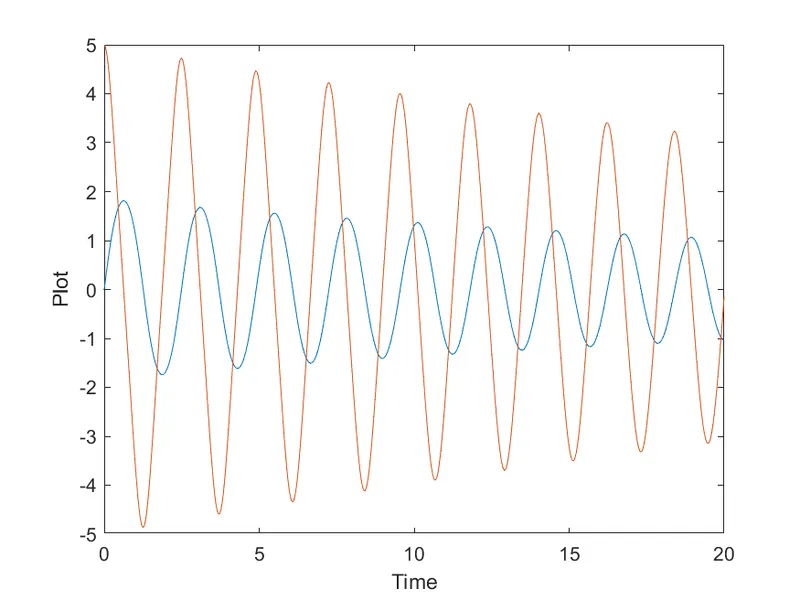
CONCLUSION
The code have been compiled correctly and the result have been obtained.