Week 4.1 - Solving second order ODEs
AIM
Solving second order ODEs
OBJECTIVE
To write a program that solves the following ODE. This ODE represents the equation of motion of a simple pendulum with damping.
INTRODUCTION
MATLAB® combines a desktop environment tuned for iterative analysis and design processes with a programming language that expresses matrix and array mathematics directly. It includes the Live Editor for creating scripts that combine code, output, and formatted text in an executable notebook.
In Engineering, ODE is used to describe the transient behavior of a system. A simple example is a pendulum
The way the pendulum moves depends on the Newtons second law. When this law is written down, we get a second order Ordinary Differential Equation that describes the position of the "ball" w.r.t time.
Similarly, there are hundreds of ODEs that describe key phenomena and if you have the ability to solve these equations then you will be able to simulate any of theses systems.
INPUT CODE
close all
clear all
clc
%inputs
b = 0.05;
g = 9.81;
l = 1;
m = 1;
%initial conditions
theta_0 = [0;5];
%time points
t_span = linspace(0,10,500);
%solve ODE
[t,results] = ode45(@(t,theta) ode_func(t,theta,b,g,l,m),t_span,theta_0);

% Plotting
figure(1)
plot(t,results (:,1))
hold on
plot(t,results(:,2))
ylabel('Plot')
xlabel('Time')
saveas(1,'Time_Plot.png')
legend('Displacement','Velocity')

%Animation
x0 = 0;
y0 = 0;
x1 = -1;
y1 = 0;
x2 = 1;
y2 = 0;

ct = 1;
for i = 1 : length(t)
    x = l*sind(results(i));
    y = -l*cosd(results(i));
    plot([x1 x0 x2],[y1 y0 y2],'linewidth',8)
    hold on
    plot([x0 x],[y0 y],'linewidth',2)
    hold on
    plot(x,y,'o','markersize',15,'markerfacecolor','b')
    axis([-2 2 -2 0])
    hold off
    pause(0.01)
    M(ct) = getframe(gcf);
    ct = ct+1;
    end

% Saving as video
movie(M)
videofile = VideoWriter('Simple_Pendulam.avi','Uncompressed AVI');
open(videofile)
writeVideo(videofile,M)
close(videofile)
Function code is given by:
function [dtheta_dt] = ode_func(t,theta,b,g,l,m)
theta1 = theta(1);
theta2 = theta(2);
dtheta1_dt = theta2;
dtheta2_dt = -(b/m)*theta2-(g/l)*sin(theta1);
dtheta_dt = [dtheta1_dt;dtheta2_dt];
end
CODE DEFINITION
- Firstly we have to initialize the variables among which the code will run.
- Then we have to input the variables which are necessary.
- According to the ODE the equations should be inputted and the formulae will be given in another function.
- Then we have to call the function and then execute the equation.
- Then we have to plot the Time vs Plot.
- Finally we have to create a video file that involves a pendulum that we can create.
OUTPUT
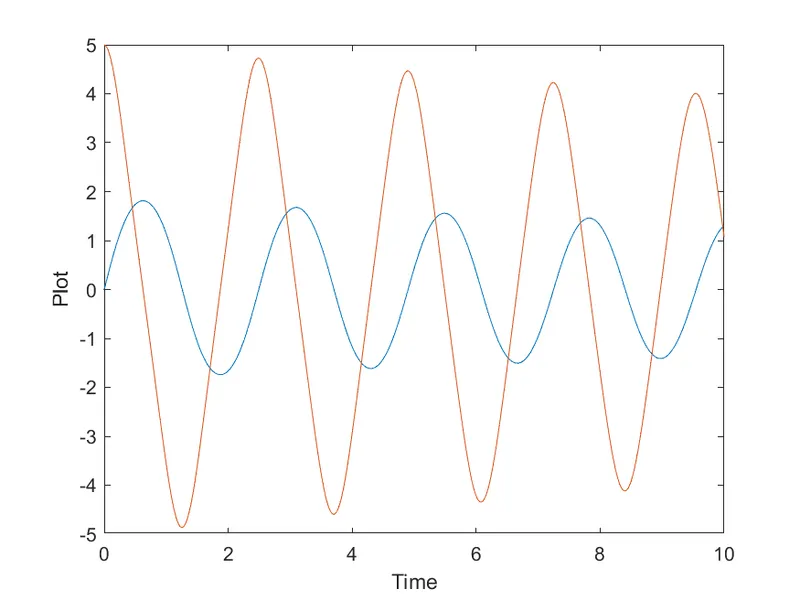
CONCLUSION
The exection of the code is done correctly and thus concluded.