Week 4.1 - Genetic Algorithm
AIM - To understand the concept to genetic algorithm and looking out information regarding stalagmite function and ways to optimise it.
Objective -
1. MATLAB to optimise the stalagmite function and find the global maxima of the function.
2. Explaining the syntax for ga in MATLAB in your report.
3. Plot graphs for all 3 studies and for F maximum vs no. of iterations.
Genetic Algorithm Explaination -
Genetic Algorithm - It is one of the optimisation processes which is a search-based optimization technique, based on the principles of Genetics and Natural Selection. It is frequently used to find optimal or near-optimal solutions to solve optimization problems in research & machine learning.
We can apply the ga to solve problems that are not well suited for standard optimization algorithms.
Fitness Function in ga - It is a function which meaures how good a solution of the given data can be. This function takes the solution as input and produces the suitable solution as the output. This shows how optimal a solution is...of the desired problem.
Working of Genetic Algorithm -
Initialization - Here first we have to decide the size of population (population is the number of sample data taken to perform the ga operation). So, higher the population size, the more combinations we will get, hence it helps to get more accurate reult.
Selection Process - In this process ga of the selected sample data points is the main objective of this selection process. The fitness value of the given data will be computed, where the most fittest value will have the most probability of mating and propagating their genetic features to the next generation. At each step the ga randomly selects the individual from current given data and use them to give the optimal solution, whicch will show the best evolution of the successive generation.
CrossOver Process - It is the process of taking two parents' data and producing a child by interchanging the genes. Where mutation is carried out to maintain the genetic diversity from one generation of a population of chromosomes to the next.
here, Total gene = No of genes * No of population i.e., 2*5=10. So total random value will be 10 i.e., genes.
Usage of Ga are as follows -
1. Optimization - is used to optimize a problem wherein we have to maximize/minimize a goven objecctive function under a given set of Bounds.
2. Image Processing - is used in digital image prossing (DIP).
3. Neural Networks - is used to train neural networks, particularly recurrent neural networks.
4. Economics - is used to characterize various asset pricing, game theory resolution, etc.
Syntax for GA -
x = ga(fun,nvars)
x = ga(fun,nvars,A,b)
x = ga(fun,nvars,A,b,Aeq,beq)
x = ga(fun,nvars,A,b,Aeq,beq,lb,ub)
x = ga(fun,nvars,A,b,Aeq,beq,lb,ub,nonlcon)
x = ga(fun,nvars,A,b,Aeq,beq,lb,ub,nonlcon,options)
x = ga(fun,nvars,A,b,[],[],lb,ub,nonlcon,IntCon)
x = ga(fun,nvars,A,b,[],[],lb,ub,nonlcon,IntCon,options) x = ga(problem)
[x,fval] = ga(___)
[x,fval,exitflag,output] = ga(___) [x,fval,exitflag,output,population,scores] = ga(___)
.
.
.
[inputs,fopt] = ga(function,number of variables)
So, here the number of variables are 2 i.e., x and y, and we will get 1*2 matrix value for each iteration, which basically gives the value of x and y and fopt i.e., the optimum value of the function at these x and y values.
Going further we can put restrictions to the value of x and y by using upper and lower bound commands, for doing so the syntax is -
[inputs,fopt] = ga(function,number of variables,A,b,Aeq,beq,lb,ub)
Where,
lb is the lower bound and ub is the upper bound
A - linear inequality constraints
b - linear inequality constraints
Aeq - linear equality constraints
beq - linear equality constraints
Since there is no constraints, A,b,Aeq,beq are represented as []..... [inputs,fopt] = ga(function,number of variables,[],[],[],[],lb,ub)
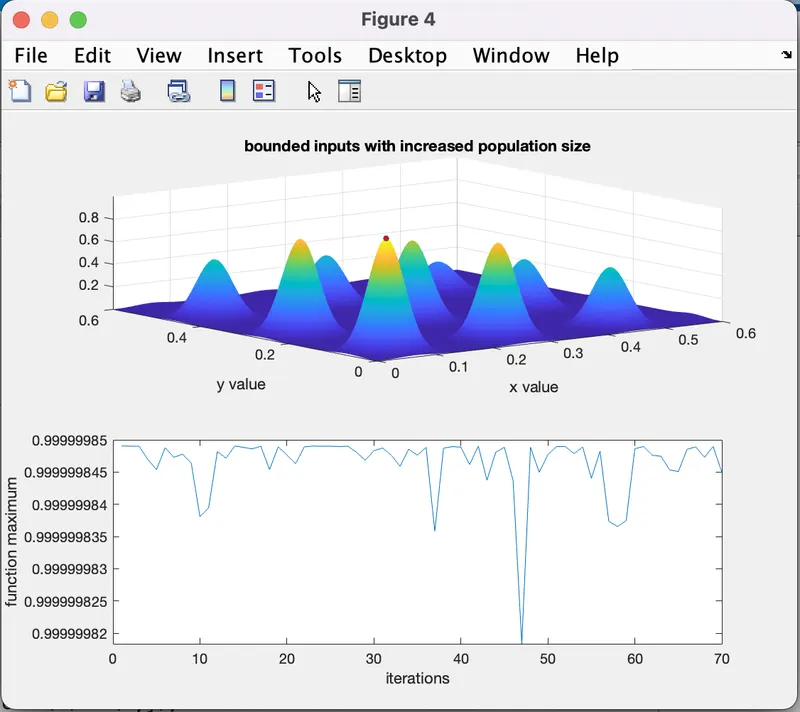
To Overcome the problem we have to increase the size of population so that there is a increase in probablity tu a global maxima.
So, the GA syntax that needs to be used is
[inputs,fopt] = ga(function,number of variables,[],[],[],[],lb,ub,[],[],options)
Steps followed -
1. Create a function to calculate the values of objective function at vairous values of X and Y.
2. Create a matrix using mesh grid function.
3. After getting values from the matrix, we will calculate the maximum value, which can be calculated using the ga function.
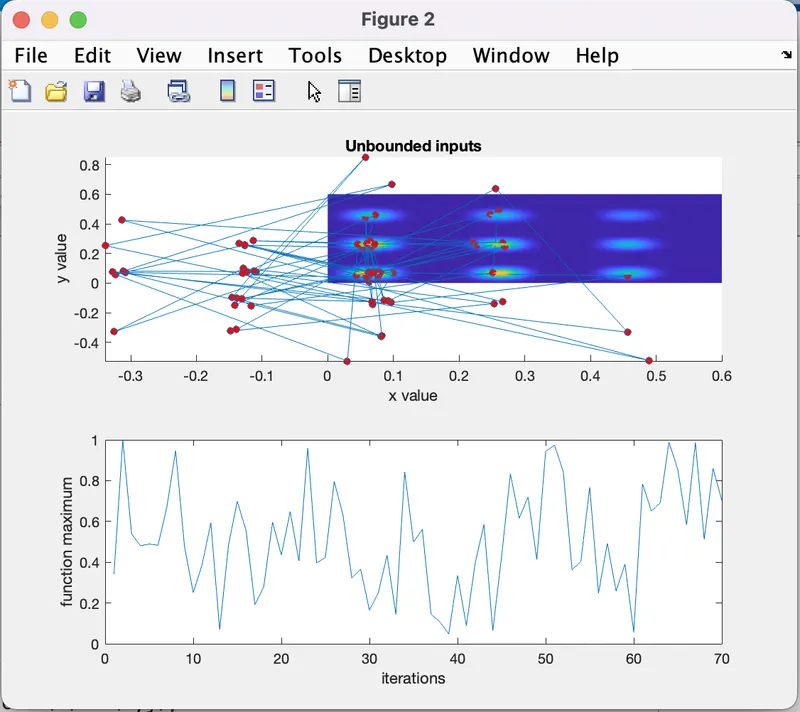
4. In Case Study #1 we ill use 'for loop' and run for 70 times.
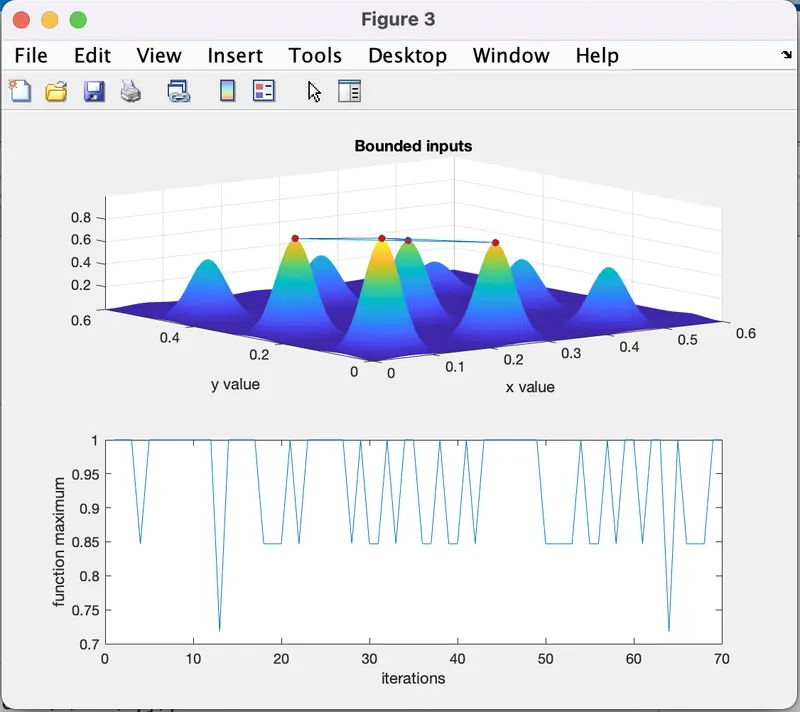
5. In Case Study #2 we are setting upper and lwer bounds.
6. In Case Study #3 we incease the population size to increase the probability.
%Stalagmite function Codes

function [f] = stalagmite(input_vector)

a=input_vector(1);
b=input_vector(2);

term1=(sin((5.1*pi*a)+0.5))^6;
term2=exp(-4*log(2)*((a-0.0667)^2)/0.64);
term3=(sin((5.1*pi*b)+0.5))^6;
term4=exp((-4)*log(2)*((b-0.0667)^2)/0.64);
[f]=-(term1*term2*term3*term4);
end
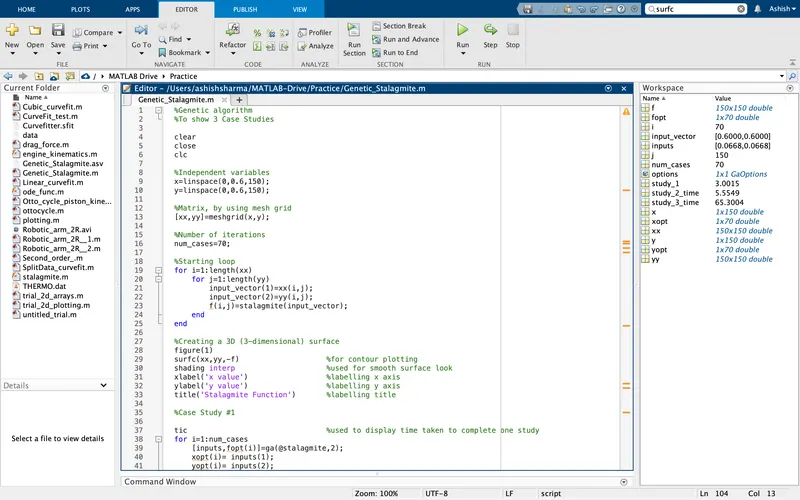
%Genetic algorithm
%To show 3 Case Studies

clear
close
clc

%Independent variables
x=linspace(0,0.6,150);
y=linspace(0,0.6,150);

%Matrix, by using mesh grid
[xx,yy]=meshgrid(x,y);

%Number of iterations
num_cases=70;

%Starting loop
for i=1:length(xx)
    for j=1:length(yy)
        input_vector(1)=xx(i,j);
        input_vector(2)=yy(i,j);
        f(i,j)=stalagmite(input_vector);
    end
end

%Creating a 3D (3-dimensional) surface
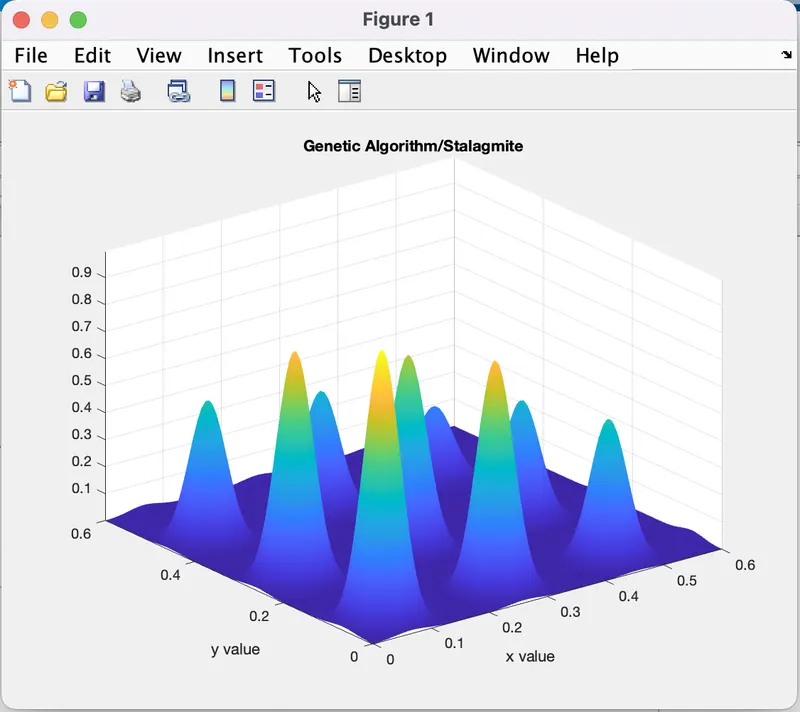
figure(1)
surfc(xx,yy,-f)                    %for contour plotting
shading interp                     %used for smooth surface look
xlabel('x value')                  %labelling x axis
ylabel('y value')                  %labelling y axis
title('Genetic Algorithm/Stalagmite')       %labelling title

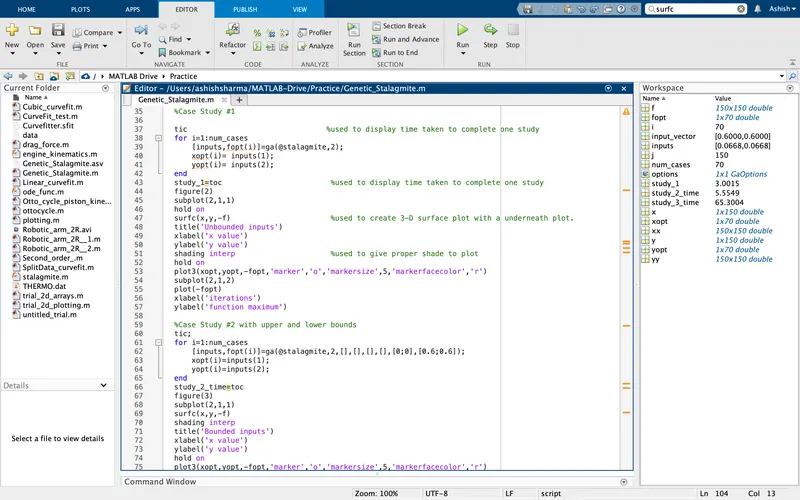
%Case Study #1

tic                                %used to display time taken to complete one study
for i=1:num_cases
    [inputs,fopt(i)]=ga(@stalagmite,2);
    xopt(i)= inputs(1);
    yopt(i)= inputs(2);
end
study_1=toc                         %used to display time taken to complete one study
figure(2)
subplot(2,1,1)
hold on
surfc(x,y,-f)                       %used to create 3-D surface plot with a underneath plot.
title('Unbounded inputs')
xlabel('x value')
ylabel('y value')
shading interp                      %used to give proper shade to plot
hold on
plot3(xopt,yopt,-fopt,'marker','o','markersize',5,'markerfacecolor','r')
subplot(2,1,2)
plot(-fopt)
xlabel('iterations')
ylabel('function maximum')

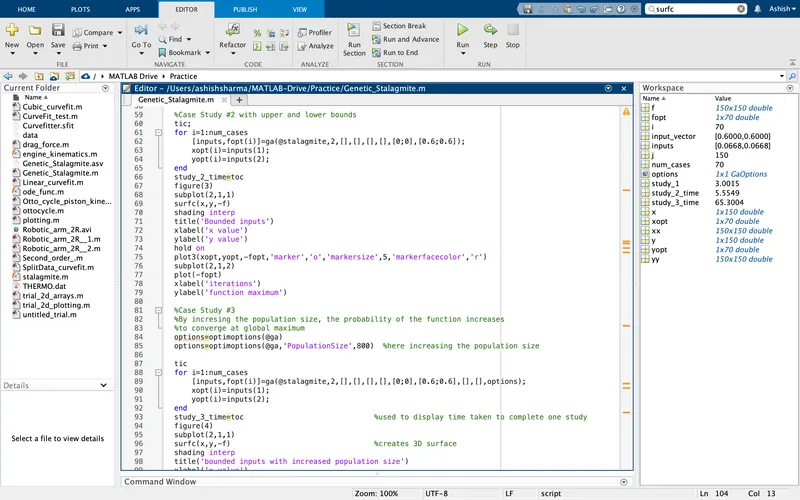
%Case Study #2 with upper and lower bounds
tic;
for i=1:num_cases
    [inputs,fopt(i)]=ga(@stalagmite,2,[],[],[],[],[0;0],[0.6;0.6]);
    xopt(i)=inputs(1);
    yopt(i)=inputs(2);
end
study_2_time=toc
figure(3)
subplot(2,1,1)
surfc(x,y,-f)
shading interp
title('Bounded inputs')
xlabel('x value')
ylabel('y value')
hold on
plot3(xopt,yopt,-fopt,'marker','o','markersize',5,'markerfacecolor','r')
subplot(2,1,2)
plot(-fopt)
xlabel('iterations')
ylabel('function maximum')

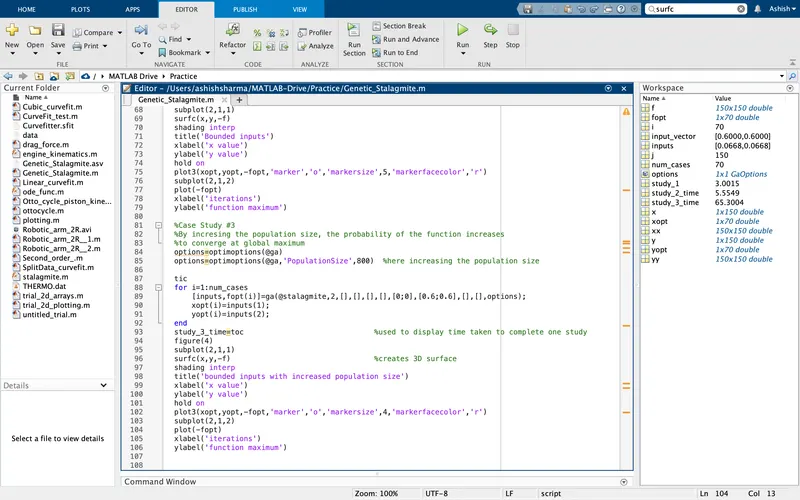
%Case Study #3
%By incresing the population size, the probability of the function increases
%to converge at global maximum
options=optimoptions(@ga)
options=optimoptions(@ga,'PopulationSize',800)  %here increasing the population size

tic
for i=1:num_cases
    [inputs,fopt(i)]=ga(@stalagmite,2,[],[],[],[],[0;0],[0.6;0.6],[],[],options);
    xopt(i)=inputs(1);
    yopt(i)=inputs(2);
end
study_3_time=toc                              %used to display time taken to complete one study
figure(4)
subplot(2,1,1)
surfc(x,y,-f)                                 %creates 3D surface
shading interp
title('bounded inputs with increased population size')
xlabel('x value')
ylabel('y value')
hold on
plot3(xopt,yopt,-fopt,'marker','o','markersize',4,'markerfacecolor','r')
subplot(2,1,2)
plot(-fopt)
xlabel('iterations')
ylabel('function maximum')
Graphical Plots -
References -
https://skill-lync.com/knowledgebase/genetic-algorithm-explained
https://skill-lync.com/premium/coursevideos/78276/en/1427
https://in.mathworks.com/support/search.html?q=Genetic%20Algorithm&page=1