Week 3.2 - 2R Robotic Arm Challenge
Problem Statement:
Write a program in Matlab to simulate the forward kinematics of a 2R Robotic Arm.
Solution Code:
A 2R robotic arm is a type of manipulator with two rotational joints (R) connected by two links (R). In this text, we'll delve into the stepwise explanation of the code provided, which simulates the forward kinematics of such a robotic arm. Forward kinematics refers to the process of determining the position and orientation of the end-effector (in this case, the end of the second arm) given the joint angles.
% 2R Robotic Arm

% Input the Lengths of the Robot Arms

l1 = 1;                     %length of 1st arm
l2 = 0.4;                   %length of 2nd arm

% Input the Rotation abiltiy (DOF) of the Arms

theta1 = linspace(0, 90, 10);  % Rotation freedom of 1st arm
theta2 = linspace(0, 90, 10);  % Rotation freedom of 2nd arm

% Counter for getting the frames for animation

counter = 1;

% Looping to get the forward kinematics

    % Note: We use nested loops to get the whole range of motion of the robotic arms

    % Explanation: First loop for the primary arm and then nest the range of the second
    % arm to get the whole range eventually

for i = 1:length(theta1)
    THETA1 = theta1(i);
    for j = 1:length(theta2)
        THETA2 = theta2(j);

        % Prescribing the positions of the 2 Robitic arms

        % initial positon of first arm (origin)
        x0 = 0;
        y0 = 0;

        % final (possible) position of first arm
        % and inital position of second arm
        x1 = l1 * cosd(THETA1);
        y1 = l1 * sind(THETA1);

        % final positon of second arm
        x2 = x1 + l2 * cosd(THETA2);
        y2 = y1 + l2 * sind(THETA2);

        % Plotting the Kinematics and prep up to save the animation
        plot([x0 x1], [y0 y1], [x1 x2], [y1 y2], 'LineWidth',3)
        axis([-0.1 1.5 0 1.5])
        pause(0.05)
        M(counter) = getframe(gcf);
        counter = counter + 1;

    end
end

% creating a movie and writing ans saving the movie
movie(M)
videofile = VideoWriter('forward_kinematics.avi', 'Motion JPEG AVI');
open(videofile)
writeVideo(videofile, M)
close(videofile)
Step-by-Step Explanation:
1. Setting up Parameters:
We start by defining the lengths of the two arms, denoted as "l1" and "l2", respectively. These lengths are crucial as they determine the reach and workspace of the robotic arm. For instance, " l1 " is set to 1 unit, and "l2 " is set to 0.4 units.
2. Defining Rotation Abilities:
The rotation freedom or the degrees of freedom (DOF) for each arm is established next. "theta1" and "theta2" represent the range of motion for the first and second arms, respectively. These are specified using the "linspace" function, generating 10 equally spaced angles between 0 and 90 degrees for each arm.
3. Looping for Kinematics:
Nested loops are employed to cover the entire range of motion for both arms. The outer loop iterates through the range of motion of the first arm ("theta1"), while the inner loop iterates through the range of motion of the second arm ("theta2"). This ensures that we calculate the position of the end-effector for every possible combination of joint angles.
4. Calculating Positions:
Within the nested loops, the positions of the two robotic arms are computed. For each combination of joint angles ("THETA1" and "THETA2"), the forward kinematics equations are utilized to determine the Cartesian coordinates ("x1", "y1", "x2", "y2") of the end-effector. These equations involve trigonometric functions (cosine and sine) applied to the joint angles and arm lengths.
5. Plotting Kinematics:
The calculated positions are then plotted on a Cartesian plane using the `plot` function. This visual representation helps in understanding the movement and workspace of the robotic arm. The `pause` function introduces a slight delay between each frame, facilitating visualization.
6. Animating and Saving:
To create an animation of the robotic arm's movement, each frame of the plot is captured using the "getframe" function and stored in a matrix "M". Finally, this matrix of frames is used to create a movie, which is then saved as a video file "forward_kinematics.avi" using "VideoWriter." The chosen video compression format is "Motion JPEG AVI".
Errors Encountered and their Solutions:
- While generating the movie, I did the counter increment before we used the command to get frames. Because of this, the animation wasn't generated accurately, and the following error occurred (see snapshot below).
- Solution: Just by shifting the counter increment after the get frames command solved the issue
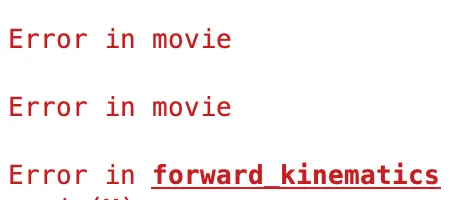
- Solution: Just by shifting the counter increment after the get frames command solved the issue
- I used normal cosine and sine functions instead of cosd and sind function. and that caused error in computations.
- Solution: I then replaced the sin and cos functions with the sind and cosd functions.
Animation Video:
Incase the hyperlink above doesn't work, click the link below.
Drive Link: https://drive.google.com/file/d/1tRDT3xHAd0-4u7k5JNsyTyEYWxkNC-Dz/view?usp=sharing