Week 3 - Solving second order ODEs
Aim: To write a program for a simple pendulum that will show the pendulum animation with respect to time.
Simple pendulum:-
A simple pendulum has a small-diameter bob and a string that has a very small mass but is strong enough not to stretch. The mass of the bob is m, the length of the string is L, the initial displacement of the bob from the vertical axis is θ. As shown in the below figure the forces acting in equilibrium condition at a given position are tension T in the string, mg force downwards at bob, and a net force of −mg sinθ toward the equilibrium position, that is, a restoring force.
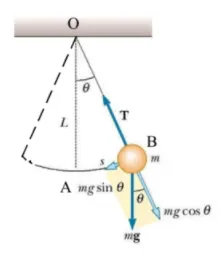
When displaced to an initial angle and released, the pendulum will swing back and forth with the periodic motion. By applying Newton's second law for rotational systems, the equation of motion for the pendulum may be obtained
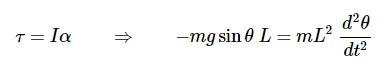
and rearranged as
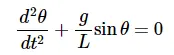 equation ---1
If the amplitude of angular displacement is small enough, so the small-angle approximation holds true, then the equation of motion reduces to the equation of simple harmonic motion.
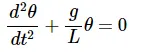
The simple harmonic solution is
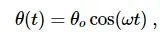
where θo">θo is the initial angular displacement and ω=g/L">ω=√(g/L) the natural frequency of the motion. The period of this system (time for one oscillation) is
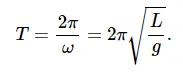
The above theory holds good to solve the basic problem where theta variation is very small and the damping effect of the system neglected.
if we consider the damping effect of the system then the equation it will convert into the differential equation.
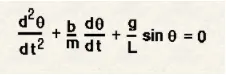
in the above equation
b= damping coefficient
L = length of string ,m
g = gravitational accn m/s^2,
θ= angular displacement
Ode function code.
function [dtheta_dt]=ode_func(t,theta,b,g,l,m);
%variable in ordinery equation,theta1, theta2
theta1=theta(1)
theta2=theta(2)
dtheta1_dt=theta2
%diffrential equation
dtheta2_dt=-((b/m)*theta2)-((g/l).*sind(theta1));
dtheta_dt=[dtheta1_dt;dtheta2_dt]
end
Code to generate animation
clear all
close all
clc
b=0.05 % damping coefficient
g=9.81 % gavitational acceleration
l=1    % length of the link
m=1  % mass

theta_0=[0;3]; % intial anguler displacement and intial velocity

time_span=linspace(0,20,100); % time span taken as input to fix the time
%solve Ode
%ode45 command is used to solve the ODe equation
%Ode_function is a function taken as a calling function which represents the ode
%equation for a pendulum
[t,results]= ode45(@(t,theta) ode_func(t,theta,b,g,l,m),time_span,theta_0);
%plot for time Vs angular velocty
figure(1)
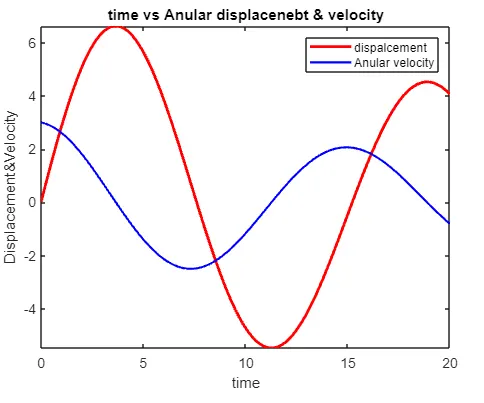
plot(t,results(:,1),'color','r','Linewidth',2)
hold on
plot(t,results(:,2),'color','b','Linewidth',1.5)
ylabel('Displacement&Velocity')
xlabel('time')
% programm to exexute the pendulam animation
ct=1;
for i=1:length(time_span)   % time span

    x0=0;             % string fixed end x coordinate
    y0=0;             % string fixed end y coordinate
    x1=l.*sind(results(i,1));  % end point of string (variable)
    y1=-l.*cosd(results(i,1));  % end point of string (variable)

    %plot for pendulam
    figure(2)
    plot([-0.5 0.5],[0 0],'Linewidth',3)
    hold on
    plot([x0 x1],[y0 y1],'color','g',"LineWidth",2)
    hold on
    plot(x1,y1,'o','Markers',10,'Markerfacecolor','r')
    axis([-1 1 -2 1])
    grid on
    title("Pendulam animation")  % to print etitel
    pause(0.03)
    hold off
    M(ct)=getframe(gcf);         % to get the frame at each loop
    ct=ct+1;                     % increment in loop
end
movie(M)                         % for creatting movie
v=VideoWriter('pendulam.avi','uncompressed AVI')
open(v)
writeVideo(v,M)
close(v)
Output for this code
1- Plot of angular velocity vs time and angular Displacement vs time.
2- Animation of pendulam.https://www.youtube.com/watch?v=41JI8KT6qlQ
Error face in coding.
1- I wrongly typed the
which showing the different position of string and bob.
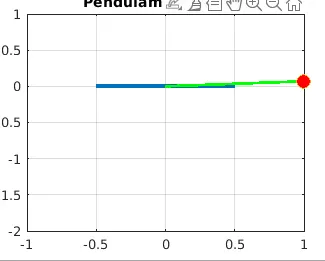
2- Major issue I was facing was with the Matlab hanging multiple times which made program termination.
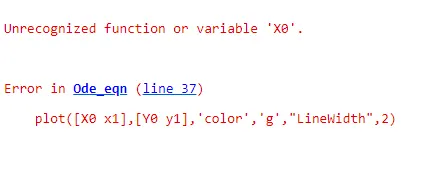
3-In plot command I typed X0, Y0 which were nowhere defined in the code and I was getting an error that X0, Y0 not defined.
Then convert it to x0, y0.