Simulation of simple pendulum motion and solve the second order differential equation using Matlab.
Aim:To solve the given ode and to simulate the simple pendulum motion.
Objective:To find the displacement of pendulum at different velocities.
Theory:
Ode helps to solve complex systems such as suspension systems,spring mass damper systems by integrating it, it gives the simplified values of displacement and velocities with respect to time.
Matlab coding for ode and simple pendulum:
clear all
close all
clc

%parameters
b=0.05;   %damping coefficient
g=9.81;   %gravity (m/s^2)
l=1;      %length of pendulum(m)
m=1;      %mass(kg)

%initial conditions with time(t=0)
z_0=[0;3];

%time span
t_span= linspace(0,20,500);

%solve ode
[t, results]= ode45(@(t,theta) ode_func(t, theta,b,g,l,m),t_span, z_0);

figure(1)
plot(t,results(:,1))
hold on
plot(t,results(:,2))
xlabel('time')
ylabel('angular displacement and angular velocity')
hold off


for i=1:length(t)
    x = 0;
    y = 0;
    theta = results(i,1);
    y1= -l*cos(theta);
    x1= l*sin(theta);
    figure(2)

    plot(x1, y1,'marker','o','markerfacecolor','r','markersize',15);
    hold on
    plot([-0.2 0.2],[0 0],'linewidth',3);
    plot([x x1],[y y1],'linewidth',3);

    axis([-1.5 1.5 -1.5 1]);
    hold off
    pause(0.0002)
    M(i)=getframe(gcf);

end
 movie(M)
 videofile= VideoWriter('ode.avi','Uncompressed AVI');
 open(videofile)
 writeVideo(videofile,M)
 close(videofile)


function [dtheta_dt]= ode_func(t,theta,b,g,l,m)

theta1= theta(1);
theta2= theta(2);
dtheta1_dt=theta2;
dtheta2_dt=-(b/m)*theta2-(g/l)*sin(theta1);
dtheta_dt=[dtheta1_dt; dtheta2_dt];
end
Explanation:
1-Initially using boundary conditions we usedtime span and linscape syntax for time intervals of oscillation(starting and ending point).
2-We used ode45 syntax to run the give ode with defining some values in ode function syntax ant then ploted the reults of displacement and velocity with respect to time interval.
3- Then for oscillation of pendulum at different time intervals we used for loop with desired boundary conditions and used marker syntax for making string and ball.
4-We used then getframe syntax to get the current plot and then converted the pause video into movbi using movie syntax and saved that video using videofile syntax.
Output:
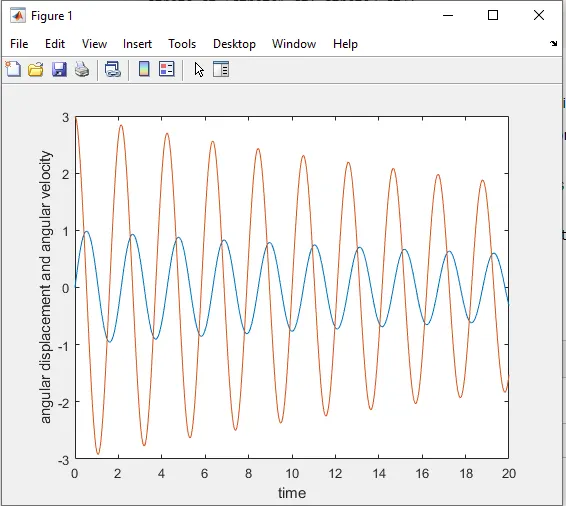
Results: