Week 3 - Solving second order ODEs
AIM
To solve the second-order ode function using Matlab which depicts the motion of the pendulum and to create an animation of the same.
ODE fuction code
% ODE Function
function dtheta_dt = ode_funs(t,theta,b,g,l,m);
theta1 = theta(1);
theta2 = theta(2);
dtheta1_dt = theta2;
dtheta2_dt = ‐(b/m)*theta2‐(g/l)*sin(theta1);
dtheta_dt = [ dtheta1_dt ; dtheta2_dt];
end
Main program :-
% Fixed Parameters

% Damping Co‐eff.
b = 0.05;
% Acceleration due to gravity(m/s^2):
g = 9.81;
% Mass(kg)
m = 1;
%Length(m)
l = 1;

 Initial condition
theta_0 = [0;3];

% Time points
tspan = linspace(0,20,200);
% Solving ODE ==============>>>
[t,results] = ode45(@(t,theta) ode_fun(t,theta,b,g,l,m), tspan, theta_0);

Plotting
figure(1)
plot(t,results(:,1))
hold on
plot(t,results(:,2))
xlabel('Time')
ylabel('Velocity (Red) & Displacement (Blue)')

% Animation ============>>>
ct = 1;
for i = 1:length(results(:,1))
x0 = 0;
y0 = 0;
x1 = l*sin(results(i,1)+pi);
y1 = l*cos(results(i,1)+pi);
figure(2)

plot([x0 x1],[y0 y1],'-o','MarkerSize',10,'MarkerFaceColor','r','MarkerEdgeColor','r','linewidth',4)
axis([-2 2 -2 2])
hold on
plot([-1 1],[0 0],'linewidth',5,'color','[0 0.3 0]')
M(ct) = getframe(gcf)
hold off
ct = ct + 1;
end

% Movie & Videofile ===========>>>
movie(M)
v_f = VideoWriter('Pendulum_Challenge.avi','Uncompressed AVI')
open(v_f)
writeVideo(v_f,M)
close(v_f)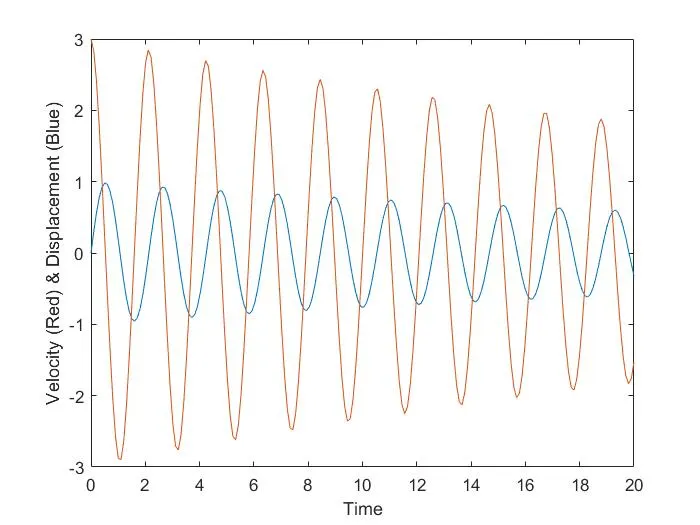
youtube link animation