Week 3 - Solving second order ODEs
CHALLENGE REPORT:
AIM:
To Write a program in Matlab that will simulate the pendulum motion.
OBJECTIVE:
*To write a program that solves the following ODE which represents the equation of motion of a simple pendulum with damping
* To simulate the pendulum motion.
EQUATIONS:
d2Ꝋ/dt2+b/m(d Ꝋ/dt)+g/l(sin Ꝋ)=0.
g = gravity in m/s2,
L = length of the pendulum in m,
m = mass of the ball in kg,
b=damping coefficient.
PROGRAMES IN MATLAB:
i)function for simple pendulum:
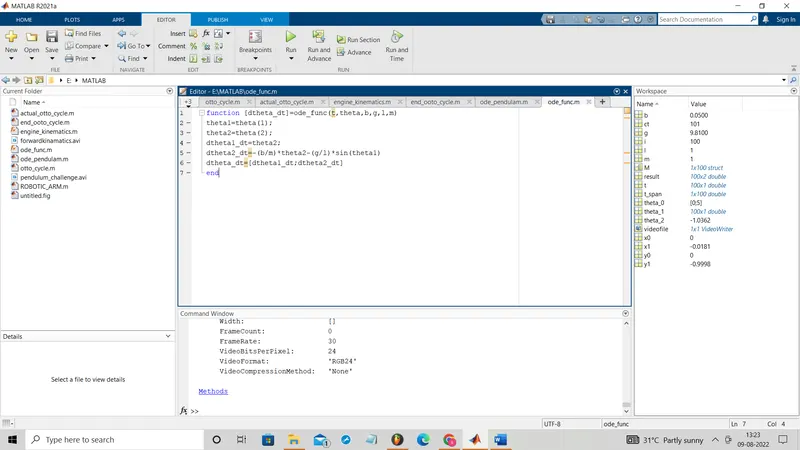
function [dtheta_dt]=ode_func(t,theta,b,g,l,m)
theta1=theta(1);
theta2=theta(2);
dtheta1_dt=theta2;
dtheta2_dt=-(b/m)*theta2-(g/l)*sin(theta1)
dtheta_dt=[dtheta1_dt;dtheta2_dt]
end
ii) code to simulate the pendulum:
clear all
close all
clc
b=0.05;
m=1;
g=9.81;
l=1;
%initial condition
theta_0=[0;5];
%time points
t_span=linspace(0,20,100);
%solve ode
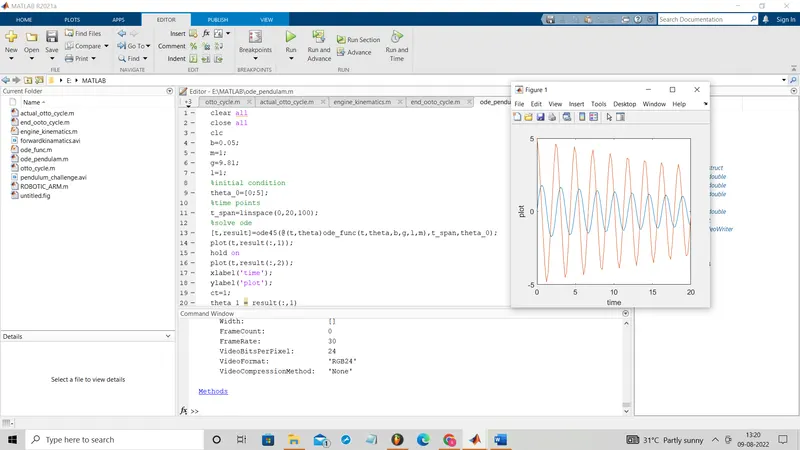
[t,result]=ode45(@(t,theta)ode_func(t,theta,b,g,l,m),t_span,theta_0);
plot(t,result(:,1));
hold on
plot(t,result(:,2));
xlabel('time');
ylabel('plot');
ct=1;
theta_1 = result(:,1)
for i=1:length(theta_1)
    x0=0;
    y0=0;
    theta_2 = theta_1(i)
    x1=l*sind(theta_2);
    y1=-l*cosd(theta_2);
    figure(2)
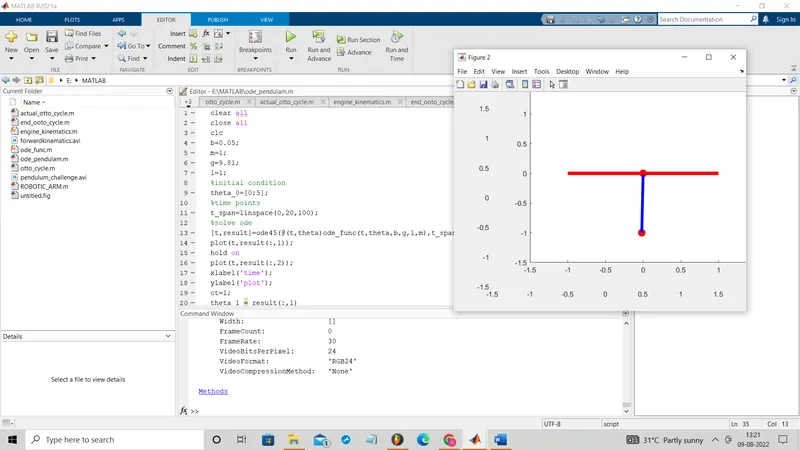
    plot([x0 x1],[y0 y1],'O','color','r','linewidth', 5) %pendulum bob
    axis([-1.5 1.5 -1.5 1.5])
    line([x0 x1],[y0 y1],'linewidth',4,'color','b')  %string/wire
    hold on
    plot([-1 1], [0 0], 'color','r','linewidth', 5)
    title('pendulum')
    M(ct)= getframe(gcf)
    hold off
    ct=ct+1

end

%creating movie
movie(M)
videofile=VideoWriter('pendulum_challenge.avi','uncompressed AVI')
open(videofile)
writeVideo(videofile,M)
close(videofile)
CODE EXPLANATION:
i)
*First created a function with [dtheta_dt] as function definition and ode_func as the function name and t,theta,b,m,l,g as their inputs.
* we are taking theta1=theta(1);theta2=theta(2); dtheta1_dt=theta2;dtheta2_dt=-(b/m)*theta2-(g/l)*sin(theta1) which is to find the dtheta_dt.
ii)
*Use clear all, clear all, clc command to clear all the veriables and ploted graphs which is previously available.
*Put the value of b,l,m,g and enter the theta_0 and t_span values .
*find the [t,result] using the ode45 inbulit command with the help of function which is already created(ode_func).
*using plot command plot (t,result(:,1)) and (t,result(:,2)).
* for simulation using the for loop the pob and string and base is plot and using movie feature we created the video.
CONCULSION:
OUTPUTS:
i)
ii)
youtube link:https://youtu.be/EA1bdlP2_CM