Week 3 - Solving second order ODEs
USED PLATFORM: Matlab R2022a
AIM:
- To solve the 2nd order ODE this is the equation of motion of a simple pendulum with damping.
- Simulate the motion between 0-20 sec, for angular displacement=0,angular velocity=3 rad/sec at time t=0.
- Animate the motion of the pendulum.
GOVERNING EQUATION: Equation of motion of a simple pendulum with damping-

Where,
g = gravity in m/s2,
L = length of the pendulum in m,
m = mass of the ball in kg,
b=damping coefficient.
STEPS TO SOLVE ODE :
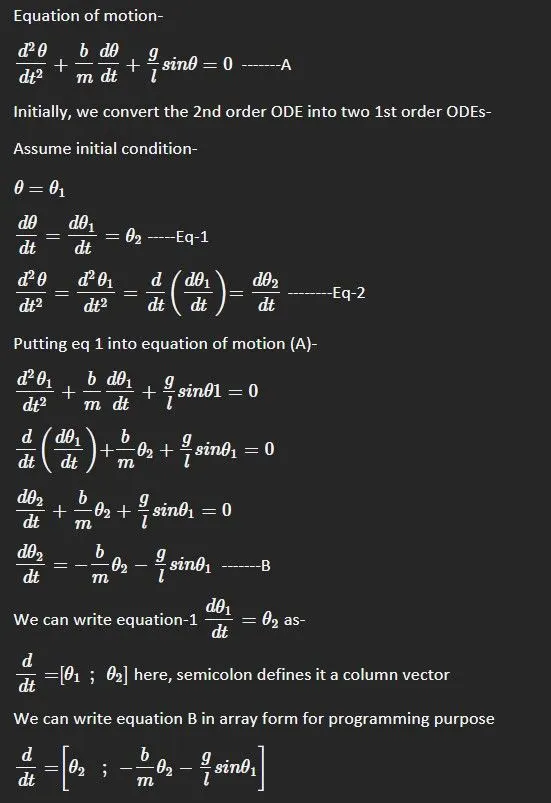
Solving given equation of motion
PROGRAM TERMINOLOGY:
g= gravity
L= length of the pendulum
m= mass of the ball
b= damping coefficient
t_span= Time for motion of pendulum
theta_0= Initial condition of 2 column vector, one for displacement and another for velocity. By this column vector, we get a plot of displacement and velocity.
ODE45= Inbuild solver for ODE (Ordinary differential equation)
PROGRAMME INPUT & OUTPUT PARAMETERS-
- Inputs:-
L=1 metre,
m=1 kg,
b=0.05 unitless
g=9.81 m/s2.
t_span=0 to 20 secs
theta_0= [0;3] Initial condition of theta and velocity respectively
- Outputs:-
Time array 't'
Angular displacement and angular velocity 'result'
BODY OF CONTENT:
Program to simulate the motion between 0-20 sec, for angular displacement=0,angular velocity=3 rad/sec at time t=0 through ODE45.
%Solving 2nd order ODEs challenge
clear all %to clear all pervious memory in workspace
close all %to close all previous plots
clc %to clear command window

%Given equation of motion of simple pendulum with damping
%d^2(theta)/dt^2+(b/m)dtheta/dt+(g/l)sin(theta)=0

%Inputs for above equation
l=1;
m=1;
b=0.05;
g= 9.81;
%where- l=length of pendulum in meter
%m = mass of the ball in kg
%b=damping coefficient
%g = gravity in m/s2

%Initial condition- Angular displacement= 0, Angular velocity= 3rad/sec at time t=0,
theta_0=[0;3]; %here theta is column vector of initial displacement and initial velocity

%Pendulum motion is for 0 to 20 sec
t_span=linspace(0,20,200);%pendulum motion is from 0sec to 20 sec with 500 values in between.

%using ODE45 solver(inbulit solver in matlab) and calling function ode_func
[t,result]=ode45(@(t, theta) func_ode(t, theta, b,l,m,g),t_span, theta_0);
%Where, t and result is output of time, velocity and displacement-
%t & theta=function of time and theta respectively-

%Plotting
plot(t,result(:,1),'linewidth',2) %to plot displacement and time
hold on %to hold the plot of displacement and then show both plot of Displacement and velocity w.r.t time on a same plot
plot(t,result(:,2),'LineWidth',2) %to plot velocity and time
xlabel('Displacement and Velocity') %to label the x axis
ylabel('Time Span') %to label the y axis
title('Motion of pendulum w.r.t time') %assigning the title to the plot
legend('Angular Displacement','Angular Velocity') %assigning the legend to the plot
%initializing counter to generate output figures seperately
ct=1;

%looping with 'for' loop to plot axes of pendulum
for i=1:length(result(:,1)); %generating index for output and store it in varible say i-
    a=result(i,1); %Allot generated index to a variable 'a'
    %Inputs
    x0=0; %Initial fixed x axis coordinate
    y0=0; %Initial fixed y axis coordinate

    %coordinates for angular displacement of ball
    x1=l*sin(a);
    y1=-l*cos(a);

    figure(2) %to generate seperate 2nd plot for motion of
    plot([x0,x1],[y0,y1],'LineWidth',2,'Color','k'); %to plot the length of string of pendulum on defined coordinate
    hold on %to retaining the plots
    plot([-0.5 0.5],[0 0],'LineWidth',2,'Color','k'); %to plot the fixed end of pendulum
    %to plot the ball, where marker size is to assign the size of ball, Marker edge color and marker face color is to give color to the ball.
    plot(x1,y1,'O','markersize',20,'MarkerEdgeColor','k','MarkerFaceColor','k')
    axis([-1.5 1.5 -1.5 1]) %to fix the axes of the plot
    title('Motion of pendulum w.r.t time with damping') %assigning the title to the plot
    hold off % to stop retaining the plots
    M(ct)=getframe(gcf);%to capture the individual motion into frame-
    ct=ct+1; %to plot figure next to ct value
end %to end for loop

movie(M) %to create the movie with the motion of pendulum
videofile = VideoWriter('Motion of Pendulum.avi','Uncompressed AVI'); %to create a new file to capture the complete motion
open(videofile); %to open the video file which is generated
writeVideo(videofile,M); %to write all seperate captures to videofile to generate a movie.
close(videofile); %to close the video file- Code for the ODE function-
%creating function 'func_ode'
%to calculate the values of 1st order ODEs

function [dtheta_dt]=func_ode(t, theta, b,l,m,g)

%Assigning the variable theta and theta
theta1= theta(1);
theta2=theta(2);

%by solving 2nd order ODE into 2 1st order ODE-
%first ODE
dtheta1_dt=theta2;
dtheta2_dt=-(b/m)*theta2-(g/l)*sin(theta1);

%assigning both ODE to array-
dtheta_dt=[dtheta1_dt;dtheta2_dt];

%ending of function
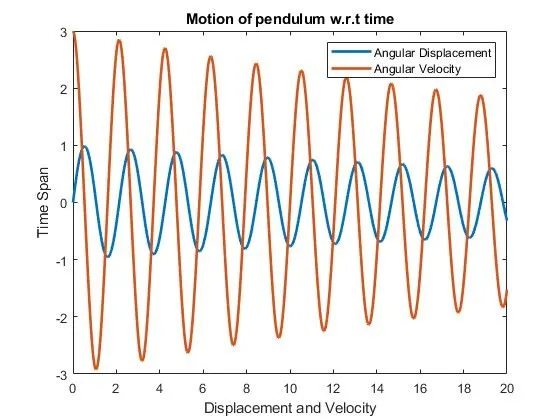
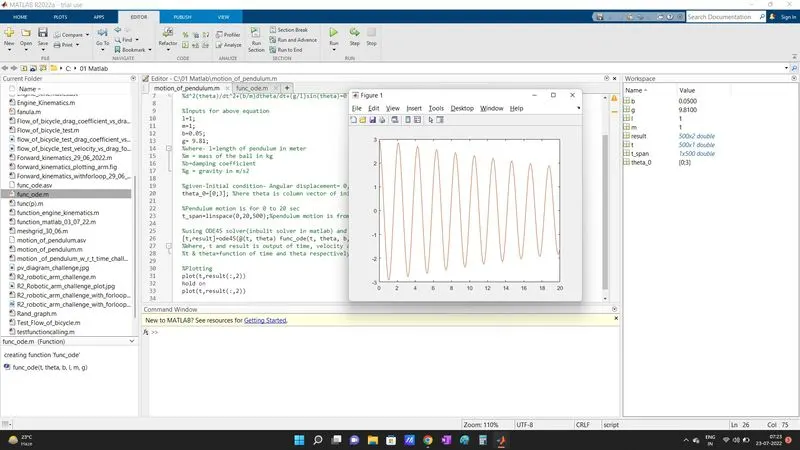
end- Graph plotted showing angular displacement and angular velocity with respect to time-
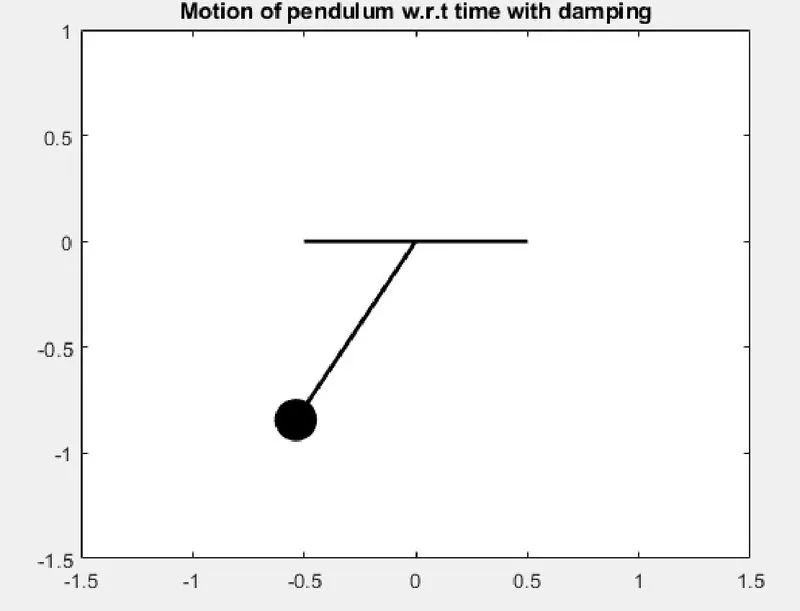
- Animation of Simple pendulum with video link for youtube-
Video Link- https://youtu.be/MmsuFmxel1U
Motion of pendulum Image-
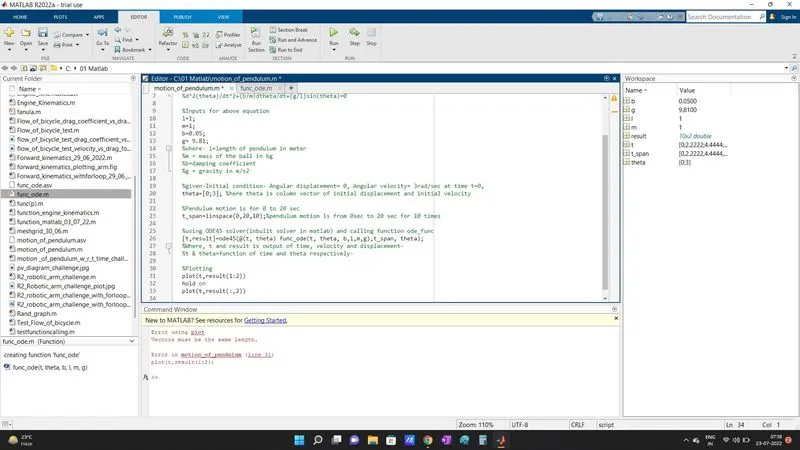
ERROR FACING WHILE PROGRAMMING:
Error 1:- Vector length mismatch
Vector define for plotting is incorrect.
Incorrect- plot(t, result (1:2))
Error Encountered- Define Displacement and velocity vector seperately.
Correct- plot(t, result (: , 1))
Error 2 :- Only one graph (velocity) was plotted instead of displacement and velocity.
Defined only one vector to plot the graph
Incorrect- plot(t, result (:, 2))
Hold on
plot(t, result (:, 2))
Error Encountered- Include both vector to plot
Correct- plot(t, result (: , 1))
Hold on
plot(t, result (: , 2))
CONCLUSION-
1. Plotted graph for angular displacement and angular velocity with respect to time through ODE45 solver and function ODE.
2. Animation video for motion of pendulum with damping uploaded on youtube. (If we use damping 0.5 instead of 0.05 then, damping sees more clear in video)