Week 3 - Solving second order ODEs
1.AIM:
- To write a program that solves the following ODE. which represents the equation of motion of a simple pendulum with damping.
- Simulate the motion between 0-20 sec, for angular displacement=0,angular velocity=3 rad/sec at time t=0.
- animate the motion of the pendulum based on the simulation.
2.GOVERNING EQUATIONS:
Equation of motion of a simple pendulum.
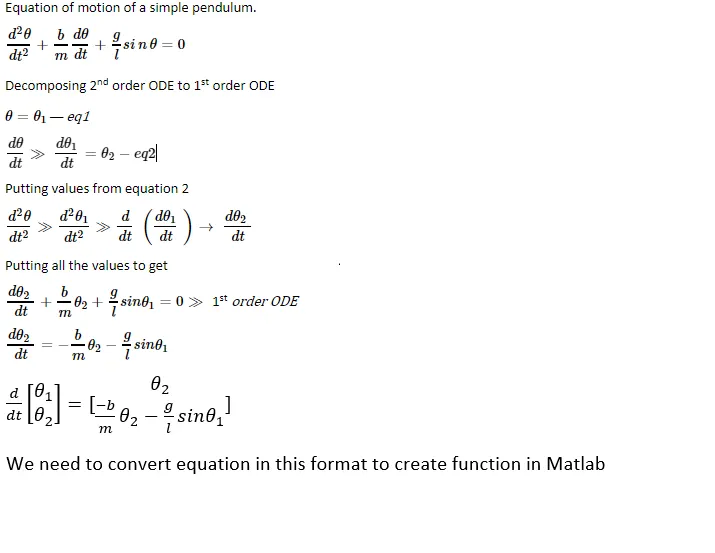
(not able to write the equation in proper way thats why i added photo of it)
3.TERMANOLOGY USED IN PROGRAM
In the above equation,
- g = gravity in m/s2,
- L = length of the pendulum in m,
- m = mass of the ball in kg,
- b=damping coefficient.
4.GIVEN INPUTS
- L=1 meter,
- m=1 kg,
- b=0.05.
- g=9.81 m/s2
- At time t=0 angular displacement is 0, and angular velocity is 3 rad/sec.
5. BODY OF THE CONTENT.
clear all
close all
clc


%input
b=0.05; % damping
g=9.81  %gravity m/s
l=1   %length of the string M
m=1  % mass

%initial condition
thita_0=[0 3]; % initial displacement is '0' and the initial velocity is 3 m/s^2
t_span=linspace(0,20,150); %tspan_is time arry having 150 values in between 0to20sec.

%Solve ODE with the help of ode45 which is a in bilt solver for 2nd order
%ODE equations.

[t,disp_velo]=ode45(@(t,thita) ode_func(t,thita,b,g,l,m),t_span,thita_0); % solving ode equation
% calling function- ode_func in whcih we have decomposed a 2nd order ode to
% 1st order ode.
%disp_velo= is 100x2 matrix 1st coloumn shows desplacement and 2 coloumn shows velocity with respec to time
subplot(2,1,1); % figur divided into to halfs this line will print in 1st half.
plot(t,disp_velo(:,1),'-b','linewidth',2,'color','c');% to plot graph b/w time and 1st column of ode result disp_velo i.e. displacement
xlabel('Time in sec'); %assignig label to X and Y axis
ylabel('Angular displacement');
subplot(2,1,2)% figure divided into 2 halfs this line will print in 2nd half of the figure.
plot(t,disp_velo(:,2),'-b','linewidth',2,'color','y');%ploting graph b/w 2nd column of ode result disp_velo i.e. velocity .
xlabel('Time in sec');%assignig label to X and Y axis
ylabel('Angulaar velocity');

% using for loop to automaticly change the values.
x0=0      % starting point lets say where pendulam string is attached.
y0=0.5
ct=1 %counter to increment the values.
for i=1:length(t)  %for loop, length of t means total number of divisions of time
    x1=l*sin(disp_velo(i)) % defining position of x1and y1 whose values are changing with time 't'
    y1=-l*cos(disp_velo(i))% the vlue of cos is in minus because it is  restoring force

    figure(2)% creating another figure.
    plot([-1 1],[0.5,0.5],'linewidth',5,'color','black')% this line is ploting the horizontal line to the center of which pendulum string is attached.
    axis([-2 2 -2 2])%defining axis.
    line([x0,x1],[y0,y1],'linewidth',3,'color','b')% definif the position of both endsof the strings
    hold on% holding plot and adding more detail without deleting prvious plot.
    plot(x0,y0,'o','markersize',5,'markerface','y')% highlighting the fixed point of string.
    plot(x1,y1,'o','markersize',25,'markerface','r')% ploting the cordinates for bob.
    title('Damping of simple pendulum')%title of the figure.

    hold off

    M(ct)=getframe(gcf)
    ct=ct+1
end

movie(M) % commond to creat the movie of frame captured by M(counter)
videofile =VideoWriter( 'simple_pendulum','Uncompressed AVI')
%writing video file with name forward kinematics and file type uncompressed
%AVI

 open(videofile) %open file to write the images into videofile
 writeVideo(videofile,M) %write the movie of m to video file
 close(videofile) %close the vido file after writing the video file


% after running the program video file with name simple_pendulum will be
% saved to the location where this program is saved.
Function for solving ODE
function [dthita_dt]=ode_func(t,thita,b,g,l,m)
thita1=thita(1)
thita2=thita(2)

dthita1_dt=thita2
dthita2_dt=-(b/m)*thita2-(g/l)*sin(thita1)
dthita_dt=[dthita1_dt;dthita2_dt]
end
%converting 2nd order ODE to 1st order ode and placing all the value in
%formate required by matlab to solve the equation
Graph
Angular velocity vs time and Angular displacement vs time
Error faced during coding/programing.
the main error i faced during programing is my pendulam is working in opposit direction .
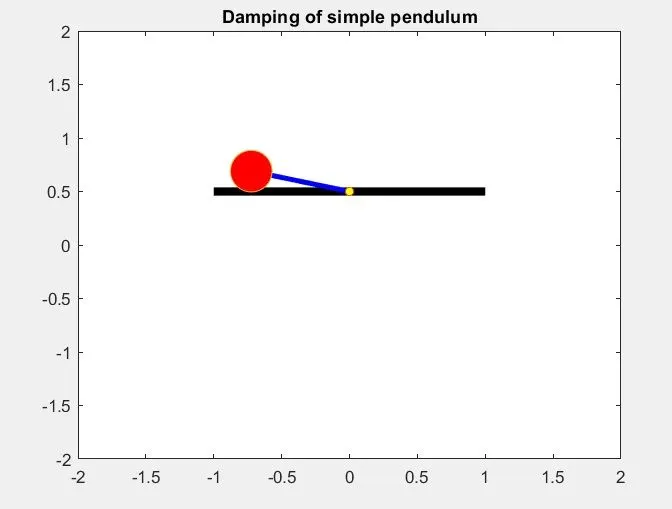
Reason for error.
all forces acting on pendulum is in positive direction
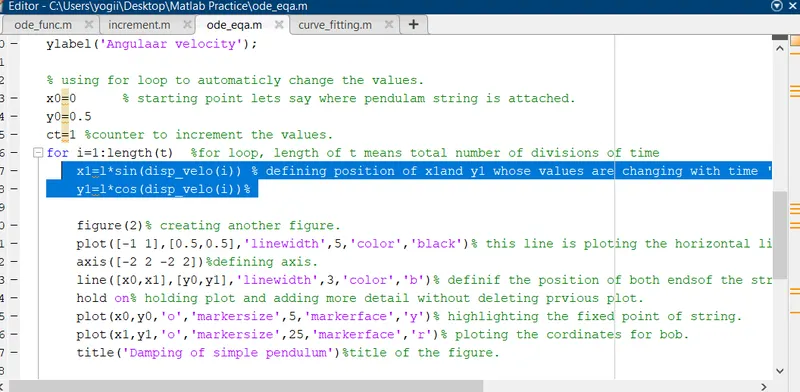
how i resolved the error
putting value of cos(disp_velo(i)) in negative, restoring force acting on pendulum
CONCLUSION
created the animation for the simple pendulum and recorded it.
tried changing the variable to see the changes in pendulum animation.(below is the link for videos)
VIDEO LINK.
Video 1= in this video the value of damping coefficient is 0.05.
https://drive.google.com/file/d/1uCujTuLxXzSFs_P3RG-km3Yvhv4K2hEV/view?usp=sharing
Video 2 = in this video the value of damping coefficient is 0.5 which results in quicker stopping of pendulum on increasing the damping.
https://drive.google.com/file/d/1sAPYMkrMt0gHlGmwv-JAeLdev92jdaka/view?usp=sharing