Week 2- 2R Robotic Arm Challenge
clear all %to clear the workspace.
close all %to close all open graphs.
clc %to clear command from the command window.

%we start the program with above codes to give matlab a fresh start.

% forward kinematics of a 2R Robotic Arm.

%Input provided
l1 = 1      %l1 is the lenght of first arm.
l2 = 0.8    %l2  is the length of 2nd arm.


%lets consider values of thita be
thita1 = 45 % angle between base and arm 1
thita2 = 30 %angle with respect to horizontal line form the end of the arm 1 to arm 2

%cordinates
x0 = 0    %cordinate of start point of arm 1
y0 = 0    %cordinate of start point of arm 2
x1 = l1*cosd(thita1)    %x cordinate of end pont of arm 1, and start cordinate of arm 2(suffix 'd'is used to specify the values in degree)
y1 = l1*sind(thita1)    %y cordinate of end point of arm 1, and start cordinate of arm 2
x2 = x1+l2*cosd(thita2)  %x cordinate of end point of arm 2
y2 = y1+l2*sind(thita2)  %y cordiante of end point of arm 2

%we have all the in put to plot a graph.

line([x0 x1],[y0 y1],'linewidth',3,'color','g') %line command to plot line on graph as per the given data
line([x1 x2],[y1 y2],'linewidth',3,'color','b')
axis([-0.5 2 0 2]) %mentioning the range of x and y axis
xlabel('X axis')% providing the name to X axis
ylabel('Y axis')% providing the name to Y axis


% the above code is capable of ploting single values of thita1 and thita2
%if we need to cheange the value of thita we need to change the value of
%thita manualy

%we need to write the a code which change the vlaue of thita autometically
%that can be done with the use of for loop.


below is the code which works autometically.


close all
clear all
clc

%forward kinematic with for loop

%Input provided
l1 = 1      %l1 is the lenght of first arm.
l2 = 0.8    %l2  is the length of 2nd arm.


thita1=linspace(0,90,10);% defening the 10 values of thita
thita2=linspace(0,90,10);

counter=1 %defining the value of counter to change the value of thita each time for loop run

for i = 1:length(thita1); %defining for loop 'length(thita1)' the total value of thita here total value are 10 and it will going to change from 1-10
    THITA1=thita1(i); %assigning new variable 'THITA1' whose values depend of the value of i which will be changed 10 times.
    for j = 1:length(thita2) %for each value of thita1 we need 10 values of thita2 defining another for loopfor thita2 inside the for loop of thita1 f
        THITA2 = thita2(j)% value of thita 2 depend on value of j


x0 = 0    %cordinate of start point of arm 1
y0 = 0    %cordinate of start point of arm 2
x1 = l1*cosd(THITA1)    %x cordinate of end pont of arm 1, and start cordinate of arm 2(suffix 'd'is used to specify the values in degree)
y1 = l1*sind(THITA1)    %y cordinate of end point of arm 1, and start cordinate of arm 2
x2 = x1+l2*cosd(THITA2)  %x cordinate of end point of arm 2
y2 = y1+l2*sind(THITA2)  %y cordiante of end point of arm 2

%we have all the input to plot a graph.

plot([x0 x1],[y0 y1],[x1 x2],[y1 y2],'linewidth',3) %plot command to plot graph as per the given data
axis([-0.5 2 0 2]) %mentioning the range of x and y axis
pause(0.09)
xlabel('X axis')% providing the name to X axis
ylabel('Y axis')% providing the name to Y axis

  M(counter)=getframe(gcf) % to get the graph for each value of thita1 and thita2
  counter =counter+1 % after capturing the graph wi will increase the valaue of theita1 by +1

    end % closing for loop 2

end % closing for loop 1
movie(M) % commond to creat the movie of frame captured by M(counter)
videofile =VideoWriter( 'forward_kinematic.Avi','Uncompressed AVI')
%writing video file with name forward kinematics and file type uncompressed
%AVI

 open(videofile) %open file to write the images into videofile
 writeVideo(videofile,M) %write the movie of m to video file
 close(videofile) %close the vido file after writing the video file


% after running the program video file with name forward kinematic will be
% saved to the location where this program is saved.
below is some error which a faced during writing the code. most of the are typo errors, or errors du to the csae sensative syntex sucha as VideoWriter ( V and W needs to be in capital letters)
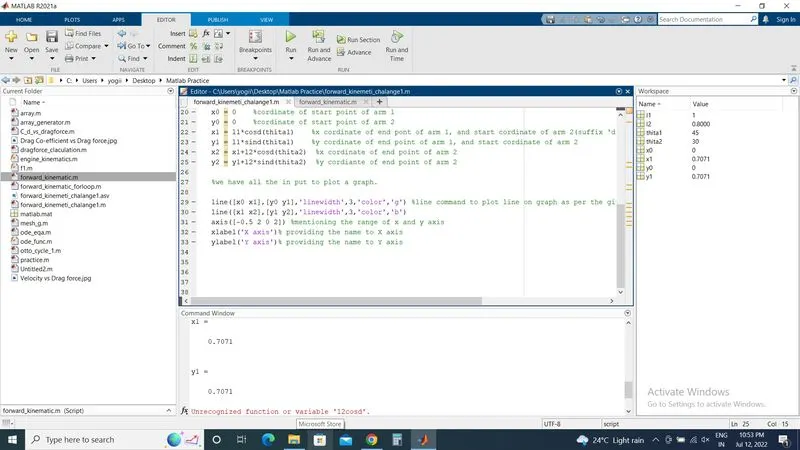
error 1
here i wrote l2cosd insted of l2*cosd
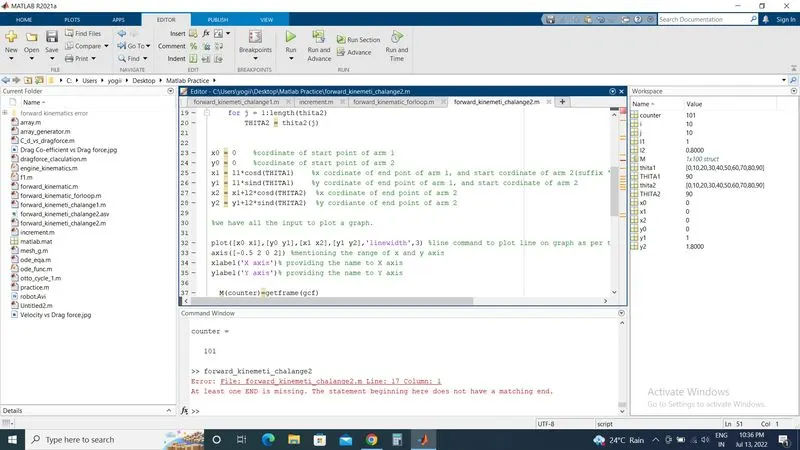
error 2
this error is due to the reason that i forgote to close one of the 'for loop' need to close both the loop by using end command.
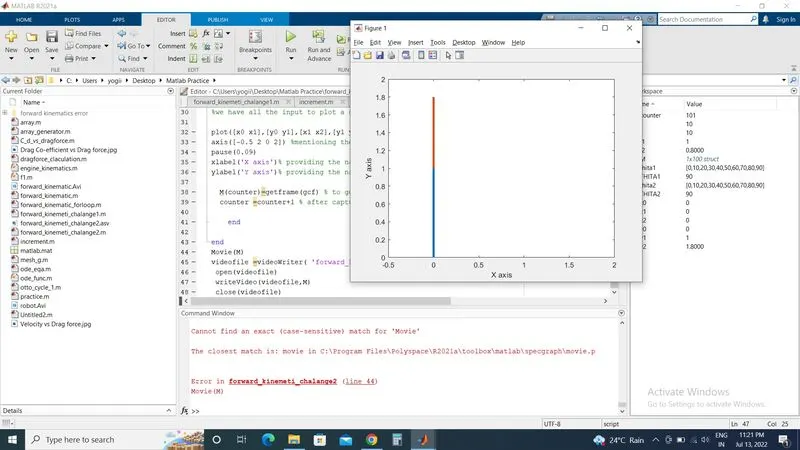
error 3
wrote 'Movie' insted of 'movie'
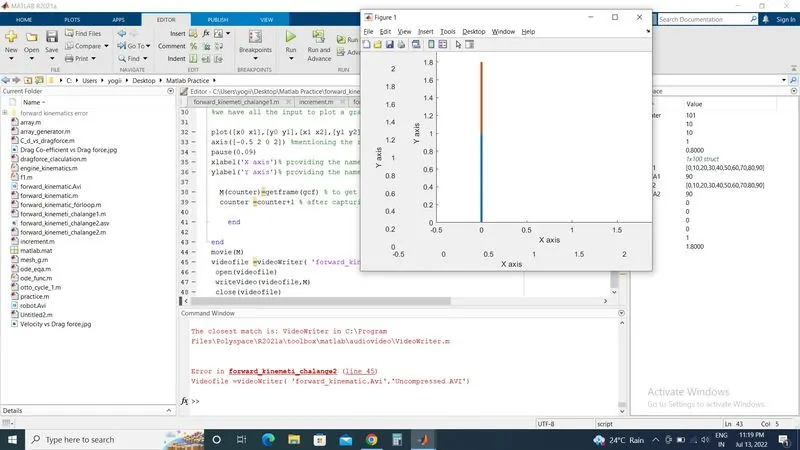
error 4
syntax is case sensitive 'v' and 'w' of the VideoWriter must be in capital letters.
https://drive.google.com/file/d/1hFC5T8sWnhKjSnzPawvwyVX1Qvnbaalb/view?usp=sharing