Week 3 - Solving second order ODEs
AIM-
- Solving ODE equation of Simple Pendulum with damping.
OBJECTIVE-
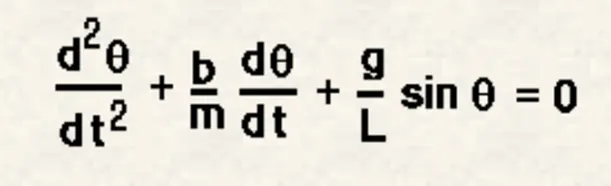
- To write a program that solves the following ODE. This ODE represents the equation of motion of a simple Pendulum with damping.
THEORY-
Newton’s second low of motion-
- The rate of change of linear momentum of a body is directly proportional to the external force applied on the body, and this change takes place always in the direction of the force applied.
Simple Pendulum-
- Simple Pendulum is a mechanical device demonstrating periodic motion.
- This has a small circular bob suspended by a thin inextensible string from any fixed end and has length L.
- Oscillatory motion – Any to and for motion performed by the pendulum in a periodic movement and when the pendulum is at its central position then the position is called equilibrium position.
- Time period – It is generally the total time taken by a pendulum to complete one full oscillation.
- Amplitude – The distance between the equilibrium position and the extreme position of the pendulum.
- Length – Length of the string is generally the distance between the fixed end of a string to the center of mass.
In the above equation,
g = gravity in m/s2,
L = length of the pendulum in m,
m = mass of the ball in kg,
b=damping coefficient.
Write a program in Matlab\Octave that will simulate the pendulum motion, just like the one shown in the start of this challenge.
use,
L=1 metre,
m=1 kg,
b=0.05.
g=9.81 m/s2.
Simulate the motion between 0-20 sec, for angular displacement=0,angular velocity=3 rad/sec at time t=0.
PROGRAM-
Function ODE Program-
function [dtheta_dt] = ode_func(t, theta, b, g, l, m)

theta1 = theta (1);
theta2 = theta (2);
dtheta1_dt = theta2;
dtheta2_dt = -(b/m)*theta2-(g/l)*sin(theta1);
dtheta_dt = [dtheta1_dt; dtheta2_dt];

end
Main Function ODE Program-
clear all
close all
clc

% Inputs
b = 0.05; %bumping coefficiency
g = 9.81; % gravity in m/s^2
l = 1; % length of pendulum
m = 0.1; % mass of the ball in kg

% initial displacement condition
theta_0 = [0;3];

% time points
t_span = linspace(0,20,500);

% solve ode
[t, results] = ode45(@(t,theta)ode_func(t,theta,b,g,l,m),t_span,theta_0);

plot (t, results(:,1))
hold on
plot(t, results(:,2))
title('Simple Pendulum');
xlabel('Time in sec');
ylabel('angular velocity in (rad/sec) / displacement (rad)')
legend('displacement','angular velocity')

%% Animation of pendulum
amplitude = results(:,1); %store amplitude values in separate matrix for loop
ct=1;
figure(2)
for i=1:length(amplitude)
    angle=amplitude(i);
    %fix point of pendulum
    x0=0;
    y0=0;
    %another end of pendulum/coordinate of mass ball
    x1 = l*sin(angle);
    y1 =-l*cos(angle);
    %plot
    plot([-1.1 1.1],[0 0],'linewidth',2);
    hold on
    plot([x0 x1],[y0 y1],'color','g','linewidth',2)%string
    plot(x1,y1,'o','markers',20,'markerfacecolor',[1 1 0])%mass ball
    title('Damping of Simple Pendulum');

    hold off
    grid on
    axis([-1.5 1.5 -1.5 0.5])
    pause(0.001)
    M(ct) = getframe(gcf);
    ct = ct+1;

end

movie(M)
videofile = VideoWriter('ODE_Pendulum.avi','Uncompressed AVI');
open(videofile)
writeVideo(videofile,M)
close(videofile)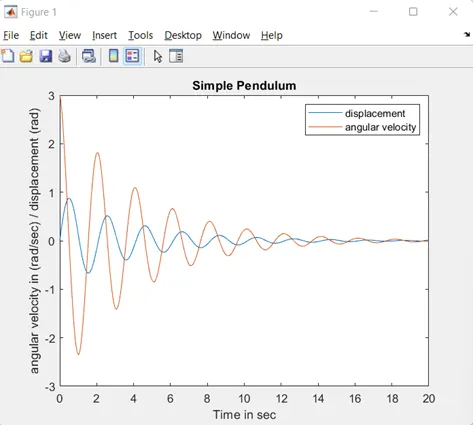
EXPLAINATION-
- To solve ODE second order equation, we break it down into first order ODE equation, as below;
- To solve this, we used ODE 45 in-built command in Matlab along with function calling command.
- ODE 45 is used to solve initial value problems with variety of properties.
- We used ‘linspace’ command for 500 equal time intervals from 0 to 20 second.
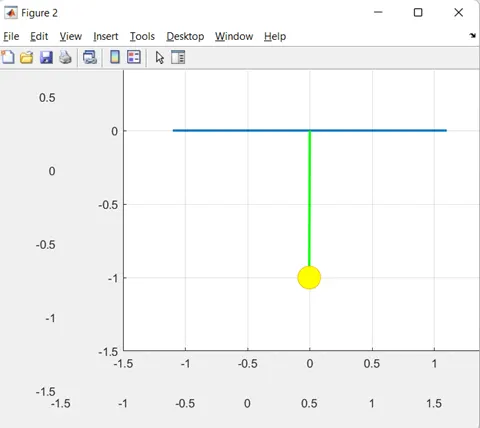
- For creating animation for Simple pendulum, we used Amplitude which is distance between the equilibrium position and the extreme position of the pendulum.
- For animation, we used ‘for loop’ command where ‘i’ is counter loop variable.
- We consider a string of length ‘L’ where one end is fixed at co-ordinate (x0 y0) and other end have pendulum /ball shape mass at co-ordinate (x1 y1).
- By using “maker’ command, we create ball size mass.
- After ‘for loop’, we write script for showing simple pendulum in movie.avi format
ERROR-
- By writing wrong order of ‘function calling’, I got wrong graph, as below;
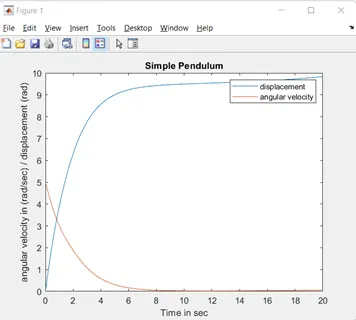
- To solved this, I rechecked program and got corrected.
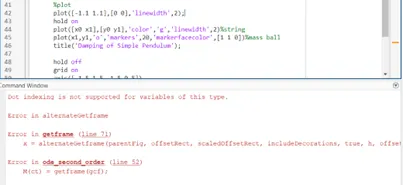
- For below error occur because animation interrupted. Once we run complete Animination/ video, error disappear.
RESULT-
YouTube link-