Week 2- 2R Robotic Arm Challenge
AIM-
- Write a program in Matlab to simulate the forward kinematics of a 2R Robotic arm.
THEORY-
Kinematics of linkages-
- Each part of machine, which moves relative to some other part, is known as a Kinematics link.
- Kinematics link should have the following two characteristics.
- It should have relative motion
- It must be a resistant body
Robotics arm-
- Robot arm is known manipulator.
- It is composed od a set of joints separated in space by the arm body.
- The joints are where the motion in the arm occurs.
- A robot arm consists of the parts: base, joints, links and a grapper.
- The base is the basis part over the arm. It may be fixed or active.
- The joint is flexible and joins two separated links.
- The link is fix and supports the grapper.
- The grapper is used to hold and move the objects.
OBJECTIVE-
- Upload an animation on You tube and provide the You tube link for an animation in your report.
- To provide the google drive link.
PROGRAM CODE 1
% forward kinematics of a 2R robotic arm manipulator
clear
close all
clc

% Inputs
l1 = 1; % length of link 1 in m.
l2 = 0.5; % length of link 2 in m.

theta1 = 45;
theta2 = 30;

% coordinates
x0 = 0;
y0 = 0;

x1 = l1*cosd(theta1);
y1 = l1*sind(theta1);

x2 = x1 + l2*cosd(theta2);
y2 = y1 + l2*sind(theta2);

% plotting
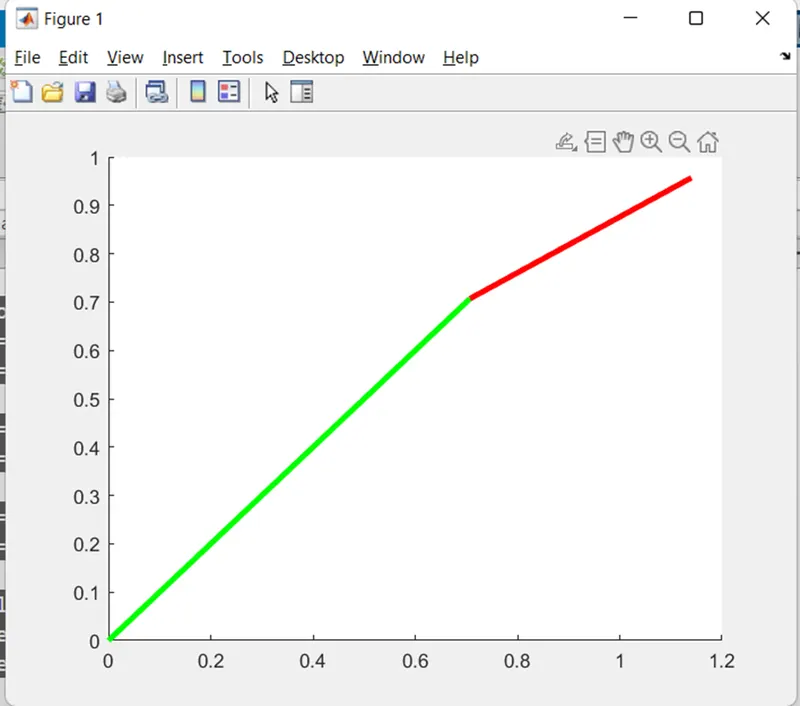
line([x0 x1], [y0 y1], 'linewidth', 3, 'color','g')
line([x1 x2], [y1 y2], 'linewidth',3,'color','r')
PLOTTING 1
PROGRAM CODE 2
clear
close all
clc

% Forward Kinematics of a 2R Robotic Arm manipulator
% Input
l1 = 1; % length of link1 in m
l2 = 0.5; % length of link2 in m

theta1 = linspace (0, 90, 10);
theta2 = linspace (0, 90, 10);

ct = 1;
for i = 1 : length(theta1)
    THETA1 = theta1 (i);
    for j = 1 : length (theta2)
        THETA2 = theta2 (j);

        x0 = 0;
        y0 = 0;
        x1 = l1*cosd(THETA1);
        y1 = l1*sind(THETA1);
        x2 = x1 + l2*cosd(THETA2);
        y2 = y1 + l2*sind(THETA2);

        % plotting

        plot ([x0 x1],[y0 y1],[x1 x2],[y1 y2],'linewidth', 3)
        axis ([-0.1 1.5 0 1.5])
        pause (0.03)
        M(ct) = getframe(gcf);
        ct = ct + 1;
    end

end

movie(M)
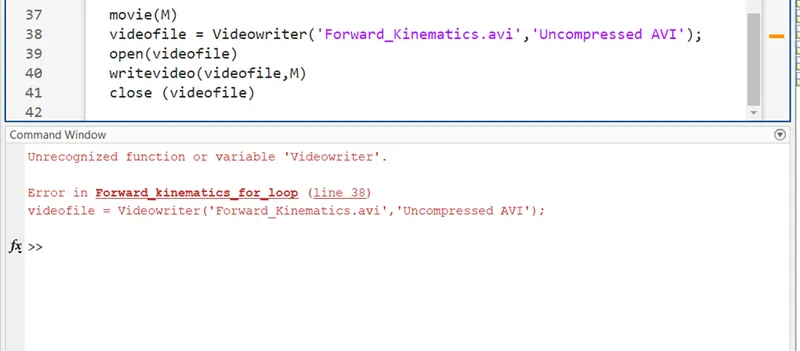
videofile = VideoWriter('Forward_Kinematics.avi','Uncompressed AVI');
open(videofile)
writeVideo(videofile,M)
close (videofile)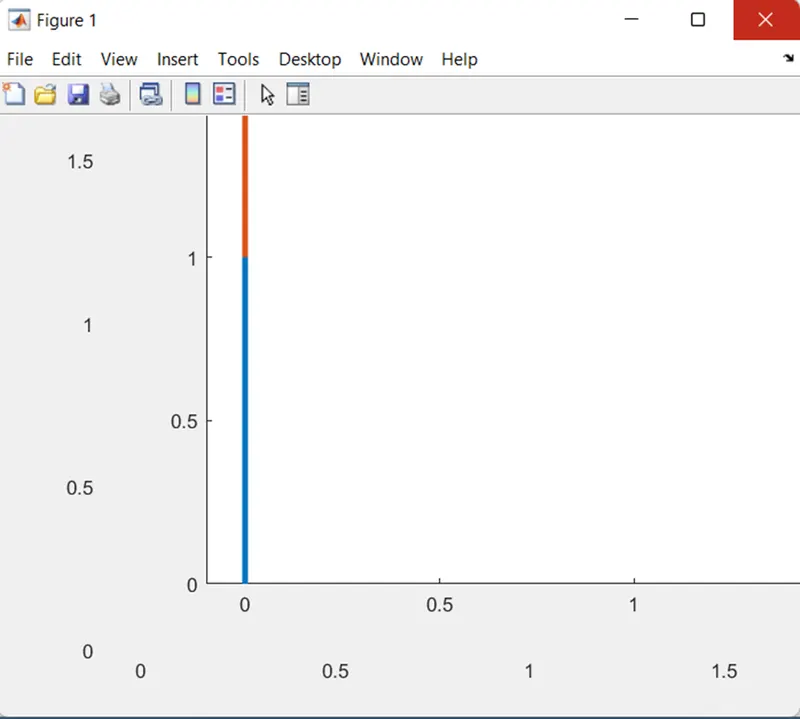
EXPLAINATION-
Program 1-
- For plotting links of 3 co-ordinates, we use ‘Line’ command.
- Here, we can change plot by changing values of theta1 and theta2 manually.
Program 2-
- Here, we consider theta1 & theta2 as Array which having 10 values varies from 0 degree to 90 degree. For that, we use Linspace command.
- For changing theta1 and theta 2 values using programming language, we used concept of ‘for loop’ command.
- ‘For loop’ command used for repeating specified number of times.
- Line no 14- In “for loop’, value of ‘i‘ changes from 1 to values of theta 1 which is 10 in our code.
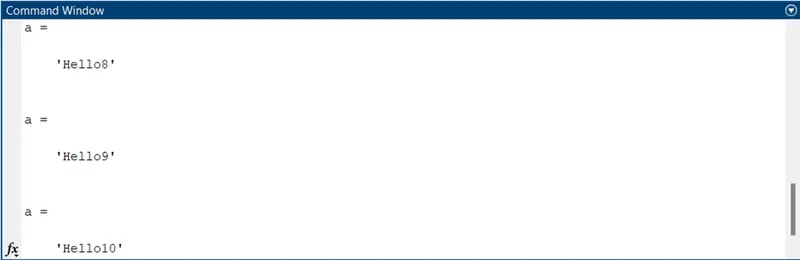
- >> a = strcat (‘Hello’, num2str(i))
- Here, the word ‘Hello’ displayed 10 times which is equal to values of ‘i’.
- THETA1 & THETA2 are variable which content only 1 value and ‘theta1’ & ‘theta2’ are array which content 10 values.
- Variable ‘i’ & ‘j’ are loop counter variable.
- Here, each value of ‘theta1’ which is each position of link1, the link 2 takes multiple position which is depend on values of ‘theta2’. Hence, we used another ‘for loop’ command for ‘theta2’ value.
- For each ‘for loop’ loop counter variable different.
- Here, for 1st ‘for loop’, counter variable is ‘i’.
- For 2ns ‘for loop’, counter variable is ‘j’.
- Counter command (ct) represent each and every frame of plot.
- While using plot command, most recent plot get display. Hence, to avoid confusion, we will use ‘hold on‘ command.
- When we get different colours of each link in plotting, we will use “close all’ command in Matlab Command window and delete ‘hold on’ command from main program.
- To fix axis of link, we used ‘axis(x y)’ command.
- (gcf) – it is figure window.
ERROR-
- While writing Movie command line, there should be care about upper case and lower case of alphabets.
RESULT-
Youtube link-
Google drive link-
https://drive.google.com/file/d/1xkf0FHEY9uaH06tmkSeO_IGH333n11Qq/view?usp=sharing