Week 3 - Solving second order ODEs
AIM: to animate the motion of a pendulum using the solution of a seciond order ODE.
EQUATIONS: `(d^2theta)/dt^2 + b/m (*d theta)/dt +g/l .sin theta = 0`
b=damping constant. m = mass of the ball. this equatuions gives the general motion of a pendulum with damping.
OBJECTIVES: first writing a function to solve the above given ODE. then using a 'for' loop to create the motion of a pendulum using the diplacement column of the solution of the ODE. then using movie command to create a clip of the pendulums motion.
BODY:
close all
clear vars
clc

b =0.05; % damoing coeeficient
g=9.8;%gravity
l =0.8; %length of the string
m =1; % mass of the pendulum
t_span= linspace(0,20,1000); %different time stamps
theta_0=[0;5]; %defining the starting condotins of mass and velocity

[t,results]= ode45(@(t,theta) odefunc(t,theta,b,g,l,m), t_span,theta_0); %calling the function 'odefunc; and using ode45
disp(results);


ct=1;
for i=1:length(results(:,1))
    x0=0; %stationary positions of the pendulumn
    y0=0;
x1=l*sin(results(i,1)); %moving position of the pendulum
y1=-l*cos(results(i,1));

plot([-1 1],[0 0],'linewidth',3,'Color','r'); %plotting the base of the pendulum
hold on
plot([x0 x1],[y0 y1],'o','markers',20,'markerfacecolor','b','linestyle','-','linewidth',3); %plotting the movement of the pendulum
axis([-1.5 1.5 -1.5 0.5]);
grid on
pause(0.0001);
hold off

M(ct) =getframe(gcf);

  ct=ct+1;
end


movie(M) %creatinga movie clip
videofile=VideoWriter('pendulum_movie.avi','Uncompressed AVI');
open(videofile)
writeVideo(videofile,M)
close(videofile)
function [A]= odefunc(t,theta,b,g,l,m) %definig the function odefunc with variables
theta1=theta(1); %theta1 is theta differentiated once
theta2=theta(2); %theta2 is theta differentiated twice

%splitting a second order ode into a series of first order ode
dtheta1_dt = theta2;
dtheta2_dt= -(b/m) *theta2-(g/l) *sin(theta1);
A = [dtheta1_dt; dtheta2_dt];


end
- defining the damping coefficient , gravity , length of the string , mass of the ball.
- defining the the tiem span under which the ODE will be solved.
- theta_0 gives the starting values for displacement and velocity which is 0 and 5 respectively .
- now we use the inbuilt ode solver in matlab called ode45.
- it syntax is : ode45(@('independant variable','dependant variable') calling the function (all the variables ), timespan , starting conditions );
- using ode45 to call the function ode_func
- the dependant variable is theta and the independant variable is t
- writng a command to display the results thats are two columns of dislacement and velocity repectively.
- Declaring a variable ‘ct’ that will increment with every iteration of 'i'. This will basically help us in getting the frames for the video by numbering each frame with every iteration.
- using a for loop to create iterations for every position of the pendulum.
- defining x0 and y0 and that is the stationary point of the pendulum.
- defining the values of x1 and y1 using the displacemetn values in the results array. and using sin and cos fucntion to get x1 and y1 respectively.
- plotting the base for the pendulum and plotting the pendulum whihc is from x0,y0 to x1,y1;
- defining the axis and turning on grid.
- turning hold off in order to not get all the values of the pendulum position.
- giving a command to get the frames using the variable ct
- increment ct with every iteration.
- ending the for loop
- Movie command creates a movie using all the values of variable M.
- creates a videofile with the name pendulum_movie and defines its format.
- opens the video file
- different frames into the videofile obtained from line 34.
- closes the video file.
explanation of the program called odefunc
- defining the function called odefunc with variables (t,theta,b,g,l,m)
- splitting the second order differential equation into 2 first order equation.
- and storing the solutions answers in the variable result called in the above mentioned program and stored in the array A.
errors . the errors faced were bacuse I was quitting the program before it could complete the plotting bacause of which I was not able to get the movie clip.

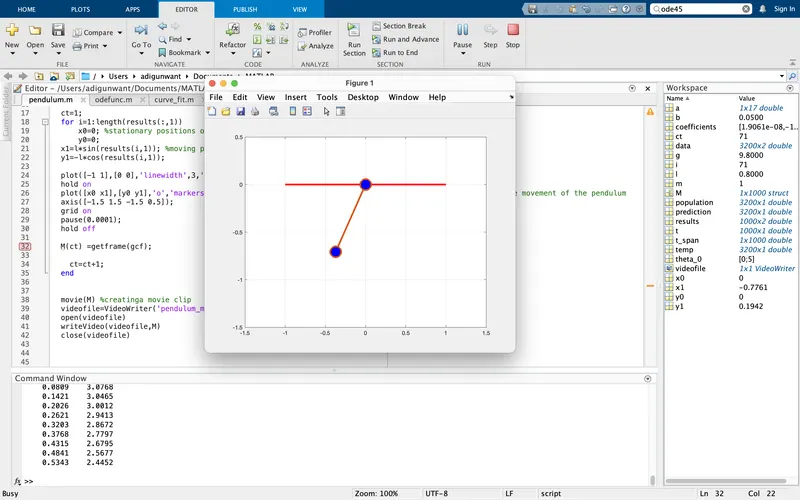
result-
clip of the motion of the pendulum.
the whole videos link is attached here : https://drive.google.com/file/d/1Ynwht96SkSDzRsSdHpawlIz6scDZeZcl/view?usp=sharing
CONCLUSION: the pendulums motion was simulated succesfully and the ode was saolved using the ode45 solver.
the limitations were that there was a lack of knowlede to simulate the mption so that it looks like a 3d model in real life. thsi will be overcome in the furutre as I gain more skill and knowledge.