Project 1 - Parsing NASA thermodynamic data
AIM: to calculate thermodynamical data from a file and plotting the graphs.
GOVERNING EQUATIONS:
`cp = (a1 + a2*T + (a3)*T^2 +(a4)*T^3 + (a5)*T^4)*R`
`H = R*T*(a1 + (a2)*(T)/2 + (a3)*(T^2)/3 + a4*(T^3)/4 + a5*(T^4)/5 + (a6)/T)`
`S= R*(a1*ln(T) + a2*T + a3*(T^2)/2 + a4*(T^3)/3 + a5*(T^4)/4 + a7)`
Cp is the specific heat , H being the enthalpy and S being the entropy for the elements.
R being the gas constant
a1=a8,a2=a9,a3=a10,a4=a11,a5=a12,a6=a13,a7=a14 for T<l_mid_temp
OBJECTIVES:
- to read all the data from the THERMO file .
- calculating enthalpy , entropy, and specific heat for different elements
- Plotting graphs for the input element
- Calculating molar mass for the input element
BODY:
close all
clear vars
clc

f1 = fopen('THERMO.txt','r');%opening the file
fgetl(f1)
a=fgetl(f1);
b=strsplit(a);
global_low_temp=str2double(b{2});%reading the global temperatures
global_mid_temp=str2double(b{3});
global_high_temp=str2double(b{4});
fgetl(f1);
fgetl(f1);
fgetl(f1);


n=input('enter compund name: ','s'); %getting the input from the user
while~ feof(f1) %using while loop till the end of file
line1=strsplit(fgetl(f1));
start=line1{1};
if strcmpi(start,'END')==1 %ending the while command when it reaches 'END'
  break
end

if strcmpi(start,n)==1 %comparing the element input with the element value on the file
l=length(line1);
l_low_temp=str2double(line1{l-3});% defining local temperatures
l_mid_temp=str2double(line1{l-2});
l_high_temp=str2double(line1{l-1});


   tline=fgetl(f1);
g=strfind(tline,'E');

 %getting the first 5 variables for the elements
a1=str2double(tline(1:g(1)+3));
a2=str2double(tline(g(1)+4:g(2)+3));
a3=str2double(tline(g(2)+4:g(3)+3));
a4=str2double(tline(g(3)+4:g(4)+3));
a5=str2double(tline(g(4)+4:g(5)+3));

%getting the second 5 variables
 tline2=fgetl(f1);
k=strfind(tline2,'E');

a6=str2double(tline2(1:k(1)+3));
a7=str2double(tline2(k(1)+4:k(2)+3));
a8=str2double(tline2(k(2)+4:k(3)+3));
a9=str2double(tline2(k(3)+4:k(4)+3));
a10=str2double(tline2(k(4)+4:k(5)+3));


 %getting the last 4 variables

 tline3=fgetl(f1);
z=strfind(tline3,'E');

a11=str2double(tline3(1:z(1)+3));
a12=str2double(tline3(z(1)+4:z(2)+3));
a13=str2double(tline3(z(2)+4:z(3)+3));
a14=str2double(tline3(z(3)+4:z(4)+3));

T=linspace(l_low_temp,l_high_temp,150);%defining Temperature values for plotting
for i=1:length(T)
    %calling the function thermodynamics to calculate enthalpy,entropy and
    %specific heat
    [cp,H,S]= thermodynamics(a1,a2,a3,a4,a5,a6,a7,a8,a9,a10,a11,a12,a13,a14,l_mid_temp,T);
end
molar_mass=molecular_weight(n);%calling function molecular weight
  mkdir(start)%stating directory
  cd(sprintf(start()))%changing directory

 else
    fgetl(f1);
    fgetl(f1);
    fgetl(f1);

end


end


%plotting all the figures
figure(1)
plot(T,cp,'linewidth',2,'color','r');
xlabel('Temperature(K)');
ylabel('Specific Heat(J/kgK');
grid on
title('Specific heat vs Temperature plot');
saveas(figure(1),'specific heat plot');


figure(2)
plot(T,H,'linewidth',2,'Color','g');
xlabel('Temperature(K)');
ylabel('Enthalpy(J/mol)');
grid on
title('Enthalpy vs Temperature plot');
saveas(figure(2),'enthalpy plot');


figure(3)
plot(T,S,'linewidth',2,'color','b');
xlabel('Temperature(K)');
ylabel('Entropy(J/K)');
grid on
title('Entropy vs Temperature plot');
saveas(figure(3),'entropy plot');

%changing directory back to matlab folder
cd('/Users/adigunwant/Documents/MATLAB/');

fclose(f1);%closing the file thermo
function[cp,H,S]= thermodynamics(a1,a2,a3,a4,a5,a6,a7,a8,a9,a10,a11,a12,a13,a14,l_mid_temp,T)
R=8.314; %defining gas constant

if T>=l_mid_temp %using first seven coefficients for temp>local mid temp
    cp = (a1 + a2*T + (a3)*T.^2 +(a4)*T.^3 + (a5)*T.^4)*R;
    H = R.*T.*(a1 + (a2)*(T)./2 + (a3)*(T.^2)./3 + a4*(T.^3)./4 + a5*(T.^4)./5 + a6./T);
S= R*(a1*log(T) + a2*T + a3*(T.^2)./2 + a4*(T.^3)./3 + a5*(T.^4)./4 + a7);
else %using second seven coefficients for temp<locak mid temp
  cp = (a8 + a9*T + (a10)*T.^2 +(a11)*T.^3 + (a12)*T.^4)*R;
  H = R.*T.*(a8 + (a9)*T./2 + (a10)*(T.^2)./3 + a11*(T.^3)./4 + a12*(T.^4)./5 + a13./T);
S= R.*(a8*log(T) + a9*T + a10*((T.^2)./2) + a11*(T.^3)./3 + a12*(T.^4)./4 + a14);

end
function[v]=molecular_weight(n)
species=['h','c','o','n','a','s']; %defining the species array

atomic_weight=[1.0079,12.0107,15.999,14.0067,39.948,32.065]; %defining atomic weights
mol_weight=0;
for i=1:length(n) %using for loop to compare input with the species name
    for m=1:length(species)

     if strcmpi(n(i),species(m))==1
           mol_weight=mol_weight+atomic_weight(m);
           place=m;
     end
    end
    %converting input name to number
    number=str2double(n(i));
    if number>1
    mol_weight=mol_weight+atomic_weight(place)*(number-1);
    end

end


v=mol_weight;

fprintf('molar mass of %s is %f' , n,v); %printing the results


end- Using fopen command to open the ‘THERMO.txt’ file and giving the permission to read it.
- Reading the first line of the ‘THERMO.txt file.
- Reading the next line of the ‘THERMO.txt file and splitting it into parts in order to read the global temperatures.
- Saving the global low, mid, high temperatures in global_low_temp, global_mid_temp, global_high_temp respectively.
- Reading the next 3 lines of the ‘THERMO.txt file.
- Taking the input for the compound name from the user.
- Using while command to execute the next lines of code till the end of the file.
- Reading the next line of the ‘THERMO.txt file and splitting in and storing the first value of it in the variable start. The name of the element/compound will get store in this start variable.
- Ending the while loop when the command stores the value ‘END’ in the variable ‘start’.
- Using if command to compare the input with the element/compound name form the file.
- If the condition is true then we get the 14 coefficients for the respective compound.
- If not the else command gets triggered and the next three lines are read in order to get to the next compound’s block and again check the name of the compound with the input.
- When the input matches with the compound name , we use the length command in order to calculate local temperatures for the respective compound.
- Using string to double command to convert string to number and store the fourth last , third last , and second last value in local low , mid and High temp.
- Reading the next line of the ‘THERMO.txt file.
- Finding the letter ‘E’ in order to read all the values in every line.
- Storing the first value from 1st point of g to the first value of E+3 in a1
- Storing the second value from 1st point of E+4 to the 2nd value of E+3 in a2
- Storing the third value from 2nd point of E+4 to the 3rd value of E+3 in a3
- Storing the fourth value from 3rd point of E+4 to the 4th value of E+3 in a4
- Storing the fifth value from 4th point of E+4 to the 4th value of E+3 in a5
- Reading the next line of ‘THERMO.txt’
This code will repeat to get all the 14 coefficients value in the same way.
- Using linspace command to get 150 values of temperature from local low to local high.
- For every value of ’T’(temperature) we calculate thermodynamical values by calling the function thermodynamics with variables (a1 ,a2 ….,a14,l_mid_temp,T).
- We get enthalpy , entropy and specific heat for every value of temperature variable.
- Stating the directory to be species and changing it to species.
Now that we have gotten all the coefficients.
- Calling the function molecular_weight with input ’n’ and storing it in molar mass in order to calculate molar mass of the respective compound.
Plotting 3 figures of enthalpy vs temperature , entropy vs temperature and specific heat vs temperature.
Labelling all the axis and giving specific titles.
Also saving the figures with respective names.
Changing the directory back to again matlab folder.
Closing the file ‘THERMO.txt’.
Code for thermodynamic function.
- Defining the function with all the variables as mentioned above.
- Stating the gas constant.
- Writing the equations to calculate the thermodynamic values.
- Using the if command to use the first 7 coefficients if T is less than or equal to l_mid_temp.
- And using the last 7 variables if T is more that l_mid_temp.
- And storing the values in cp,H,S.
Code for molecular_weight function.
- Defining the function molecular_weight with variable n.
- Defining species variable with different elements to compare later in the code.
- Defining atomic weight array to get the mol_mass values.
- Defining the starting mo_weight value to be 0.
- Using for loop to compare every element of the compound with the different values of species array.
- the mth value of species array matches with mth value of atomic_weigth. Therefore when the string comparison command gives the true value we use the mth value of the atomic_weight array to calculate the molar mass.
- And save the mth value in variable ‘place’ in case the next value of input is a number.
- If the next value is a number the m value will iterate from 1:length(species) and will not go through as the string comparison will give the result as false.
- The code falls through to the next if statement.
- Where the string value is converted to a number and if the number of greater than 1 the mol_weight is calculated with using the atomic weight of the previous element whose position value we have stored in place variable.
- Example :
- H20
- First the program iterates between different values of species and the condition comes true when it reaches the H element which is the first one itself.
- We calculate the mol_weight by considering the m th value of the atomic_weight array which in this case is the first value.
- Place variable stores the value as ‘1’ because m value is one because H is the first element in species array.
- Then comes the next iteration of ‘i ‘ .
- n(2) value is 2.
- The string comparison fails every time as there is no value in species that match with 2.
- The code falls through the next block and 2 is converted from string to number.
- Since it is greater than one the if block is executed.
- And molecular weight is = mol_weight(calculated above)+atomic_weight(place)[which is H atomic weight because the value of place is 1]*(2-1) .
- We use number -1 because we have already considered one hydrogen atom and we need only one more.
Then we just print the values in the command window.
Results: 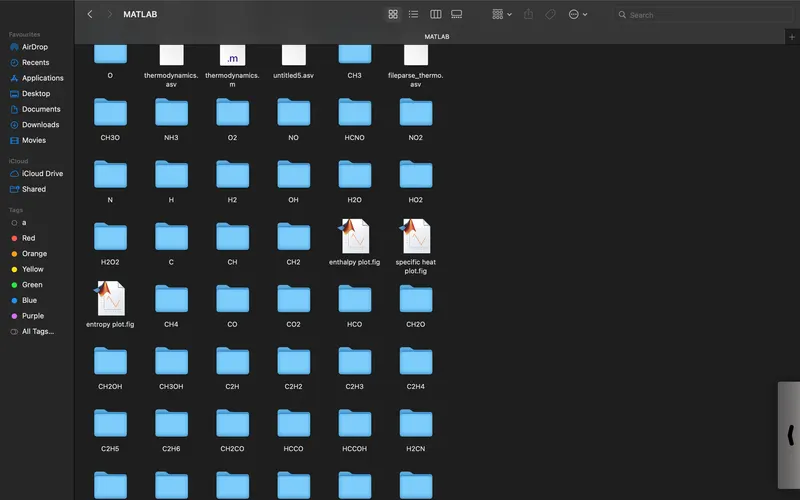
fig(1.1)this is the folder in which different element's folders are formed and their respective plots are saved.
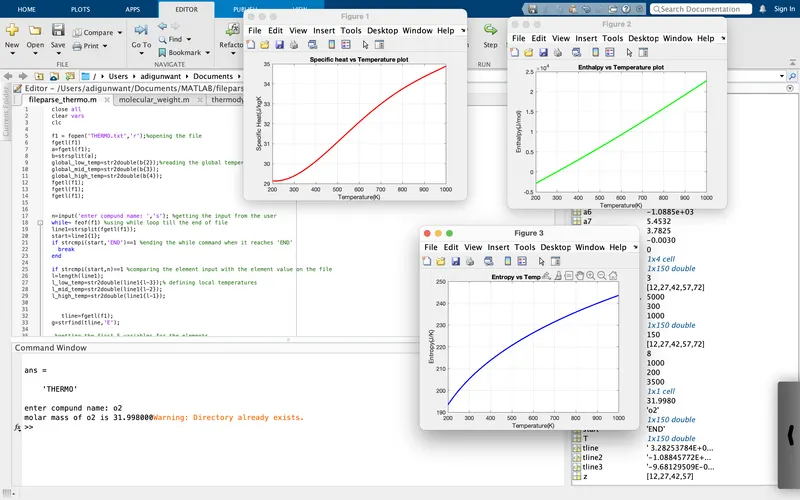
fig(1.2) plots and molar mass for o2
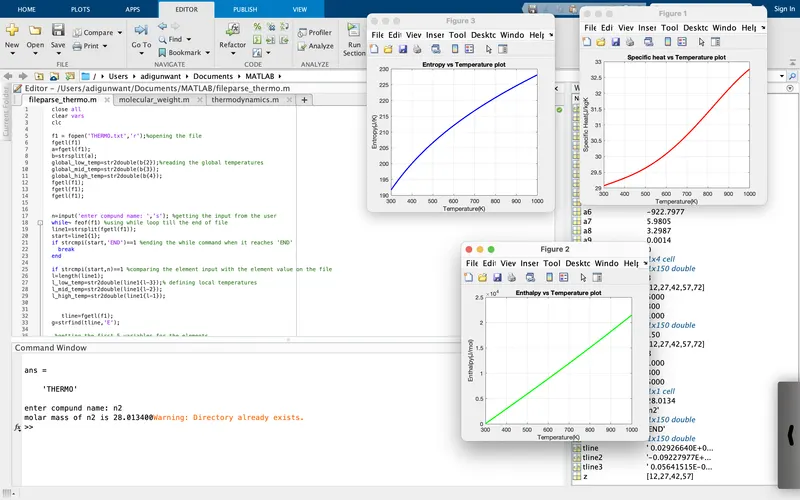
fig(1.3) plots and molar mass for n2
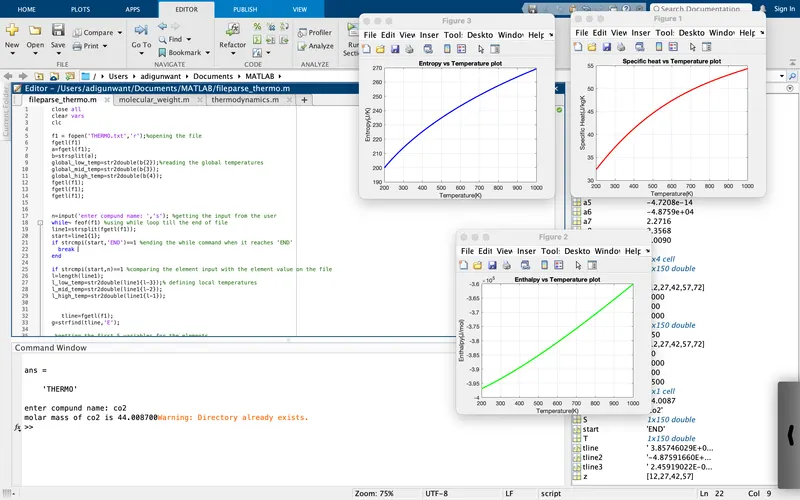
fig(1.4) plots and molar mass for co2
Errors: 
the syntax for writing the formulas was not proper. one needs to use the dot operator along with the multiplication and power function when multiplying a scalar value with an array.
there were also errors for not using the correct syntax to get the first value for a cell .
Conclusion: the results were plotted and the code was optimised along with saving each plot in the respective folder.
the only limitation there was that I was not able to write a code to save the plot. files with elements inputs name.
references: https://www.mathworks.com/help/matlab/ref/fscanf.html