Week 3 - Solving second order ODEs
AIM: To evaluate the motion of simple pendulum by solving ODEusing MATLAM
THEORY:
In engineering, ODE is used to describe the transient behavior of a system. A simple examle is a pendulum. the way the pendulum moves depends on the Newtons second law. this law is writen dowen, we get a second order ordinary Differential equation that describes the position of the ballw.r.t. time.
Consider a pendulum with ball of mass (m) attached to the end string of length (l) with other end being for
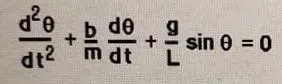
Where,
θ = angular displacement
g = gravitational acceleration
t = time
b = damping coefficient
A second order differential equation should be converted into two sinlge order differential equations to slove in matlab.
θ = θ1
dθ/dt=θ2
and this leads to following differential eguations,
dθ1/dt = θ2
dθ2/dt= -(b/m).θ2-(g/l).sinθ1
Now these equation can be solved using ode45 function of MATLAM.
The parameters choosen for study are as follows:
l = 1 (meter)
m= 1kg
b = 0.05
g = 9.81(meter/s^2)
with initial conditions,
θ = 0
dθ/dt = 3
MAIN PROGRAM FOR MATLAB:

%program to slove 2nd order ode for pendulum

clear all

close all

clc

% inputs from challenge

l= 1; %length of pendulum

m=1; %mass of ball

b=0.05; %damping coefficient

g=9.81; %gravitational acceleration

%Initial condition

theta_0=[0;3];

%time points

t_span=linspace(0,20,500);

%ODE solution

[t_results]= ode45(@(t, theta) ode_func(t, theta, b, g, l, m),t_span, theta_0);

%plot results

figure(1)

plot(t, results(:,1))

hold on

plot(t, results(:,2))

xlable1('time')

ylable1('plot')

%creating animatiom

ct=1;%counter variable to keep track of frame number

for i= 1: length(results(:,1))

x0= 0;

y0=0;

x1= 1*sin(results(i,1));

y1= -1*cos(results(i,1));

figure(2)

plot([-1 1], [0 0], 'linewidth', 10 'color', 'g')    % plot fixed support

axis([-2 2  -2 2])

hold on

line([x0 x1], [y0 y1], 'linewidth', 5, 'color', 'b')  %plot string position

plot(x1, y1, 'o', 'markersize', 25, 'markercolor', 'r')  % plot ball position

hold off

M(ct) = getframe(gcf);  % stores current frame

ct = ct+1;

end

% Create movie

movie(M)

videofile = videowriter('pendulum_simulation.avi', 'Uncompressed AVI');   %create videofile

open(videofile);  % open videofile

writeVideo(videofile,M)   % Write frames to videofile

close(videofile)   %close video file

ode_func:

function [dtheta_dt]  = ode_func(t, theta, b, g,  l, m)

theta1 = theta(1);

theta2 = theta(2);

theta1_dt = theta2;

theta2_dt = (b/m)*theta2-(g/l)*sin(theta1);

dtheta_dt = [dtheta1_dt; dtheta2_dt];

end
not able to resovle the code