Week 3 - Solving second order ODEs
Aim:- To write a program in Matlab that will simulate the pendulum motion.
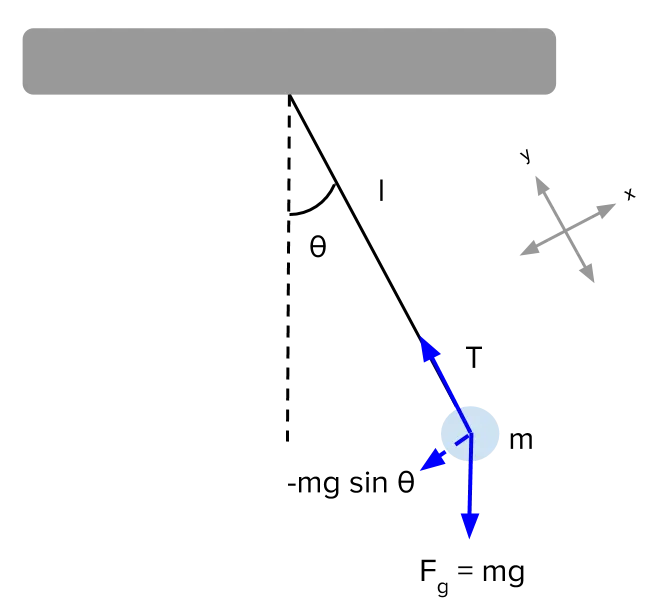
Theory :- By using the below equation we have to calculate the position of the bob during the pendulum motion
It's an second degree equation so first of all we have to convert it into a simple form
Let `theta = theta 1`
`d/dt theta1 = theta2`
`(d theta)^2/dt^2 =d/dt theta 2`
The values that are given are as follows
L=1 metre,
m=1 kg,
b=0.05.
g=9.81 m/s2.
Program:- The following is the program to represent the animation of motion of the pendulum.
It is also explained in the form of comments in the progamm.
%A program that will simulate the pendulum motion
clear all
close all
clc

%Inputs that are given
b=0.05;
g=9.81;
l=1;
m=1;

%initial condition
theta_0 =[0;3];

%time points
t_span = linspace(0,20,500);

%solve ode
[t, results] = ode45(@(t,theta) ode_func(t,theta,b,g,l,m),t_span,theta_0);

% To plot a graph
figure(1)
plot(t,results(:,1))
hold on
plot(t,results(:,2))
xlabel('plot')
ylabel('time')
ct = 1;
%To create a loop to simulate the pendulum
for i = 1:length(results(:,1))
    x_start = 0;
    y_start = 0;
    x_end = l*sin(results(i,1));
    y_end = -l*cos(results(i,1));
    figure(2)
    plot([x_start x_end],[y_start y_end],'marker','o','MarkerSize',25,'MarkerFaceColor','black','MarkerEdgeColor','black','linewidth',5)
    axis([-1.5 1.5 -1.5 1.5])
    hold on

    %to plot the base of the pendulum
    plot([-1 1],[0 0],'linewidth',10,'color','black')

    % To create a video file to save it.
    M(ct) = getframe(gcf);
    hold off
    ct = ct + 1;
end
movie(M)
videofile = VideoWriter('2_order.avi','Uncompressed AVI');
open(videofile)
writeVideo(videofile,M)
close(videofile)
The following are the steps that explains the program step by step
- Give the input value in the program that are known to us.
- Give the initial conditions of the pendulum
- Now with the help of ODE45 function solve the second order equation.Basicaly this function is use to solve second order equation in matlab.
- Create a function program which will calculate the values with the help of formula that is given to us. The function program is further explained below
- Now plot the graph of pendulum with respect to time
- Now with the help of movie command save the animation file.
Function Program:-
In function program the formula that is given is simplified as mentiond above.
function [dtheta_dt] = ode_func(t,theta,b,g,l,m)

theta1 = theta(1);
theta2 = theta(2);

dtheta1_dt = theta2;
dtheta2_dt = -(b/m)*theta2-(g/1)*sin(theta1);
dtheta_dt = [dtheta1_dt; dtheta2_dt];

end
The following are the steps that explains the program step by step
In this function the second orderequation is converted it into a simple form
The simplest form of the equation is used to calculate the required valuees for the pendulum.
Output:-The following is the figure of graph that is plotted w.r.t. time(sec)
The following is the youtube link to open the video file of animated representation of pendulum.
Error:- The error that i faced are stated below
The bob of the pendulum should oscillate downward.
Steps taken to overcome: Put a minus(-) sign in the "y_end = -l*cos(results(i,1))" line of the program.