Week 3 - Solving second order ODEs
OBJECTIVE: To solve 2nd order ODE using function and creating animation data of pendulum.
EXPLANATION: To achieve objecive first we insert inputs as mentioned in codes which are as following:- b = dampner , g= gravitational force, l= length of the conecting rod , m= mass of the object.
insert initial condition which are displacement & velocity ( using column function) and time span using linspace command.
Then to solve ode create a function here its ode function which is ode_func( t, theta ,b,g,l,m) all input data is included in this function. In this function the dtheta is assigned value put it in array. which include dtheta_dt1 & 2 which carries data from data mentioned in question dtheta_dt1= theta 2 and dtheta_dt2 =b/m*theta(2) - g/m * sin theta(1)
In main program we use ODE45 command to solve differntial equations .ode_func is used as part of ode45 function as it provides input and use data for diffenrtial equation . After that we use plot command using column data for velocity and displacement (plot(t,x(:,1) we use this because we use diplacment data in column adn velocity in second .
After plotting the graph for dispalcment and velocity will be given but to create film of data we need to use data of 'x' which is results and create pendulum movement accordingly .
We use 'for' loop command where base co ordinates are 0,0 and end cordinates r determined using simple formula we have practiced before
x1= l*cos(x(i)) & y1= l*sin(x(i) ( we use x here because we need pendulum to move according to data calculated above a) .
Only addition procedure other than plotting the data is we need marker at x1 &y1 cordinates so it can act as ball object that is why we use circle marker('O') so it looks like exact pendulum .
After plotting we use M(ct) command to get every frame of 'for' loop and convert it into movie using movie comand after 'end' and saving file for video proof.
close all
clear all
clc

% inputs
b= 0.05;
g= 9.81;
l=1;
m=1;

% initial condition
theta_0= [0;3];

%time points
t_span= linspace(0,20,100);

% solve ode
[t,x]= ode45(@(t,theta)  ode_func(t,theta,b,g,l,m),t_span,theta_0);

figure(1)
plot(t,x(:,1))
hold on
plot(t,x(:,2))
xlabel('plot')
ylabel('time')

% animation of pendulum
rx=x(:,1);
x0=0;
y0=0;

ct=1
for i= 1:length(rx)
    X1= l*cos(rx(i)-1.75)
    Y1= l*sin(rx(i)-1.75)

figure(2)

plot([-2 2 ], [0 0], 'linewidth',6)
axis([-2 2 -2 2]);
;
hold on
plot(x0,y0 ,'-O','markersize', 1,'markerfacecolor','b');
plot(X1,Y1,'-O','markersize', 20,'markerfacecolor','k');
plot([x0 X1],[y0, Y1],'g','linewidth', 3)
title('Damping of simple pendulum');
legend('fix point', 'length of pendulum', 'body of pendulum', 'support rod');
grid on

M(ct)=getframe(gcf);
ct=ct+1
hold off


end

movie(M)
videofile = VideoWriter('odetest','Uncompressed AVI');
open(videofile)
writeVideo(videofile,M)
close(videofile)
IT is function used for min program.
function [dtheta_dt]= ode_func(t,theta,b,g,l,m)

theta1=theta(1)
theta2=theta(2)
dtheta1_dt= theta2;
dtheta2_dt=-(b/m)*theta2 - (g/l)*sin(theta1);
dtheta_dt= [dtheta1_dt; dtheta2_dt];

end
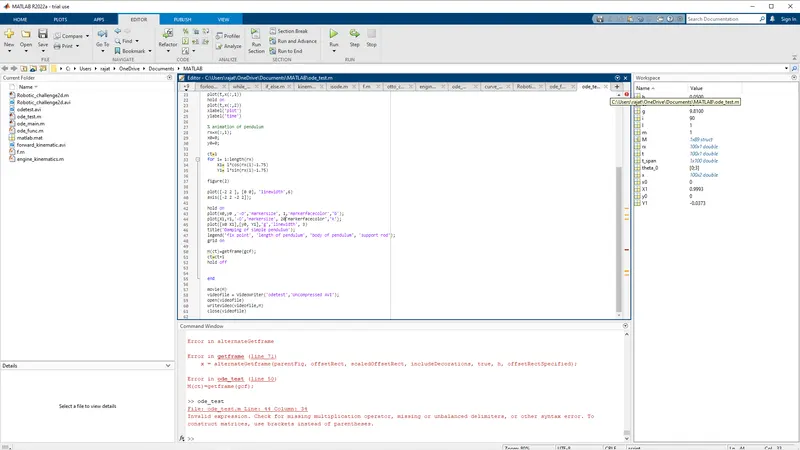
ERROR- Only error made was i didnt put , after the marker size before mentioning size eg ('markersize', 20 markerfacecolor) it should be 20,markerface color) after correcting it ran properly.