Week 3 - Solving second order ODEs
AIM:To solve an ordinary differential equation(ODE) and make an animation of motion of the simple pendulum using matlab program.
THEORY:
- The pendulum is a mechanical system of mass attached to a long massless inextnsible string that performs ossilatorymotion.pendulums are used to keep a track of time in ancient days.pendulum is also used for identifying the beats.
- The time period of the pendulum remains constant even the amplitude is changed but if the acceleration due to gravity changes the time period of the simple pendulum also changes.this property is used to determine or verify the accleration due to gravity.the time period also depends on thelngth of the string to which the bob of the simple pendulum is attached.
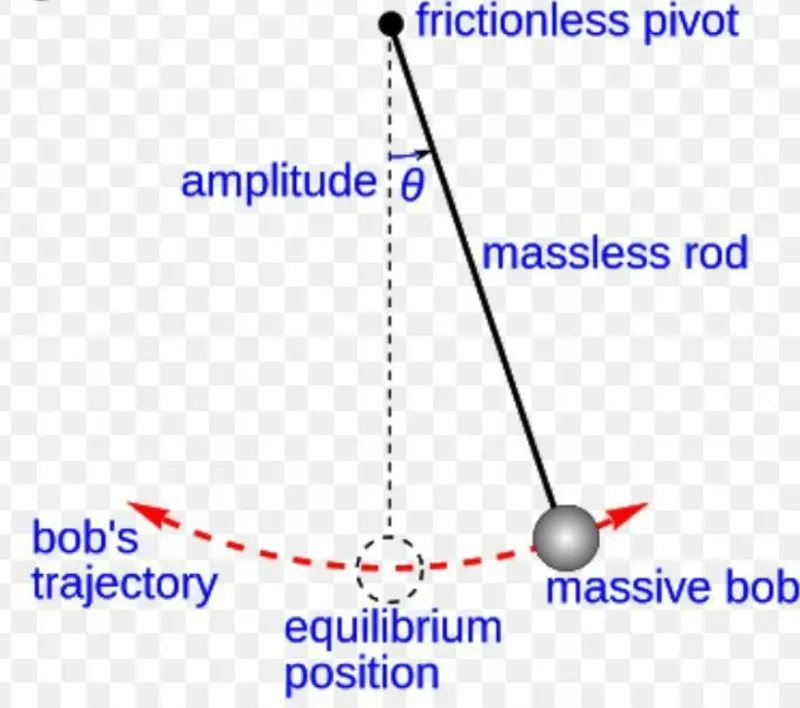
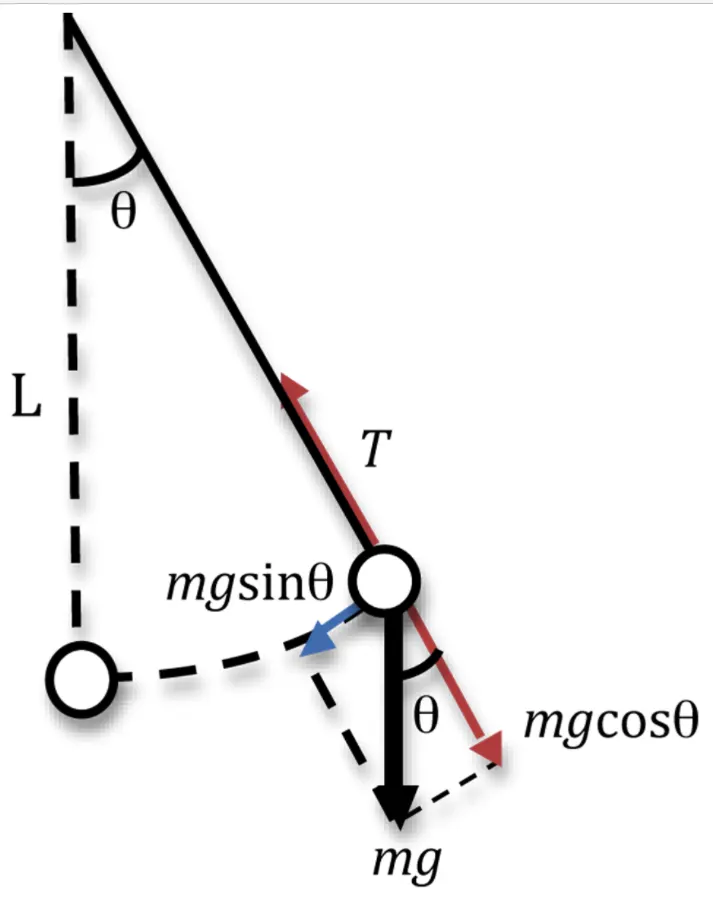
Form the figure,
- The simple pendulum is defined to have an object which has small mass,also called as pendulum bob,which is suspended from a light wire or a string.when the bob is moved from the initial position and it get to be realeased.,the pendulum moves back untill the motion damps.
- The simple pendulum consists of a mass 'm' hanging from the string length'l' and is fixed at one end.when the pendulum get displaced it makes an angle `θ`
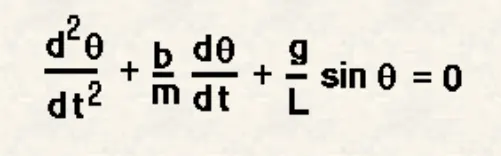
let us assume,
θ=θ1=dθ1/dt=θ2------------->(1)
d^2θ/dt^2=d^2θ1/dt^2=d/dt(dθ/dt)=d(θ2)/dt
d^2θ/dt^2 +b/m*dθ1/dt +g/L*sinθ1=0
dθ2/dt+b/m*θ2 +g/L*sinθ1=0
d(θ2)/dt=-(b/m)*θ1-(g/L)*sinθ1.------------>(2)
applying the values of (1) and (2) we get the first order differential equation.
from the above formula,
the second order ode equation has simplified to first order equation.
g=gravity in m/s^2,
L=length of the pendulum,
m=mass of the ball in kg,
b=damping coefficient.
INPUTS:
L=1 metre,
m=1kg,
b=0.05,
g=9.81m/s^2.
INITIAL CONDITIONS:
Angular displacement t=0;
Angular velocity=3 rad/sec,@ time t=0;
Time motion between 0 to 20sec
SOLVING ODE:
ODE45 is the funtion to solve the ODE,it is so accurate that its default behavior is to use its interpolant to provide resultsat intermediate points.ODE solver ODE45 is used in this program.the results are stored in an array of row matrix of two columns for the values of displacement and velocity at different time periods.
ODE FUNCTION PROGRAM:
function[dtheta_dt]=ode_func(t,theta,b,g,l,m);
     theta1=theta(1);
     theta2=theta(2);
     dtheta1_dt=theta2;
     dtheta2_dt=-(b/m)*theta2-(g/l)*sin(theta1);
     dtheta_dt=[dtheta1_dt;dtheta2_dt];
end
In this function,the file name is also same as the function name.the input values (t,theta,b,g,l,m) are given in the command window.this function is added to the main program by just adding the funtion name .
PROGRAM TO ANIMATE SIMPLE PENDULUM:
%THE PROGRAM TO ANIMATE THE MOTION OF SIMPLE PENDULUM.
clear all
close all
clc
%inputs
b=0.05;%damping coefficient
g=9.81;%gravity in (m/s^2)
l=1;%length of the string in metre
m=1;%mass of the ball in kg
%initial condition
theta_0=[0;3];%angular displacement is 0,angular velocity is 3 @t=0
%time plots
t_span=linspace(0,20,400);%the pendulum moves between 0 to 20 sec
%solve ODE
[t,results]=ode45(@(t,theta) ode_func(t,theta,b,g,l,m),t_span,theta_0);
%plot
figure(1)
plot(t,results(:,1))%plotting the angular displacement value
hold on
plot(t,results(:,2))%plotting angular velocity value
xlabel('time')%show in x-axis
ylabel('displacement (blue)''and''velocity(red)')%show in y-axis

%animation
ct=1;%counter with initial value 1
for i=1:length(results(:,1))%repeatation of the process untill the condition
    x0=0;%start point of x axis
    y0=0;%start point of y axis
    x1=l*sin(results(i,1));%end point of x axis
    y1=-l*cos(results(i,1));%end point of y axis

figure (2)
plot([-2 2],[0 0],'linewidth',2,'Color','r');%plotting origin of linewidth of 2 with red color

line([x0 x1],[y0 y1],'linewidth',4,'Color','g');%length of the string linewidth of 4 with green color
hold on
plot(x1,y1,'marker','o','MarkerSize',20,'markerfaceColor','b');%to add the sphere on the string
axis([-2 2 -2 2])%fixing the axis value for the pendulum
title('motion of the pendulum')

pause(0.03)
hold off
M(ct)=getframe(gcf);%get frame command used to capture all the frame and stores as movie
ct=ct+1;%incrementing the counter value
end%ending the loop
movie(M);%creating the movie from  the frames
videofile=VideoWriter('simple pendulum.avi');%creating movie file simple pendulum
open(videofile);%opening the videofile
writeVideo(videofile,M);%writing the videofile M
close(videofile);%close the videofile
EXPLANATION:
- Clear all command used to remove the data from the workspaces,close all commnd is used to closes previous plots and figure,clc command is used to clear the command window.
- Defining the input values,the damping coefficient as b=0.05,gravity as g= 9.81 m/^2,length of the string as l=1 metre,mass of the ball is m=0.1 kg.
- Initial conditions of angular velocity has defined as 3rad/sec,angular displacment as 0 ,and the time span is to be 0.
- Then the ode45 is used,it is the function that solves the ordinary and partial differential equations using a numerical method.it takes three value of inputs,time span and the initial conditions[t,results] it shows the result with respect to time.
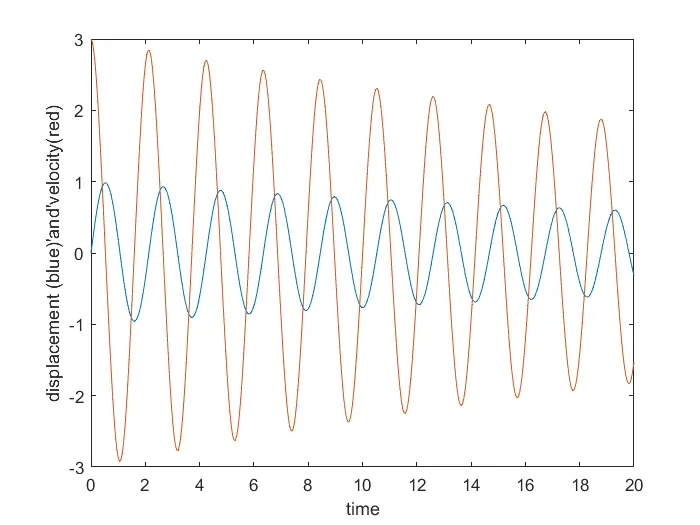
- After calculating the results,plots can be made with angular velocity,angular displacement ,with respect to time,shows the output in the figure 1window.
- Counter value is declared as 1,For loop is used to make the repeatation of process.the loop is used where all the values of timespan are assigned in variable 'i'.
- The coordinates are,x0=0,y0=0,x1 is the end point of x-axis,y1 is the end point of y-axis
- Plotting is done with the values of[-2 2],[0 0] for the figure 2.pause command is used to pause the values.
- Line command is used to make the length of the string
- Plotting (x1,y1,'o','marker' is used to create the spehere on the end of the string.
- Fixing the axis of the pendulum,[-2 2 -2 2] with these values.
- M(ct)=getframe is used to get the frames from the all the values of input.counter value get incremented.end is used to end the for loop.
- To create the movie of animation,the moviecommand is used.the VideoWriter command is used to assign the video format, simple pendulum.avi is file is created.open command is used to open the video.write video command is used to write the video with plotted frames.close command is used to close the video file.
PLOTTING THE VALUES OF ANGULAR VELOCITY,DISPLACEMENT WITH THE TIME:
ERROR I GOT:
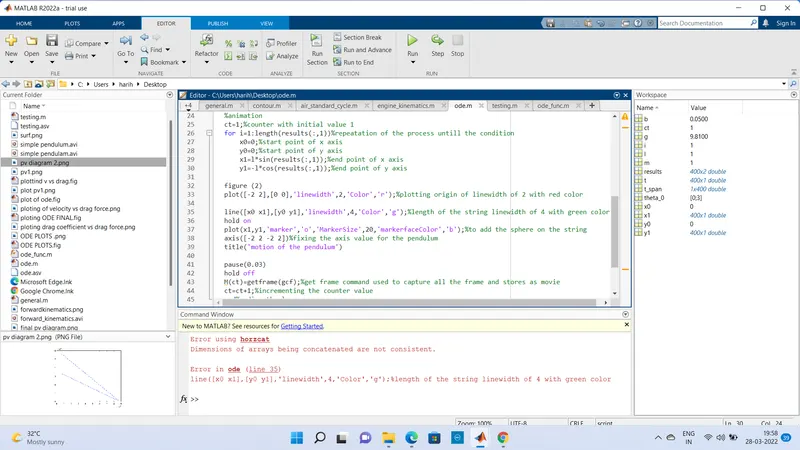
the error is the dimentions of array being concatenated are not consistent.this error is corrected by including the range i value in x1 and y1 values (:,1) to (i,1)
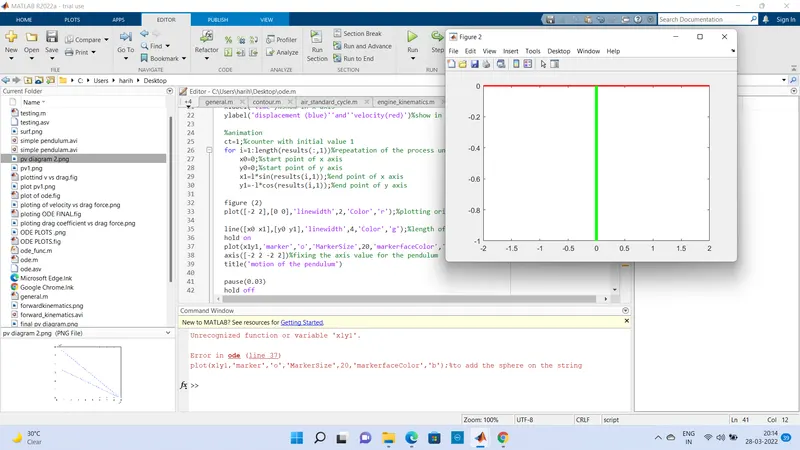
the error is in the plot line 37 x1y1 in the program.then i changed it to(x1,y1)then the program gives proper output.
ANIMATION:
RESULTS:
The animation of simple pendulum has to be done with the matlab program by solving ODE.