Week 2- 2R Robotic Arm Challenge
AIM:TO SIMULATE FORWARD KINEMATICS OFA 2R ROBOTIC ARM USING MATLAB
OBJECTIVE:
1.)Write a program to simulate forward kinematics of a 2R Robotic Arm.
2.)Creating the Animation and Movie from the plots we obtained in the Program.
INTRODUCTION:
A Robotic Arm is a type of mechanical arm,usually programmable,with similar functions to human arm;the arm may be the sum total of mechanism or may be part of a more complex robot.The links of such a manipulator are connected by joints allowing either rotational motion or translational displacement.The links of the manipulator can be considered to form a kinematic Chain.the end kinematic chain of manipulator is called the end effector.it has connection of linkages.
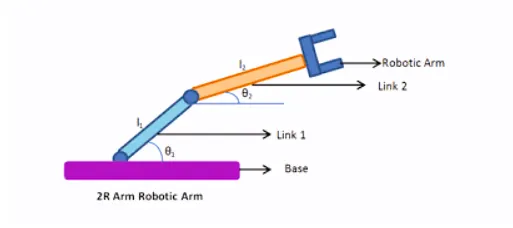
From the image the links is attached to the base,it has two rotational joints,the end point of the link2 is to be the manipulator. that place is going to workspace.where it can hold the complex machining tools.
INPUTS:
l1=length of the first link attached to the base.
l2=length of the second link between the end joint of L1 and the end effector.
COORDINATES:
(x0,y0):The starting point of link 1 that attached to the base.
(x1,y1):The end of link 1 or the starting point of the link 2.
(x2,y2):The end of link 2 where the end effector is fixed.
theta1:The angle made by link 1 with x-axis.
theta2:The angle made by link 2 with y-axis.
FORMULA:
x1=L1*cosd(theta1);
y1=L1*sind(theta1);
x2=x1+L2*cosd(theta2);
y2=y1+L2*sind(theta2);
ERROR I GOT :
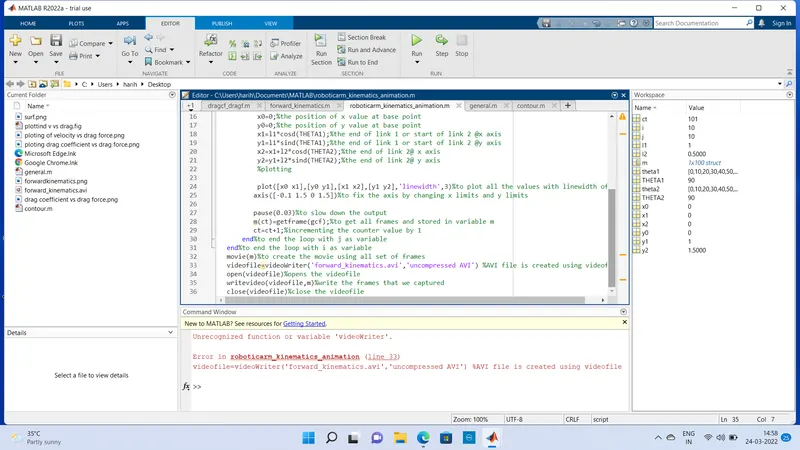
error occured in the 33rd line was an unrecognized function or variable'videowriter'.
videofile=Videowriter('forward_kinematics.avi','uncompressed AVI')
I have corrected by this error by upper case V-instead of lowercase v and also in the 35th line as writeVideo(videofile,m)
PROGRAM:
        %forward kinematics of 2R ROBOTIC ARM

clear all%to clear the data stored in workspce
close all%toclose all the figures and plots
clc%clears the command window
%inputs
l1=1;%length of the link 1
l2=0.5;%length of the link 2
theta1=linspace(0,90,10);%angle for the link 1 with x  axis
theta2=linspace(0,90,10);%angle for the link 2 with  x axis
ct=1;%counter value declaration
for i=1:length(theta1)%value of i from 1 to 10 using for loop
    THETA1=theta1(i);%displaying the value of i in for loop
    for j=1:length(theta2)%value of j from 1 to 10 using for loop
        THETA2=theta2(j);%displaying the value of j in the loop
        x0=0;%the position of x value at base point
        y0=0;%the position of y value at base point
        x1=l1*cosd(THETA1);%the end of link 1 or start of link 2 @x axis
        y1=l1*sind(THETA1);%the end of link 1 or start of link 2 @y axis
        x2=x1+l2*cosd(THETA2);%the end of link 2@ x axis
        y2=y1+l2*sind(THETA2);%the end of link 2@ y axis
        %plotting

        plot([x0 x1],[y0 y1],[x1 x2],[y1 y2],'linewidth',3)%to plot all the values with linewidth of 3
       axis([-0.1 1.5 0 1.5])%to fix the axis by changing x limits and y limits

       pause(0.03)%to slow down the output
       m(ct)=getframe(gcf);%to get all frames and stored in variable m
       ct=ct+1;%incrementing the counter value by 1
    end%to end the loop with j as variable
end%to end the loop with i as variable
movie(m)%to create the movie using all set of frames
videofile=VideoWriter('forward_kinematics.avi','uncompressed AVI') %AVI file is created using videofile
open(videofile)%opens the videofile
writeVideo(videofile,m)%write the frames that we captured
close(videofile)%close the videofile
EXPLANATION:
Clear all is used to clear all the data stored in the workapace,close all is used to close the figures and plots and clc clears the command window.The input value of theta1 and theta 2 is given using linspace to range value between 0 to 90 with 10 values.Then initialize the counter value (ct),To move the arm of the robot we have used the for loops,i value declared for the THETA1 TO position the link 1and j value declared for THETA2 to position the link 2.Then enter and plot the values of([x0 x1],[y0 y1],[x1 x2],[y1 y2]) with the LINEWIDTH of 3.Then axis command is used to fix the axis by changing the values of x limits and y limits.Then the pause command is used to slow down the position of links in the output.using getframe command we get all frames and stored in m.ct+1 we incrementing the counter value by 1.end is given to end the for loop.we can make a movie from the frames we have got by using movie command.videofile command is used to create the uncompressed AVI file. open the videofile usingopen command,then writing the movie and then close the videofile using close command.
ANIMATION/VIDEO:
RESULT:
We have simulated the forward kinematics of 2R Robotic arm.from the animation the links get to be varied with various angles.