Week 3 - Solving second order ODEs
Aim- Write a program to make a simulation of single pendulum.
Objective- write a program that solves the following ODE. This ODE represents the equation of motion of a simple pendulum with damping.
lets see a single pendulum first.
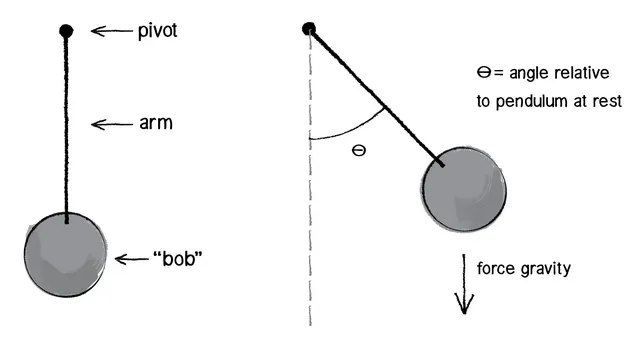
forcs acting on ball of pendulum
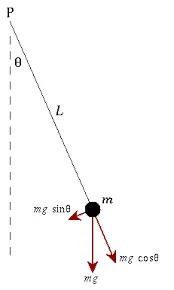
The way the pendulum moves depends on the Newtons second law. When this law is written down, we get a second order Ordinary Differential Equation that describes the position of the "ball" w.r.t time. which is as follows
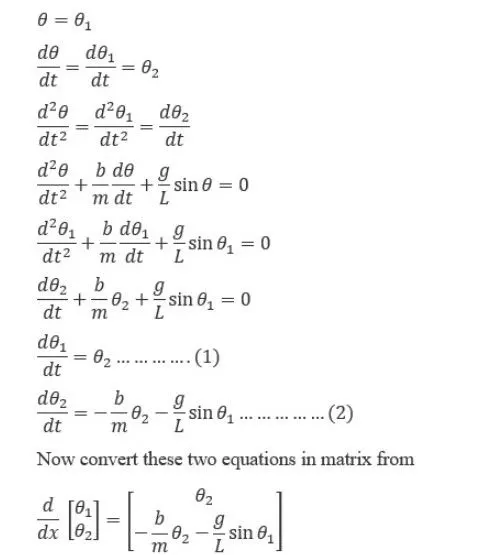
lets assume all values
b= damping force 0.05
m= mass of ball is 1 kg
g is 9.81 standard
length of string id 1m
as we know if we need to solve differntioal equation using matlab we use ode45 inbuilt command but we have to make function for that
Our Function program
function [dtheta_dt] = ode_func(t,theta,b,g,l,m)

theta1 = theta(1)
theta2 = theta(2)
dtheta1_dt = theta2;
dtheta2_dt = -(b/m)*theta2 - (g/l)*sin(theta1);
dtheta_dt = [dtheta1_dt; dtheta2_dt];
end
now make program
clear all
close all
clc

% inputs
b = 0.05; %damping coefficient
g = 9.81; % gravitational Accelration
m = 1;  %mass of ball
l = 1;  % length of string

% initial conditon
theta_0 = [0;3];

% time points
t_span = linspace(0,20,500);

%solve ode
[t, results] = ode45(@(t,theta) ode_func(t,theta,b,g,l,m), theta_0);


plot(t,results(:,1))
grid on
hold on
plot(t,results(:,2))
xlabel('Time in sec')
ylabel('plot')
when we run this codes we get this error
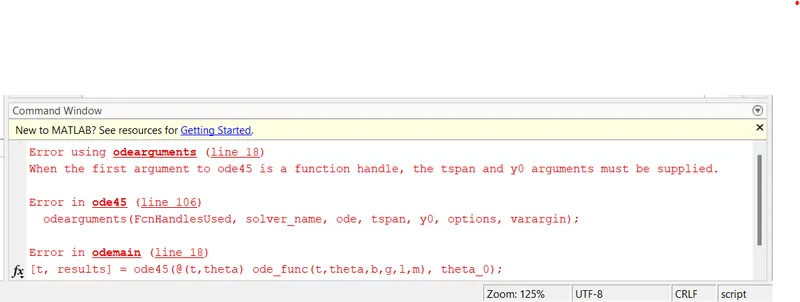
it look like we miss some arguments lets clear it
clear all
close all
clc

% inputs
b = 0.05; %damping coefficient
g = 9.81; % gravitational Accelration
m = 1;  %mass of ball
l = 1;  % length of string

% initial conditon
theta_0 = [0;3];

% time points
t_span = linspace(0,20,500);

%solve ode
[t, results] = ode45(@(t,theta) ode_func(t,theta,b,g,l,m),t_span, theta_0);


plot(t,results(:,1))
grid on
hold on
plot(t,results(:,2))
xlabel('Time in sec')
ylabel('plot')
when we run this program we get our plot
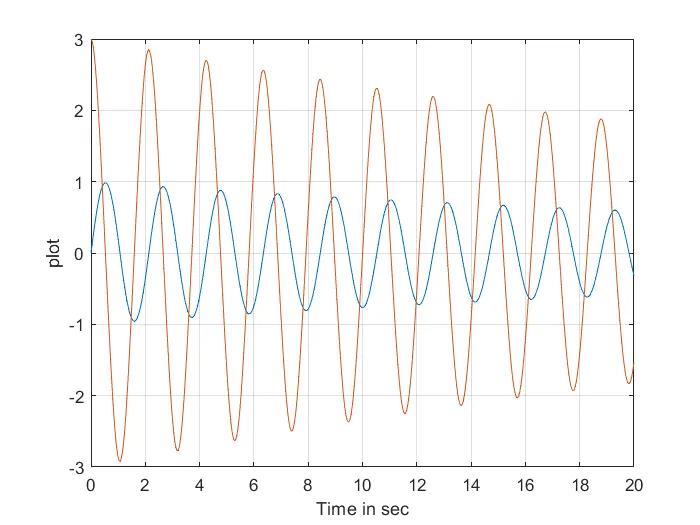
now we have make animation so make program for that using movie opertaion which is very simple to use,
so our final program look like this
clear all
close all
clc

% inputs
b = 0.05; %damping coefficient
g = 9.81; % gravitational Accelration
m = 1;  %mass of ball
l = 1;  % length of string

% initial conditon
theta_0 = [0;3];

% time points
t_span = linspace(0,20,500);

%solve ode
[t, results] = ode45(@(t,theta) ode_func(t,theta,b,g,l,m),t_span, theta_0);


plot(t,results(:,1))
grid on
hold on
plot(t,results(:,2))
xlabel('Time in sec')
ylabel('plot')

% create animation

ct = 1;
theta_1 = results(:,1);

for i = 1:length(results(:,1))
    %initial coordinates

   x_start = 0;
   y_start = 0;
   theta_2 = theta_1(i);
   % final cordinates
   x_end = 1*sin(theta_2);
   y_end = -1*cos(theta_2);

   % animation plotiing
   figure(2)
   % pendulum base
   plot([-1 1],[0,0],'LineWidth',4,'Color','r')
   hold on

   % string of pendulum
   line([x_start x_end],[y_start y_end],'linewidth',6,'color','b')
   hold on

   % bob of pendulum
   plot(x_end, y_end,'Marker','o','MarkerSize',28,'MarkerFaceColor','b')
   axis([-2 2 -2 2])
   pause(0.03)
   hold off
   M(ct)=getframe(gcf);
   ct = ct+1;
end
% create movie
movie(M)
videofile = VideoWriter('simple_pendulum.avi','Uncompressed AVI');
open(videofile);
writeVideo(videofile,M);
close(videofile);
our final outputs,
animation link
Project link- https://skill-lync.com/student-projects/simulation-of-pendulum-using-matlab-5
thanks.....