Week 3 - Solving second order ODEs
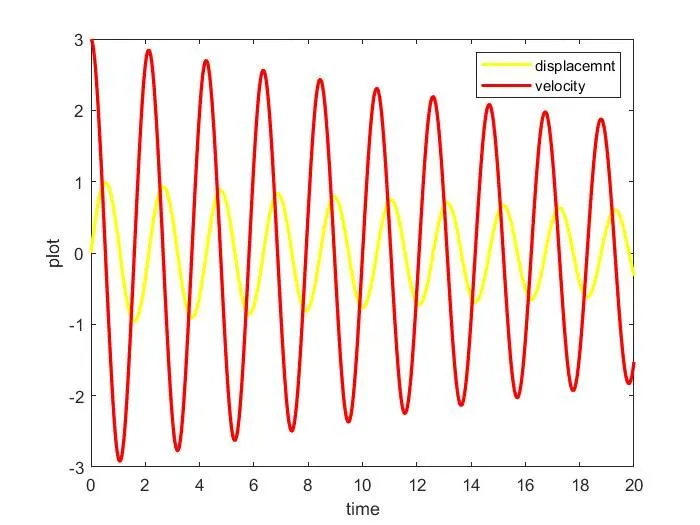
Second order differential equation is used to obtain the values of displacement & velocity wrt time in the given above equation. This ODE also helps us to understand the motion of the pendulum.
Keeping all the input values & points, the below program has been written & the required output are obtained.
ode_main.m

clear all %1%
close all
clc

b=0.05; %2%
g=9.81;
l=1;
m=1;

theta_0=[0;3]; %3%

t_span=linspace(0,20,500); %4%

[t,results]=ode45(@(t,theta) ode_function(t,theta,b,g,l,m),t_span,theta_0); %5%

figure(1) %6%
plot(t,results(:,1),'linewidth',2,'color','y')
hold on
plot(t,results(:,2),'linewidth',2,'color','r')
xlabel('time')
ylabel('plot')
legend({'displacement','velocity'}) %7%

ct=1; %8%
for i=1:length(results(:,1)) %9%
    x0=0; %10%
    y0=0;
    x1=l*sin(results(i,1));
    y1=-l*cos(results(i,1));

    figure(2) %11%
    plot([-1 1],[0,0],'linewidth',3,'color','k')
    hold on
    plot([x0 x1],[y0 y1],'linewidth',2,'color','b')
    plot(x1,y1,'marker','o','linewidth',10,'color','g')
    axis([-1.5 1.5 -1.5 0.5])
    pause(0.01)
    hold off
    M(ct)=getframe(gcf); %12%
    ct=ct+1;%13%
end

movie(M) %14%
videofile=VideoWriter('pendulum.avi','uncompressed AVI') %15%
open(videofile) %16%
writeVideo(videofile,M) %17%
close(videofile) %18%

ode_function.m

function [dtheta_dt]=ode_function(t,theta,b,g,l,m) %1%
theta1=theta(1); %2%
theta2=theta(2);
dtheta1_dt=theta2; %3%
dtheta2_dt=-(b/m)*theta2-(g/l)*sin(theta1);
[dtheta_dt]=[dtheta1_dt;dtheta2_dt]; %4%
end
Stepwise explanation of the program;
ode_main.m
1 - The first 3 lines are used to the clear the previous data,in order to, avoid any unnecessary inputs.
2 - The next few lines are used to provide the fixed input values.
3 - This line is used to provide the initial condition of displacement & velocity.
4 - This line is used to tell the program about the time range.
5 - This line is an in-built ode solver in matlab, this equation provides us the required values of displacement & velocity wrt time.
6 - The next few lines are used to plot a graph of displacement & velocity wrt time with the help of the values generated.
7 - This line is used to generate a legend to distinguish the 2 different curves obtained in the graph.
8 - This line is the frame number for writing the animation video.
9 - This line contains a for loop to generate different frames with the help of input provided.
10 - The next few lines are the values & formulas to obtain different point values.
11 - The next few lines are used to plot a graph with help of for loop values to generate an animation of the motion of the pendulum.
12 - M is an array used to record the frame obtained in the current for loop.
13 - This line is used to increment the frame values to obtain different frames.
14 - This line is used to tell that a movie needs to be generated for M array values.
15 - This line is used to create a videofile to store the frames & also create a animation.
16 - This line is used to open the videofile.
17 - This line is used to write the M array animation in the videofile created.
18 - This line is used to close the videofile.
ode_function.m
1 - This line is used to create a calling function for the ode_main program.
2 - The next 2 lines is used to assign the theta values.
3 - The next 2 lines are the formulas to obtain the displacement & velocity values with the help of theta values.
4 - This line provides the output value to the calling function.
Errors faced during the program;
I was glad that i didn't encounter any major error in this challenge as i had encountered the error in the previous challenges. That doesn't mean, i got the required output in the first go. Therefore, I did get error message but they were for mistyping or any symbol missing.
The output graph for Displacement/Velocity vs Time ;
Pendulum Animation Link;
https://drive.google.com/file/d/1h2ecmQ5QD1ApkxS_eRnLmBcLVbObEH0L/view?usp=sharing