Week 3 - Solving second order ODEs
MATLAB for Mechanical Engineers
AIM: To write a program in Matlab that will simulate the pendulum motion.
In Engineering, ODE is used to describe the transient behavior of a system. A simple example is a pendulum.The way the pendulum moves depends on the Newtons second law. When this law is written down, we get a second order Ordinary Differential Equation that describes the position of the "ball" with respect to time.
In this program we are going to write a program that solves the following ODE. This ODE represents the equation of motion of a simple pendulum with damping
For solving ODEs using MATLAB, higher order differential equations needs to be converted into a set of single order differential equations.
consider a pendulum of mass(m) is attached to a string of length (l) which is fixed at one and.
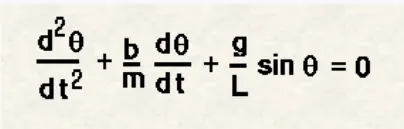
In the above equation,
g = gravity in m/s2,
L = length of the pendulum in m,
m = mass of the ball in kg,
b=damping coefficient.
A second order differential equation sholud be converted into two single order differential equations. This is done by considering
theta=theta1
dtheta1/dt=theta2
And this leads to following differential equations,
dtheta1/dt=theta2
dtheta2/dt=-(b/m)*theta2-(g/l)*sin(theta1)
Now, This two single order equations can be solved in MATLAB by using a solver ode45.
ode45 is a solver in matlab which is used to solve the differential equations, but one condition is it can solve only 1st order differential equations. and that is a reason we have discritized the 2nd order differential equation into two 1st order differential equation.
The parameters and intial conditions for doing the challenge are as follows
L=1 metre,
m=1 kg,
b=0.05.
g=9.81 m/s2.
Simulate the motion between 0-20 sec, for angular displacement=0,angular velocity=3 rad/sec at time t=0.
EXPLANATIONS:
To write a program in Matlab that will simulate the pendulum motion, first we have to create a function which is named as called ode_func to the given 2nd order differential equations by considering all the given parameters and conditions.
- Assign the values for theta 1 and theta 2.
- Find the derivations of theta1 and theta 2.
- create a array for dtheta_dt which is a function with coloume matrix.
- And than end the function by end command.
PROGRAM:
%FUNCTION
function[dtheta_dt]=ode_func(theta,b,m,g,l)
theta1=theta(1);
theta2=theta(2);
dtheta1_dt= theta(2);
dtheta2_dt= -(b/m)*theta2-(g/l)*sin(theta1);
[dtheta_dt]=[dtheta1_dt;dtheta2_dt];
end
After creating the function,By using the function we have to write a program in matlab to simulate the pendulum motion.
- First start writing the program by giving close all, clear all and clc.
- Then give the Inputs to the program as required. i.e, the length of string(l), mass(m),damping coefficient(b)and gravity(g).
- Then assign the time span for the pendulum.Total time taken in 20sec where 300 in between values are considered.
- Then mention the Intial Conditions. 1st coloume represents the displacement and 2nd represent the velocity.
- By using "ode45",solve the differential equations by attaching the function ode_func. here we also use function handles.
- After solving the ode, we need to do the plotting by using the plot command with respect time/displacement and time velocity.
- Use figure command to create figure.
- Then label the x and y axis by using xlabel abn ylabel command.
- Use grid command to make the grid visible.
- After this, we need to create a animation of pendulum.
- For,that we need to first Attach a value for counter variable(ct).
- Now, create a for loop and assign a falue for (i).
- Give the values for starting position of pendulum which is fixed.(x0,y0,).
- Give the values for the end position of pendulum (x1,y1).
- Create a figure window for plotting an animation of pendulum.
- After figure window is created.plotting for animation is done.
- First, we need to plot the fixed roof, then link for fixed roof and mass,and mass.
- Here, while we we do lotting we use many command like linwidth, color, marker, markerfacecolor, markersize.
- Use Variable(M), for storing the frams by using getframe command.
- Increment the counter(ct) value by 1,i.e, ct=ct+1.
- End the for loop by using end command.
- Now, we have to create a movie, for that we have to use command 'movie'.
- Create a videofile by using VideoWriter command by giving the name for he vide and typ of file(AVI).
- Use open command to open the video file.
- Use WriteVideo command to write the frames of the videofile.
- Use close commend to close the video file.
- And then run the program, if any errors occure, try to solve them and execute the program and get the output.
PROGRAM:
%Program to solve 2nd order ODE and create pendulum motion
close all
clear all
clc
%Inputs
l=1;
m=1;
b=0.05;
g=9.81;
%Initial conditions
theta_0=[0;3];
%Time points
t_span=linspace(1,20,300);
%ODE solution
[t,result]=ode45(@(t,theta)ode_func(theta,b,m,g,l),t_span,theta_0);
%Plotting
figure(1)
plot(t,result(:,1))
hold on
plot(t,result(:,2))
xlabel('TIME')
ylabel('DISPLACEMENT/VELOCITY')
%Creating an animation for pendulum
ct=1;
for i=1:length(result(:,1))
   x0=0;
   y0=0;
   x1=l*sin(result(i,1));
   y1=-l*cos(result(i,1));
   figure(2)
   plot([-1,1],[0,0],'linewidth',10,'color','r')
   axis([-2 2 -2 2])
   hold on
   line([x0,x1],[y0,y1],'linewidth',6,'color','b')
   plot(x1,y1,'o','markersize',30,'markerfacecolor','k')
   hold off
   M(ct)=getframe(gcf);
   ct=ct+1;
end
%Creating a Movie for the pendulum
movie(M)
videofile= VideoWriter('pendulum_animation.avi','uncompressed AVI');
open(videofile);
writeVideo(videofile,M)
close(videofile)
OUTPUT:
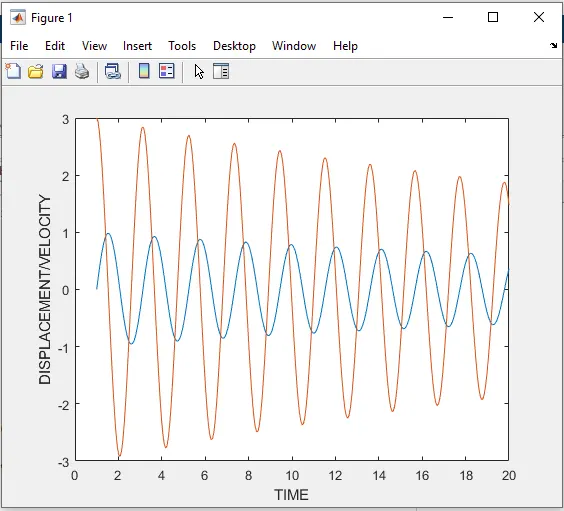
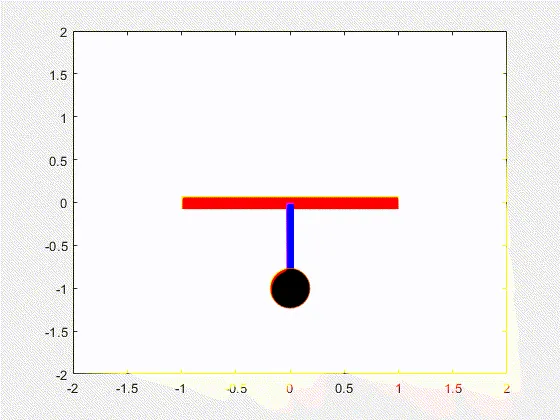
ERRORS:
I face few errors during the process of writing the program, and solved one by one by understanding ,observing, reading and correcting .
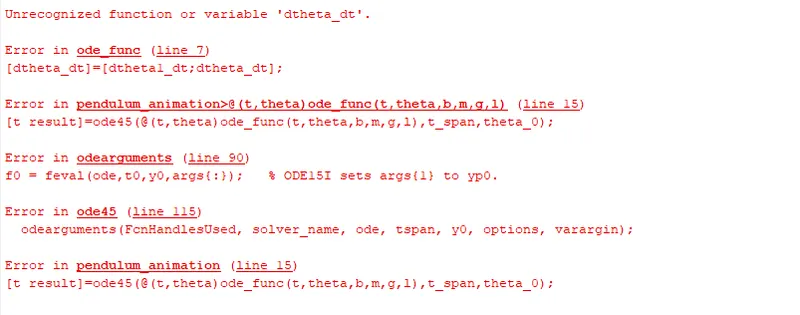
CONCLUSION:
Finally we have completed writing the program in Matlab that will simulate the pendulum motion by giving the respected inputs,parameters and intial conditions.
LEARNING OUTCOMES:
- Learned how to write a program in matlab.
- Learned how to create a function in matlab.
- Learned how to use "ode45 solver"and solve the differential equation.
- Learned how to do plotting in matlab.
- Learned hoe to use for loop.
- Learned how to create an animation.
- Learned how to create a Movie in matlab.
GOOGLE LINKS:
1.Function program: https://drive.google.com/file/d/15bCNbkLOeB509T7X3U7xxrjGm3FKlvvn/view?usp=sharing
2 Program for pendulum motion: https://drive.google.com/file/d/1sDp6ovCkAEi7QR3iAIMcYq50pJ0Mo2nU/view?usp=sharing
3 Youtube link: https://youtu.be/42_tqbB73oc