Week 3 - Solving second order ODEs
AIM:
To solve an ordinary differential eruations(ODE) and use the calculated infermation to animate the motion of the pendulam via MATLAB.
INTRODUCTION:
Pendulum motion basically depicts the motion of a mass hanging from a string that moves back and forth. The variables in pendulum motion are the mass, the length of the string, and the location, which is measured by an angle. Forces acting on the mass in pendulum motion are tension and gravity.
m = mass of the bob kg, g = acceleration due to gravitym/s^2, l = length of the string m. The simple pendulum problem can be solved by using the second order ode functions and by solving these we will get the theta1 an theta2 values of the simple pendulum.
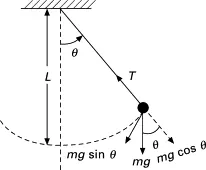
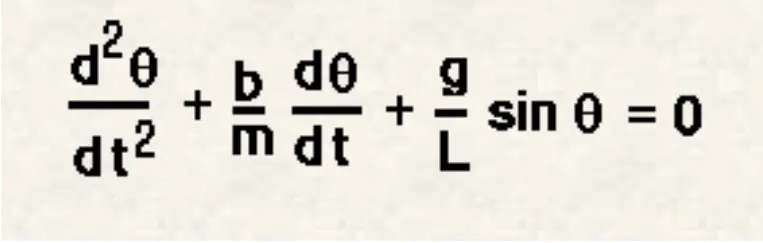
An ordinary differential equation (ODE) is an equation containing one or more functions of one indipendent variable and derivatives os those functions.The ODE equation and calculation is shown below.
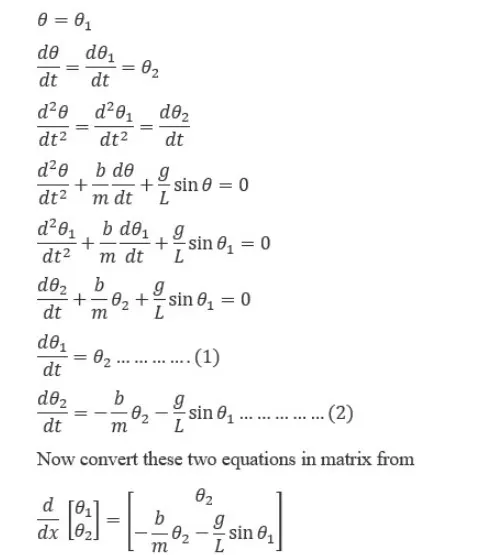
Code explination:
% THE FUNCTION WHICH WILL BE CALLED IN MAIN PROGRAM TO SOLVE THE ODE
function[dtheta_dt] =ode_func(t,theta,b,g,l,m)

theta1 = theta(1)
theta2 = theta(2)
dtheta1_dt = theta2;
dtheta2_dt = -(b/m)*theta2-(g/l)*sin(theta1);
dtheta_dt = [dtheta1_dt;dtheta2_dt];
end
Main code for motion of the pendulum:
%Second order ODE of pendulam
clear all
close all
clc

%inputs
b = 0.05; %damping coefficient
g = 9.81 ;%gravity(m/s^2)
l = 1; %lenght of spring in m
m = 0.1; %mass in kg

%intial condition
%angular displacement is 0 and angular velocity is 5
theta_0 = [0;5];

% time spane
%pendulam oscillation
t_span = linspace(0,20,300);

% solving ODE using function created
[t,results] = ode45(@(t,theta)ode_func(t,theta,b,g,l,m),t_span,theta_0);

plot(t,results(:,1))
hold on
plot(t,results(:,2))
ylabel('plot')
xlabel('time')

%To creat a simple pendulam
%counter value is defined
c = 1;
for i = 1:length(results(:,1))
    x_start = 0;
    y_start = 0;
    x_end = 1*sin(results(i,1));
    y_end = -1*cos(results(i,1));

    %plotting the animation
    figure (2)
    plot([-1 1],[0 0],'linewidth',3)
    hold on
    plot([x_start x_end],[y_start y_end],'linewidth',3)
    hold on

    %To get the Bob using marker function
    plot(x_end,y_end,'o','Markersize',20','markerfacecolor','b')
    title('Animation of pendulum motion')
    axis([-1.5 1.5 -1.5 1])
    pause(0.03)
    hold off
    M(c) = getframe(gcf);
    c = c+1;
end

%Animation of pendulam motion
movie(M)
Videofile = VideoWriter('pendulam animatio.avi','Uncompressed AVI');
open(Videofile)
writeVideo(Videofile,M)
close(Videofile)
Before writing the code it is important to start with clear all,close,and clc commands since
clear all-removes data from the workspace,freeing up system memory
close all - deletes the current figure or the spacified figure
clc - clears all inputs and outputs from command window display,giving you a clean screen
next spet is to defined the input variables.The damping coefficient,gravity,length of the spring and mass of bob have also been defined.
next step is to define the initial conditions,the angular displacement and angular velocity have been defined.Timespan has also been defined.
next step is to solve the ODE,ode45 was used,it is a function in matlab that solves ordinary or partial diffential equations using a numarical method.The numerical method in question here is the 4th order Runge kutta method,the function ode45 takes 3 inputs.The 3 inputs are the function to be integrated,the time span and the initial condition.[t,result]means that the results that have been calculated with respect to time.
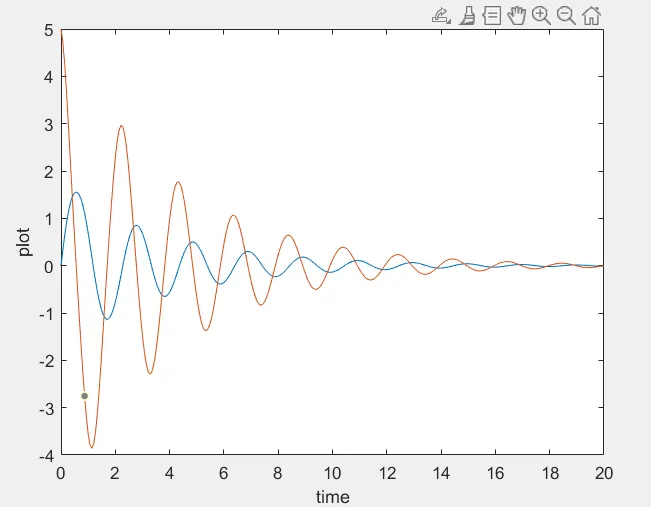
After calculating the results,graph has to be plotted,the graph contained two plots.One for angular displcement with respect to time and one for angular velocity with respect for time.Thhe x and y axis labels have been defined.
The second part of the code is to eastablish for a for loop,a for loop is repitation control structure that allows you to efficiently write a loop that needs to execute specific number of times.A counter was add before the for loop.The start and end points of x and y axis where defined.The loop is where all the values of timespan are assinged to a variable 'i' one at a time.The coordinate of [x0 x1 y0 y1] and their coresponding relations are entered to for a 'string' of the pendulam.The markersize command is used to form the bob of the pendulam.
The 'pause' command is used for pausing the command for peticular time (0.03s) we used.M command is used to capture the the current frame every time foe loop runs. Final step of loop is to add +1 to the variable 'c' this will increment fram every time the for loop runs.End command is used for the plot and for the for loop to stop both from running.
The final step of the code is to creatb a movie of the pendulum movement,so the movie command is used.The vedioWriter command was used to assign the vedio format,for this project.avi is used as the format.The open command was to open the vediofile.writevedio command is used to write the vedio with plot frames.Finally the close command is used to close the vedio file.
Conclusion:
The values of x_start,y_start and x_end,y_end is shown below
x_start= 0
y_start= 0
x_end= -0.0113
y_end= -0.9999
Link for vedio animation of pendulam: https://youtu.be/P65J-a4idPw .