Week 3 - Solving second order ODEs
A program (1) that will simulate the pendulum motion:-
clear all
close all
clc

b = 0.05;
g = 9.81;
l = 1;
m = 1;

%initial condition
theta_0 = [0;3];

%time points
t_span = linspace(0,20,500);

%solve ODE
[t,results] = ode45(@(t,theta) ode_func(t,theta,b,g,l,m),t_span,theta_0);

%Graph shows relation between Angular displacement & angular velocity
figure(1)
hold on
plot(t,results(:,1))
plot(t,results(:,2))
xlabel('Time')
ylabel('Plot')

%Pendulam animation
ct = 1;

for i=1:length(t)
    x=l*sin(results(i,1));
    y=-l*cos(results(i,1));

    figure(2)
    plot([-1,1],[0,0],'LineWidth',5) %for the fixed support
    hold on
    plot([0,x],[0,y],'LineWidth',5)     %for pendulam support
    plot(x,y,'o','MarkerSize',10,'MarkerFaceColor','r')     %pendulam end point
    axis([-2 2 -2 2])
    hold off
    pause(0.03)

    P(ct)=getframe(gcf);
    ct = ct+1;
end

movie(P)
video=VideoWriter('Pendulam_animation.avi')
open(video)
writeVideo(video,P)
close(video)
Program (2) to define ode_func:-
function[dtheta_dt] = ode_func(t,theta,b,g,l,m)

theta1 = theta(1)
theta2 = theta(2)
dtheta1_dt = theta2;
dtheta2_dt = -(b/m)*theta2-(g/l)*sin(theta1);
dtheta_dt = [dtheta1_dt; dtheta2_dt];
end
Figure 1:-
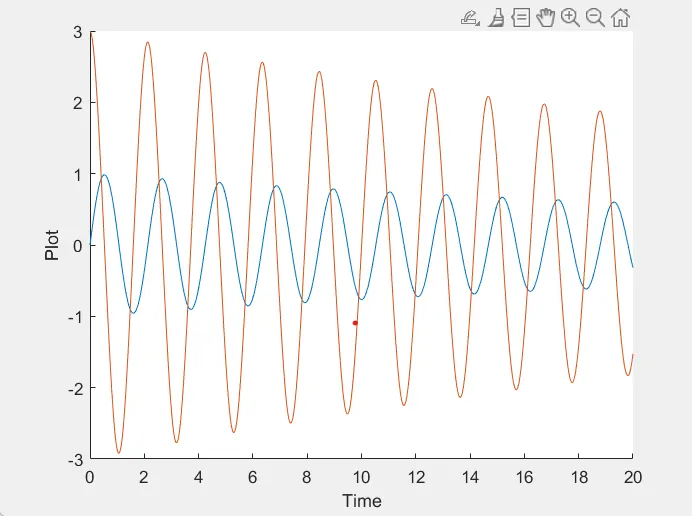
Figure 2:-
Animation of Pendulum
Link:- https://youtu.be/jchWOwqB6uo
Explanation:-
In this program, we have solved the problem of swing ball, like how long it oscillate till it comes to stop.
Its angular velocity and angular displacement is been found through the second law of newton.
We can implement it in suspensions.
an ordinary differential equation (ODE) is a differential equation containing one or more functions of one independent variable and the derivatives of those functions.
ODE is a function of time(t), and theta.
The new function is been called by ode_func in program 2. where the actual formula for dampening is been split and solved by giving values like Gravity, Damping co-efficient, length of string, mass, angle of approach.
A graph has been plotted as shown in figure(1). where the blue line shows a.displacement &red line shows a.velocity.
Time is taken 20 sec, still mass is not completely stationary.
Now, pendulum animation is been formed using for loop command.
Fixed support is been formed using [x1,x2],[y1,y2], a horizontal line is formed.
The supporting member between mass and fixed support [0,x2],[0,y2], its initial point for x&y axis is fixed.
Mass is been formed using the marker 'o'. its been filled by 'marker face color'
Axis limitation is provided by ([x1 x2 y1 y2])
Then, this frame-by-frame picture is been stored in the 'P' variable using ct for looping.
It's stored in the movie, file with Pendulum_animation.avi is created.
Now open the file, write the whole program & close the file.
Here you will get the actual animation demo where it shows how it will perform at the data given.