Week 3 - Solving second order ODEs
To create an animation of simple pendulam by using second order differential equation
For simulation the second order equation is simple pendulam to plot between angular velocity and displacement of simple pendulam using ode45
INPUTS:
For simple pendulam
where,
b = damping coefficient (N m/s)
g = gravity (m/s)
l = length of pendulam (m)
m = mass (kg)
ODE 45
The ode45 command is inbuilt in matlab, To solve requires the simple differential equation to any kind of the higher order differential equation.
By taking constant we can solve the higher order equation to simple ordinary differential equation
let us consider
θ = θ1 ---------(1)
dθ /dt = dθ1/dt = θ2 ---------(2)
d^2θ/dt^2 = dθ2/dt --------(3)
By using second order equation becomes
dθ2/dt = -(b/m)*θ2 -(g/l)*sinθ
The simple differential equation in matrix form

CODE
clear all
close all
clc
b = 0.05;
g = 9.81;
l = 1;
m = 1;
%intial condition
theta_0 = [0; 3];
%time span
t_span = linspace(0,20,500);
%ode solve
[t,result] = ode45(@(t,theta) ode_funct(t,theta,b,g,l,m), t_span,theta_0);
plot(t,result(:,1))
hold on
plot(t,result(:,2))
xlabel('time in sec')
ylabel('angular velocity and displacement')
legend('displacement', 'angular velocity')
%for loop
ct = 1;
for i = 1 : length(result(:,1))
x_start = 0;
y_start = 0;
x_end = 1*sin(result(i,1));
y_end = -1*cos(result(i,1));
%plotting the animation
figure(2);
plot([-3,3], [0,0], 'linewidth',5)
hold on
plot([x_start x_end],[y_start y_end], 'linewidth',3)
hold on
plot(x_end,y_end,'o','MarkerSize',15,'MarkerFaceColor','y')
title('Animation of transitent behaviour of pendulam')
axis([-3 3 -2 2])
pause(0.1)
hold off
M(ct) = getframe(gcf);
ct = ct+1;
end
%Animation of pendulam
movie(M);
videofile = VideoWriter('pendulam animation.avi');
open(videofile)
writeVideo(videofile,M)
close(videofile)
ODE FUNCTION PROGRAM
function [dtheta_dt] = ode_funct(t,theta,b,g,l,m)
theta1 = theta(1);
theta2= theta(2);
dtheta1_dt = theta2;
dtheta2_dt = -(b/m)*theta2 - (g/l)*sin(theta1);
dtheta_dt = [dtheta1_dt; dtheta2_dt];
end
PROGRAM EXPLANATION
clear all, close all, clc is command to clear workspace, clear the exsist graph and clear the command window
The inputs that are used in program are
L=1 metre,
m=1 kg,
b=0.05.
g=9.81 m/s2.
ode45 command is inbuilt in matlab. ode is function of t1 theta and the defining function is theta b,g,l,m after that we provide initial condition
after that we provide time array corresponding to starting of the time
Damper system is used to regulate the flow rate of air through the ducting system
At end of the loop command we use
Movie M command is used to create film stored data of the motion of pendulam
videowriter command is used tospecifies the name of file stored in it
writevideo command is used to create video animation by using MovieM
ERROR
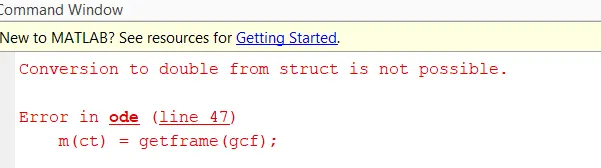
Mistake that ai had made command movie M instead of I use small m, so this is minor mistake which I made
OUTPUT:
PLOTTING GRAPH
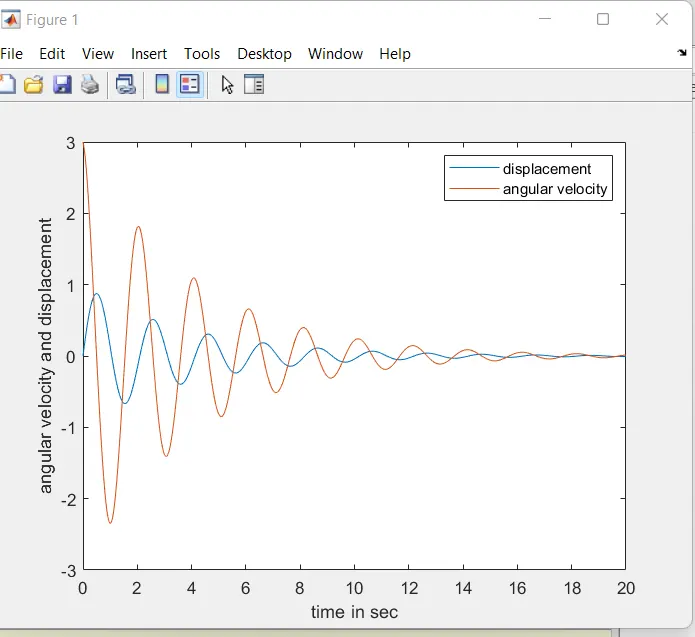
The blue curve starts from 0 as displacement and the red curve starts from 3 as angular diplacement
The both displacement and angular velocity meets at zero level
ANIMATION VIDEO
below link is the animatio of simple pendulam
https://www.dropbox.com/t/TmEEbLuOYDcN09Jn
INSERT CODE
, . '' ; [] () * ^ % @ - _ = + :