Week 3 - Solving second order ODEs
Aim: To solve the second order ODE using Matlab which replicates the motion of a pendulum.
Objective:
- To write a program that solves the following ODE. This ODE represents the equations of motion of a simple pendulum with damping.
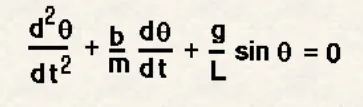
In the above equation,
g = gravity in m/s^2,
L = length of the pendulum in m,
m = mass of the ball in kg,
b = damping coefficient.
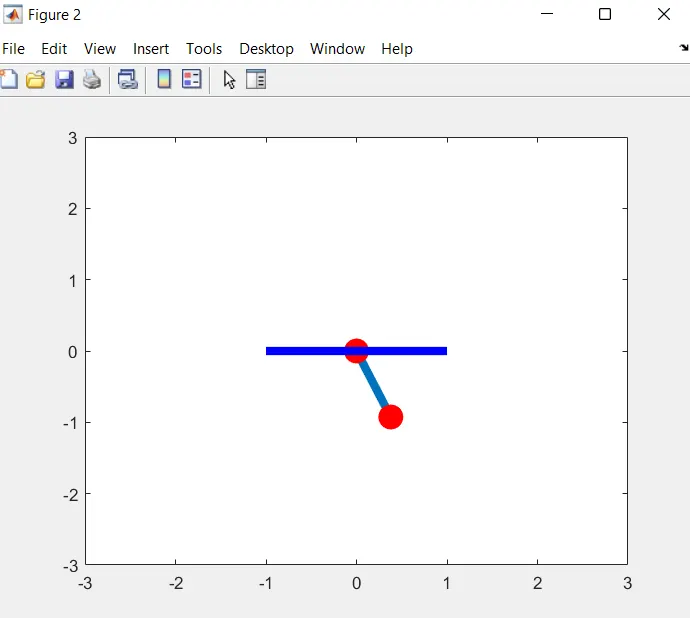
2. Animate the motion of the pendulum using matlab.
Theory:
A Pendulum is a weight suspended from a pivot so that it can swing freely. When a pendulum is displaced sideways from its resting, equlibrium position, it is subjected to a restoring force due to gravity that will accelerate it back towards equlibrium position. When released, the restoring force acting on the pendulum's mass causes it to oscillate about the equlibrium position, swinging back and forth. The time for one complete cycle, a left swing and a right swing, is called the period. The period depends on the length of the pendulum and also to a slight degree on the amplitude, the width of the pendulum's swing.
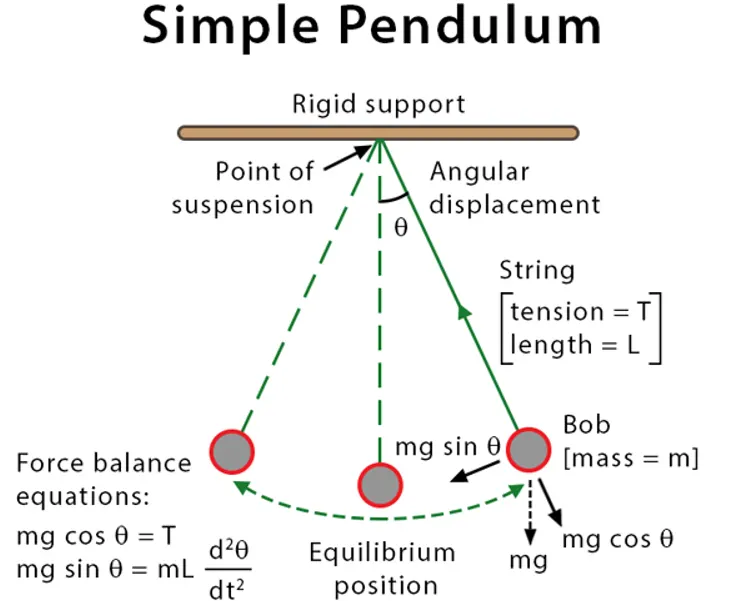
Program to solve the following ODE:
Known parameters:
Damping coefficient (b) = 0.05,
Acceleration due to gravity (g) = 9.81 m/s^2,
Length (L) = 1 meter,
Mass (m) = 1 kg,
Time span = 0-20 seconds,
Initial displacement = 0,
Initial velocity = 3 rad/sec at time = 0.
Code for the Main program:
clear all
close all
clc

%%Inputs
b=0.05;
g=9.81;
l=1;
m=0.1;

%%Initial condition
theta=[0;3];

t_span=linspace(0,20,500);

[t,results]=ode45(@(t,theta_1)ode_func(t,theta_1,b,g,l,m),t_span,theta);

%%plotting
figure(1)
hold on
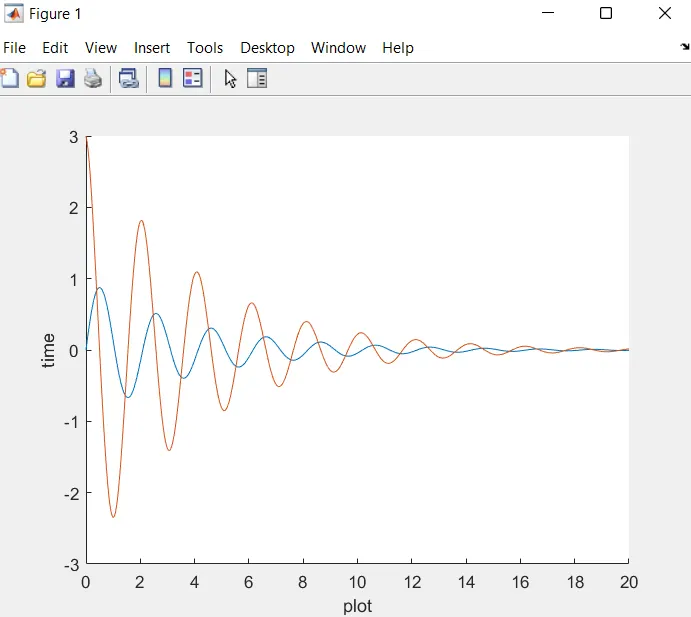
plot(t,results(:,1))
plot(t,results(:,2))
xlabel('plot')
ylabel('time')

%%Animation
ct=1;
for i=1:length(results(:,1))
    x0=0;
    y0=0;
    x1=l*sin(results(i,1)+pi);
    y1=l*cos(results(i,1)+pi);

    figure(2)
    plot([x0 x1],[y0 y1],'-o','markersize',10,'markerfacecolor','r','markeredgecolor','r','linewidth',5)
    axis([-3 3 -3 3])
    hold on
    plot([-1 1],[0,0],'linewidth',5,'color','b')
    M(ct)=getframe(gcf);
    hold off
    ct=ct+1;
end

%%Videofile

movie(M)
video_file=VideoWriter('Pendulum_Movement.avi','Uncompressed AVI')
open(video_file)
writeVideo(video_file,M)
close(video_file)
Code for the function "ode_func" used in this program:
function [theta_dt]=ode_func(t,theta_1,b,g,l,m)
theta1=theta_1(1);
theta2=theta_1(2);
dtheta1_dt=theta2;
dtheta2_dt=((-b/m)*theta2)-(g/l)*sin(theta1)
theta_dt=[dtheta1_dt;dtheta2_dt];
end
Plotting:
Animation of the Pendulum motion:
https://drive.google.com/file/d/1EexoppxkUGQN6fJjga5b-B4KzrfP-2cB/view?usp=sharing
Explination of the code used:
- To begin with the program I started off using the 'clear all', 'close all', and 'clc' command. These commands clears the workspace, closes all figures, and clears command window respectively.
- Then I entered all the fixed parameters. Those are Length (L), Mass (m), Damping coefficient (b), Acceleration due to gravity (g), Time span, and the inital conditions of displacement and velocity.
- Then using the ode45 command ODE function (ode_func) is introduced.
- The ode45 command in an inbult standard solver for ordinary differential equations in MATLAB.
- The function in the program simplifies the second order ODE to first order ODE by introducing the terms 'theta1' and 'theta2'. Then theta1 and theta2 are differentiated and the theta_dt gives a column matrix.
- Then, using the plot command velocity and displacement is plotted in the y-axis against time in the x-axis.
- using the for loop command the mass at various points at various times are plotted on the graph.
- Finally, using the movie command the plot is saved as an uncompressed avi file named as 'Pendulum_Movement.avi'.