Week 3 - Solving second order ODEs
AIM:
To write a program to simulate the oscilation behaviour of a simple pendulum and to create an animation of it's motion.
OBJECTIVE:
The equation of motion of a simple pendulum with damping.
THEORY :
In Engineering ODE is used to describe the transient behavior of a system. An example for this process is a simple pendulum. It depends on the Newton's 2nd Law of Motion. When the law is written down, we get a second order diffrential equation that describes the position of the ball with respect to time.
Let we consider a simple pendulum with ball of mass(m) attached to the end of string of length(L) where other end is fixed.
FORMULA:
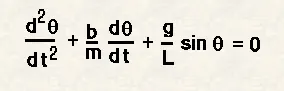
Where,
`theta` = Angular Displacement;
g = Gravitational Acceleration;
t = time;
b = damping coefficient.
A second order differential equation should be converted into two single order diffrential equations.This is done by,
`theta` = `theta1`
d`theta1`/dt = `theta2`
then the following diffrential equations is,
d`theta1`/dt = `theta2`
d`theta2` = -(b/m).`theta2`-(g/l).sin`theta1`
Now this equation can be solved using ode45 function in MATLAB.
GIVEN VALUES:
L = 1m;
m = 1kg;
b = 0.05;
g = 9.81m/s.^2
`theta` = 0;
d`theta`/dt = 3.
PROGRAM:
close all
clear all
clc


% Inputs
l = 1;  % length of pendulum
m = 1;  % mass of ball
b = 0.05;  % Damping coefficient
g = 9.81;  % Gravitational acceleration

% Initial Condition
theta_0 = [0;3];

% Time Points
t_span = linspace(0,20,500);

% ode solution
[t, results] = ode45(@(t,theta) ode_func(t,theta,b,g,l,m),t_span,theta_0);

% plot results
figure(1)
plot(t, results(:,1))
hold on
plot(t, results(:,2))
xlabel('time')
ylabel('plot')

figure(2)
plot(results(:,1),results(:,2))
xlabel('displacement')
ylabel('angular velocity')

%counter variable to keep track of frame number
ct = 1;


for i = 1 : length(t)
    x1 = 0;
    y1 = 0;
    x2 = l*sind(results(i,1));
    y2 = -l*cosd(results(i,1));
    x3 = -1;
    y3 = 0;
    x4 = 1;
    y4 = 0;

    figure(3)
    % plot fixed support
    plot([x3 x4],[y3 y4],'linewidth',2,'Color','k')
    hold on

    % plot string position
    plot ([x1 x2],[y1 y2],'linewidth',3,'color','b')
    hold on

    %plot ball position
    plot(x2,y2,'o','marksize',15,'markerfacecolor','r')
    hold off

    axis([-2 2 -2 2]);
    pause(0.03);

    %stores current frame
    M(ct) = getframe(gcf);
    ct = ct+1;
end

% Create Movie
movie(M);
% to create videofile
videofile = Videowriter('Pendulum_simulation.avi','Uncompressed AVI');
 % open videofile
open(videofile);
% write frames to videofile
writevideo(videofile,M);
getframe(gcf);
% close videofile
close(videofile);
EXPLANATION OF THE CODING:
1.The inputs damping co-efficient(b),mass(m),length(l),angle(theta),timeinterval(t_span),accleration due to gravity(g) are declared.
2.The linspace command is used to generate 500 values between 0 to 20 for the time interval.
3.The ODE45 command is used to integrate the values using the function ode_func by specifing the time interval and initial conditions for the fiunction to start.
4.A for loop is used for the time interval t is written in which 2 points (x1,y1) & (x2,y2) are plotted.
5.The value (x2,y2) are governed by the displacement value of the results.
6.An animation file is created for the 3rd figure to replicate the motion of pendulum using getframe(gcf).
Function:
function[dtheta_dt] = ode_func(~, theta,b,g,l,m)

theta1 = theta(1);
theta2 = theta(2);
dtheta1_dt = theta2;
dtheta2_dt = ((-(b/m)*theta2) - ((g/l)*sin(theta1)));
dtheta_dt = [dtheta1_dt; dtheta2_dt];
end
EXPLANATION:
1.In function displacement value of theta is stored in theta1 & angular velocity value is stored in theta2.
2.The second order differential equation is split into 2 First Order Diffrential Equation and solved value is stored in dtheta_1dt, dtheta_2dt.
ERRORS OCCURED:

Not assigned my values in the parentheses. By seeing command window i rectifie my error.
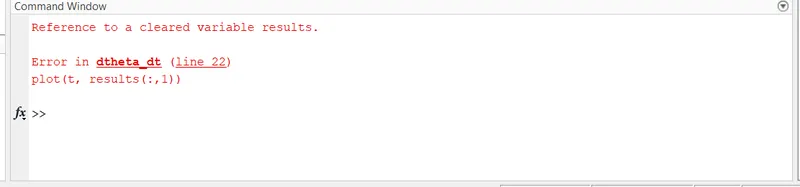
Typo error made while programming. By seeing command window i rectifie my error.
RESULTS:
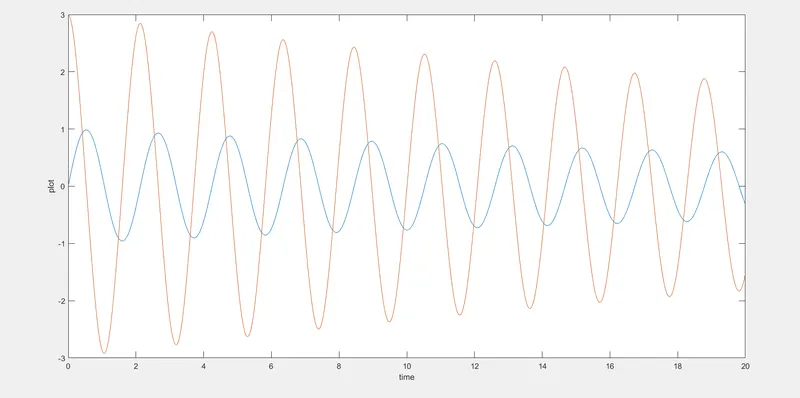
1.Time/Displacement, Angular Velocity:
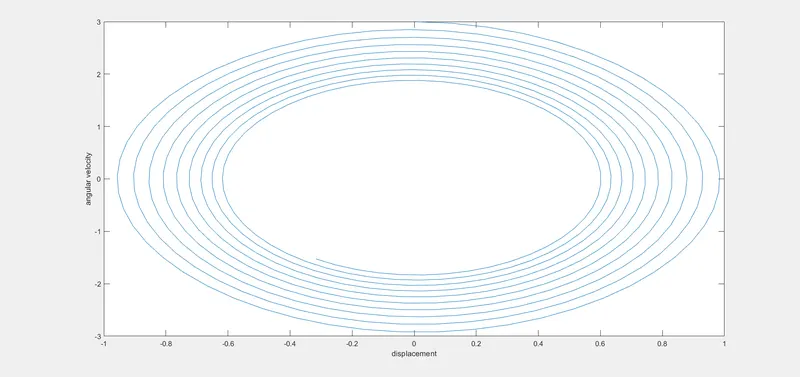
2.Displacement/Angular Velocity:
3.Animation of pendulum motion:
youtubelink: https://youtu.be/QmafsJWFqNQ
RESULT:
Thus the program to simulate the oscilation behaviour of a simple pendulum and to create an animation of it's motion is done.