Week 3 - Solving second order ODEs
% SOLVING 2ND ODE USING MATLAB SOFTWARE
- AIM:-
solving 2nd ODE of simple pendulum using MATLAB software.
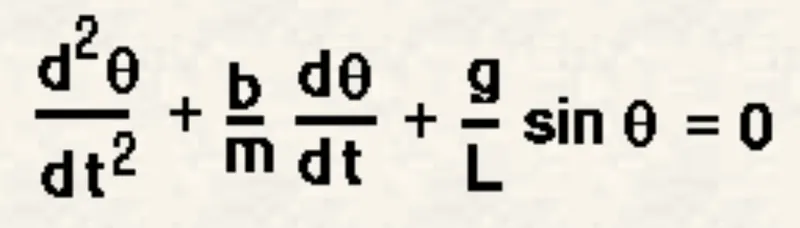
In the above equation,
g = gravity in m/s2,
L = length of the pendulum in m,
m = mass of the ball in kg,
b=damping coefficient.
- OBJECTIVE:-
1) By using ode45 solver which is an inbuilt solver in MATLAB . The ode45 solver should require simple differential equation to solve any kind of higher order differential equation.
2) By taking constants we can solve the higher order differential equation to a simple ordinary differential equation.
- DERIVATION:-
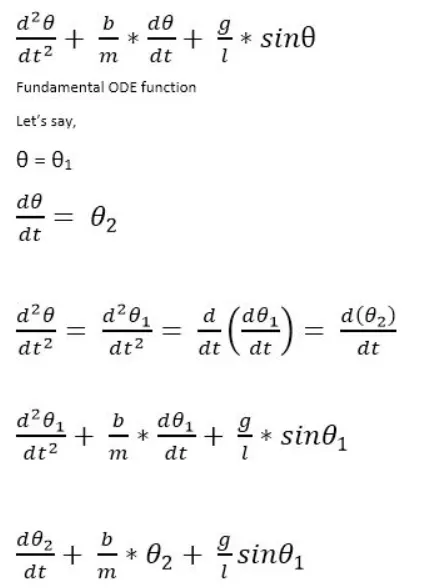
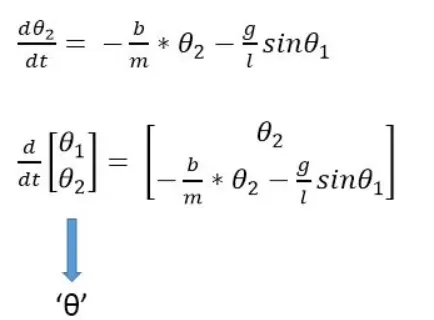
- Given Data For Solving The Program:-
L=1 metre,
m=1 kg,
b=0.05.
g=9.81 m/s2.
- CODEING OF 2ND ODE IN MATLAB:-
close all
clear all
clc
% given data
b=0.05;
g=9.81;
l=1;
m=1;
% intial condition
theta_0 = [0;3];
t_span = linspace(0,10,500);
% solve ODE
[t, results] = ode45(@(t,theta) ode_func(theta, b, g, l, m),t_span,theta_0);
figure(1)
plot(t,results(:,1))
hold on
plot(t,results(:,2))
xlabel('time')
ylabel('theta')
legend('angular velocity' ,'angular displacement')
hold off
disp=results(:,1)
figure(2)
ct=1;
for i=1:length(t_span)
x0=0;
y0=0;
x1=1*sin(results(i,1));
y1=-1*cos(results(i,1));
plot([-1 1],[0,0],'linewidth',2 ,'color','g')
hold on
plot([0 0],[0 -1.3],'linewidth',2 ,'color','k')
plot([x0 x1],[y0 y1],[-0.5 -0.5],[0 0],'linewidth',3,'color','b')
hold on
plot(x1, y1, 'Marker','o','MarkerSize',30,'MarkerFaceColor','r')
hold off
axis([ -1.5 1.5 -1.5 1])
pause(0.0003)
M(ct)=getframe(gcf)
ct=ct+1
end
% making the videofile
movie(M)
videofile=VideoWriter('simple_pendulum_animation_ode,avi')
open(videofile)
writeVideo(videofile,M)
close(videofile)
- ODE FUNCTION DERIVATION CODING:-
function[dtheta_dt] = ode_func(theta, b, g, l, m)
theta1 = theta(1);
theta2 = theta(2);
dtheta1_dt = theta2;
dtheta2_dt = -(b/m)*theta2-(g/l)*sin(theta1);
dtheta_dt = [dtheta1_dt ; dtheta2_dt];
end
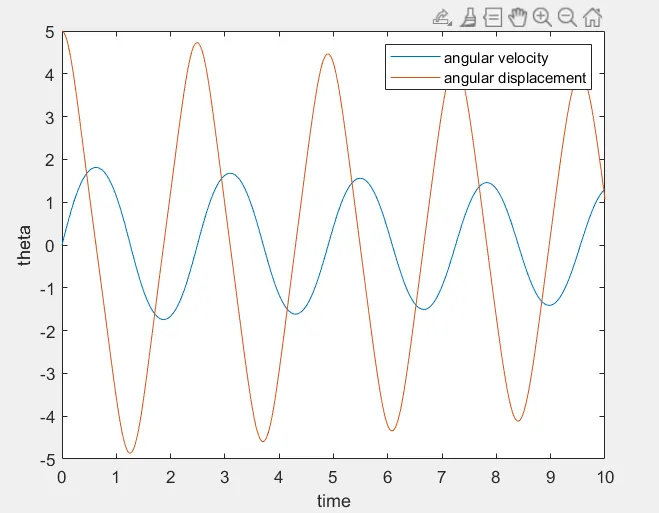
- GRAPH OF SIMPLE PENDULUM:-
- LINK OF SIMPLE PENDULUM ANIMATION:-
https://drive.google.com/file/d/1IvWA9zE_y1QUeloSVpgl4b03Vex5kNpw/view?usp=sharing
- CONCLUSION:- In this Program i was studied How to program type and using the help ode45 how the program run in MATLAB .