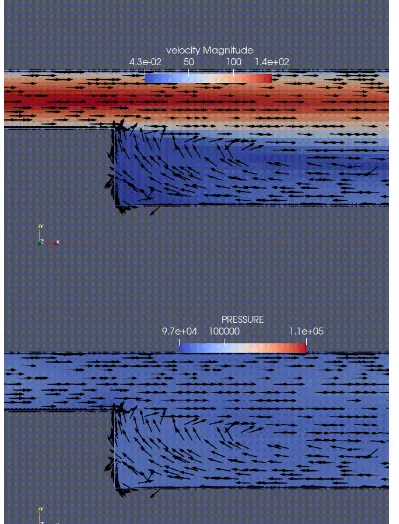
Week 3: Flow over a backward facing step
Aim: To flow over a backward-facing step
Objective: The simulation is run for the three different mesh sizes
|
S.No |
dx (m) |
dy (m) |
dz (m) |
|
MESH 1 |
2.00E -03 |
2.00E -03 |
2.00E -03 |
|
MESH 2 |
1.50 E -03 |
1.50 E -03 |
1.50 E -03 |
|
MESH 3 |
1.20 E - 03 |
1.20 E - 03 |
1.20 E - 03 |
Contents to be shown in the report:
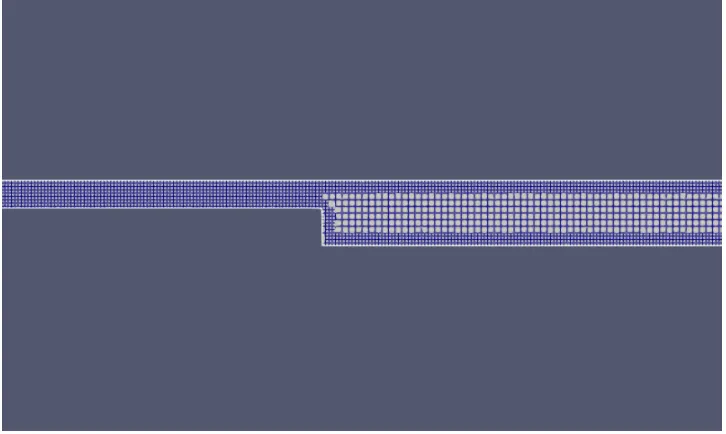
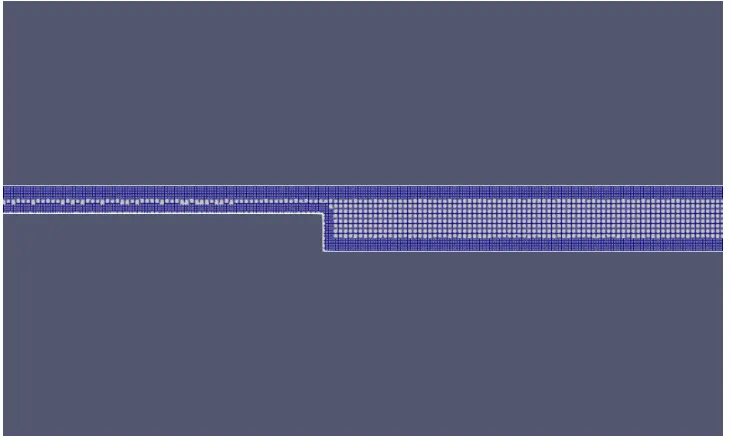
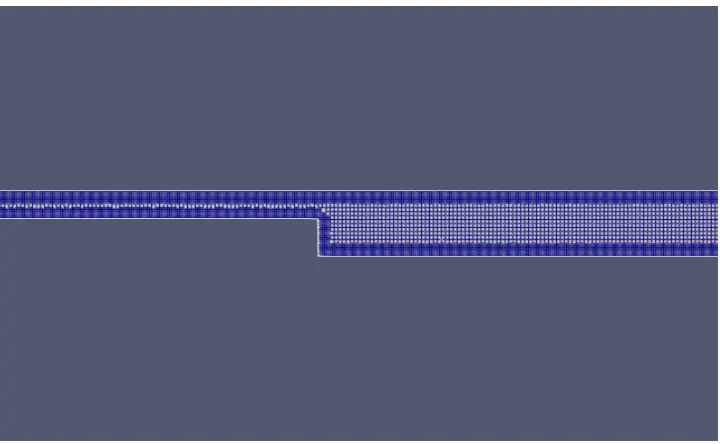
1. Show the mesh (i.e surface with edges) for all the 3 base mesh sizes
2. Show pressure and velocity contours
3. Show the plots of velocity, pressure, mass flow rate, and total cell count for all the 3 base mesh sizes
4. Also explain where and why separation is taking place in detail.
Introduction:
Backward-facing
The backward-facing step is widely used for its application of turbulence in internal flows. The flow separation is caused due to the sudden changes in the geometry and the inlet and outlet pressure values. The flow separation causes a point of reattachment and a point of recirculation.
The backward-facing step represents separation flows, which can be widely seen in aerodynamic flows, heat
transfer, engine flows, condensers, vehicles, and flow around the building.
Case setup
The bfs. STL file is loaded into the Converge-CFD set-up.
The "Normal Toggle" is selected from the ribbon, upon selecting the normal toggle it was observed that the normal is pointing outside the volume, technically the normal should point inside the volume where the fluid is flowing. Therefore in the geometry dock, the "Transform" option is clicked. The "Normal" tab is selected from the geometry dock and one of the triangles containing the normal pointing outward is selected. The -Apply option is selected for removing the normals.
The diagnosis dock is selected from the "View" option and the "Find" option is selected. It is found that there is no problem observed in the geometry ("Intersections(0)","Non manifold Problems(0)","Open Edges(0)-, "Overlapping
Tric(0)-"Normal orientation(0)", "isolated tris (0)" 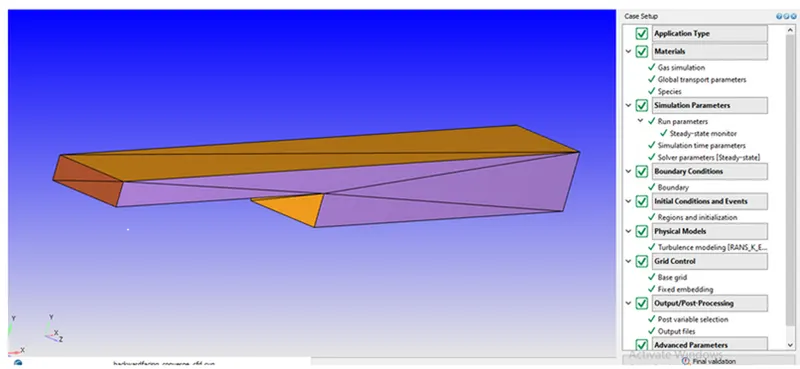
The "Time. based "Application" type is selected. The "Material" is selected and the predefined mixture is selected as air. The 'Reactant mechanism" is checked off because it is not a combustion problem. The species is selected and the "Apply is clicked. Under "Gas simulation" the Equation at state is selected as "Redlich Kwong", the critical temperature is 133K and the critical pressure is 3770000Pa. The Turbulent Prandtl number is 0.9 and the Turbulent
Schmidt number is 0.70 under Global Transport parameters. Under "Run parameters" the "Steady-state salver is selected. The "Temporal type" is locked for the steady-state. The "simulation mode" is selected as "Full Hydrodynamic" because the geometry is simple so while creating the mesh inside the geometry solves the NS equation as well, the geometry is complex "Na hydrodynamic solver" is selected as such if there is an error it will point out immediately while creating the mesh, otherwise if the hydrodynamic solver a selected then it will be very tedious to identify the error in the simulation case set up.
Boundary conditions:
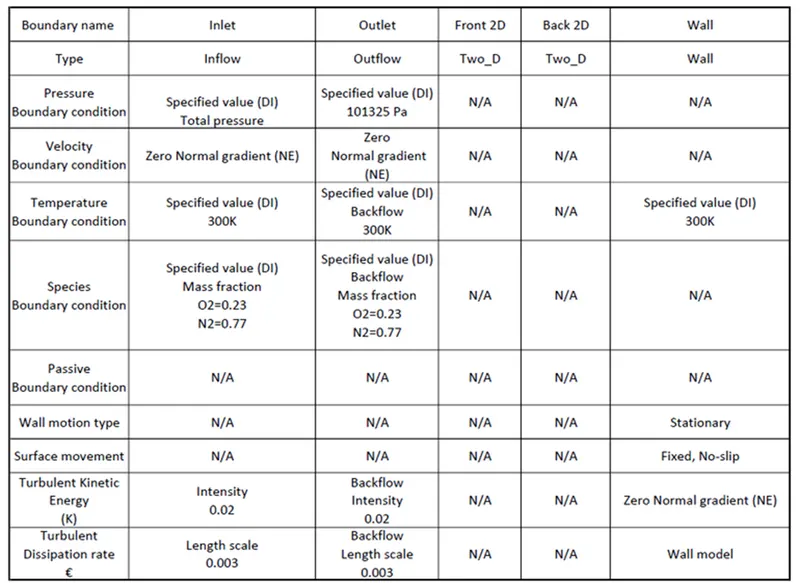
Determination of flow velocity:
First of all, let us assume that the flow is incompressible, the Bernoulli Equation for the incompressible flow states that the sum of the mechanical, potential, and kinetic energy remains constant, so any increase in one form may result in a decrease in another form. Therefore for the above surface, the equation can be written as
Ps + 1/2 ρ v^2 + ρgh = Ptotal
Ps + 1/2 ρ v^2 = Ptotal equation 1
Ps1 = total - 1/2 ρ v^2 = equation 2
Ps2 + 1/2 ρ v2^2 = Ptotal
Ps2 + 1/2 ρ v2^2 = Ptotal - 1/2 ρ v1^2 +1/2 ρ v1^2
Apply continuity equation:
a1v1 = a2v2
A1, is the inlet area =H * W
Height of the inlet = 0.008548m
Width of the inlet = 0.025m
Therefore A1 =0.0002137m^2
A2, is the outlet area = H * W
Height of the outlet=0.0199m
Width of the outlet= 0.025m
Therefore A2 =0.0004975m^2
: v1/v2 =A1/A2
v1/v2 = 2.328
eq 5 is
ps2 = 101325pa
ptotal = 111325pa
eq 5 beomes
v2^2 = 2000/1.177
v1 = 303.465 m sec^-1
v2 = 130.3547m sec ^-1
Calculating Mach number for the flow
Mach number is defined as the ratio velocity of the object to the velocity of the sound
M = V/A (or) V/C
Minlet = 303.465/346.3 = 0.87
Moutlet = 130.354/346.3 = 0.376
calculating the density of air inlet using the Redlich Kwong equation of state
A cubic equation of state implies an equation that, when expanded, would contain the volume terms raised to the power first second, and third respective! Mon of the common two barometers cubic e notions can be expressed by the equation
Equation 8 is
p= RT/(V-b) - a /T^0.5V(V + b)
a = 0.42748 * R^2 Tc^2.5/Pc
b = 0.08664 * RTc /Pc
R = 287.05 J/kg k
Critical temp Tc = 132.63k
Critical temp Pc = 3.7858pa
Calculating amity at the inlet using the allowing relations. compressible flows
In an isentropic process for the compressible flow, the relationship between static pressure and the total pressure is
pstatic = Ptotal{1+ gamma -1 /2 * M^2)^-`gamma-1 /gama`
calculating of Reynolds number:
Re = Rho * v * D /miu
D is the hydraulic diameter is D= 4Ac/p = 2ab/a+b
D = 2ab/a+b = 0.012m
there for Re = 97965
for internal flow is Re> 4000 is a turbulent flow
Calculating Hydrodynamic Entrance Length for the turbulent flow.
The entrance length in the turbulent flow 9 much shorter and as expected its dependence on the Reynolds number a weaken The non-dimensional hydrodynamic entrance length is approximated as
Equation is
Le = 10*D
Le = 0.12m
Using the value of Le to calculate the local Reynolds number which is 979651
Calculating Turbulent boundary layer thickness
The boundary layer thickness is defined as the thickness at which the viscous velocity becomes 99% of the
freestream velocity.
The boundary layer thickness (0) calculated from one-seventh power law combined with empirical data for turbulent flow-through smooth pipes is given byroDel/x = 0.38/Re x ^0.2
del = 0.0028m
Calculating Skin friction Coefficient
Cf = 0.059/979651^0.2
Cf = 0.00373
Calculating wall shear stress
tau = 0.5 * Row * u^2 *Cf
tau = 35.9807 N/m^-2
Calculating friction velocity
Ut = root(tow W /Rou)
Ut = 5.529 msec^-1
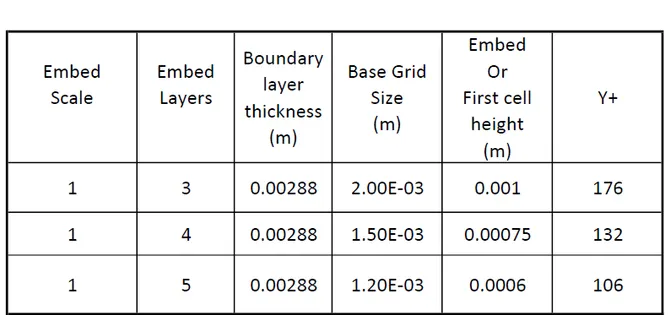
Summerzing all values:
Important commands use4 in Cygwin for post-processing the output files
The "cd" command is used for changing the directory. Once the command 'Md. is utilized for navigating in the
required directory. The simulation is performed by converging executable file, using a parallel processor (2) by using mpiexec.exe which is mpiexec - n2
The ampersand is used for dumping the output tile into the logfile.
In order to print the last ten lines of the output file MAP command is used
tail -10 logfile.
The output folder contains the files which need to be post-converted by using post_convert_30_msmpi_64 which creates a .vtm group of files that is used for post-processing the results in -Paraview.
Post-processing
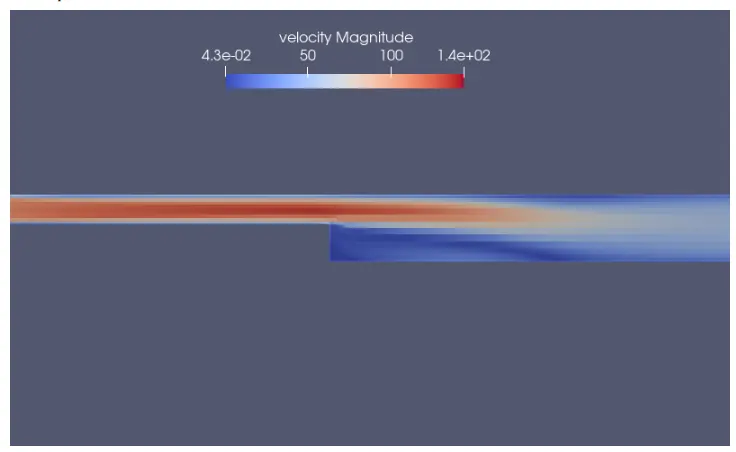
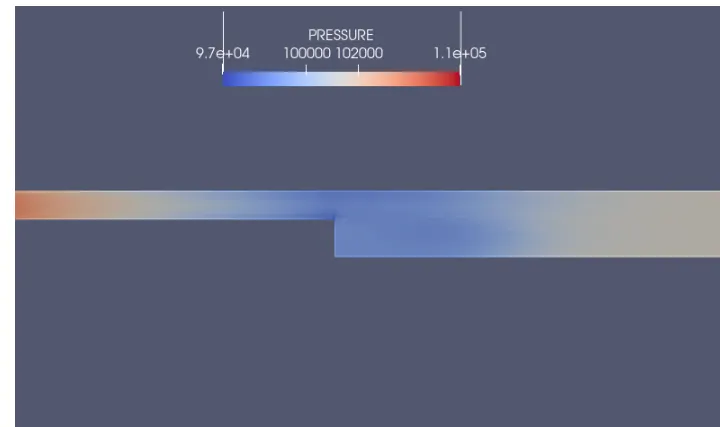
The command used in "Cygwin' generates the "Am' group of files in the output folder, and the Varavievi utilizes those group of files M generates the results. The "'v.. group of files is opened and the slice is made. The y-normal is selected, the 'Triangulate. the option is checked off, and 'Show plane' is checked off. The 'Surface with edges. is selected from the "Paravieve ribbon to visualize the mesh. The velocity magnitude contour plot and pressure contour plot are created and their respective animations were saved.
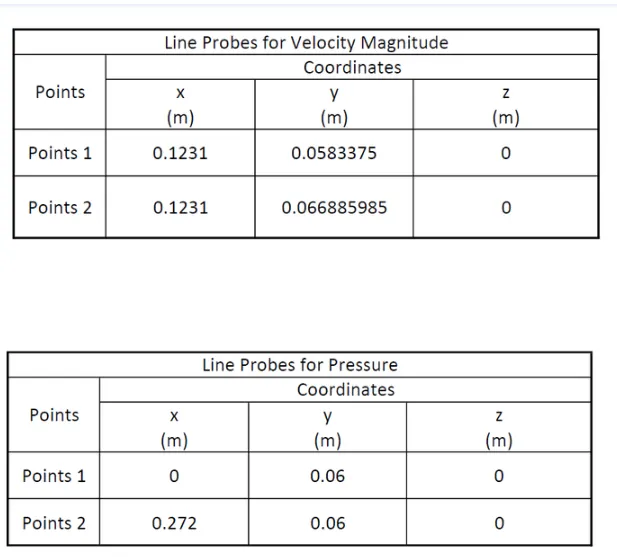
Line probes
Results:
Mesh -1
Mesh -2
Mesh - 3:
Mesh - 1
Contour plots
velocity
pressure:
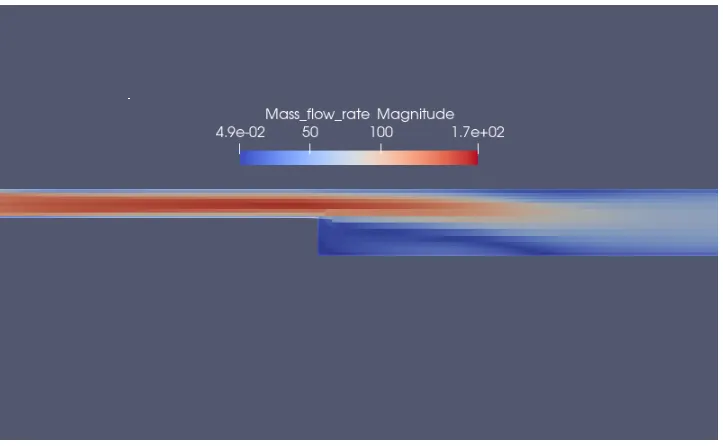
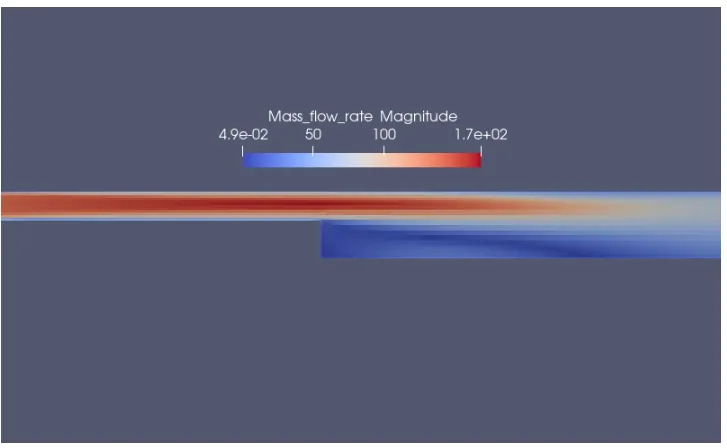
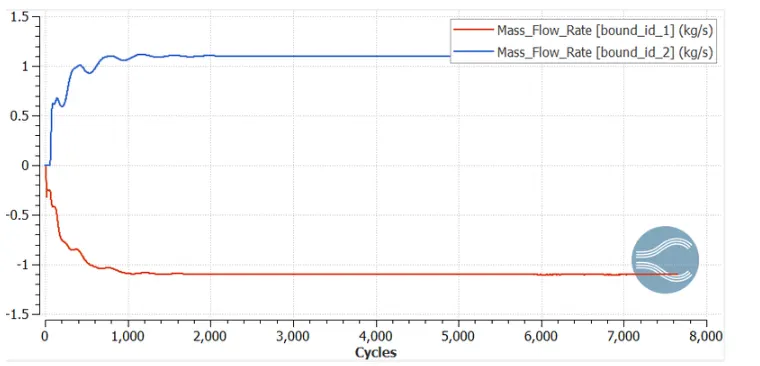
Mass flow rate:
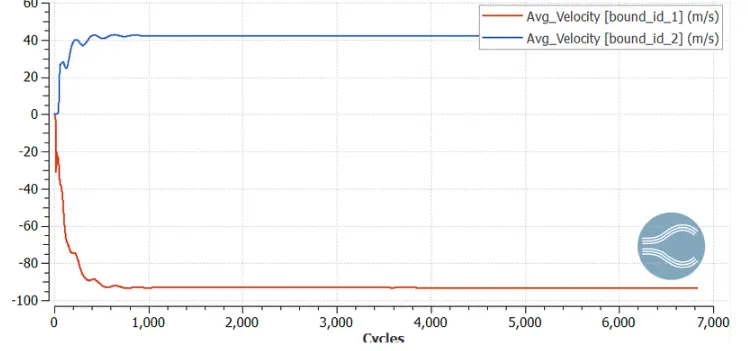
Mesh - 1:
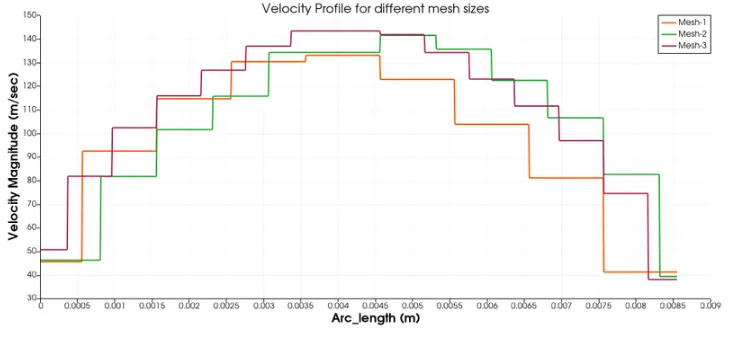
Velocity plot:
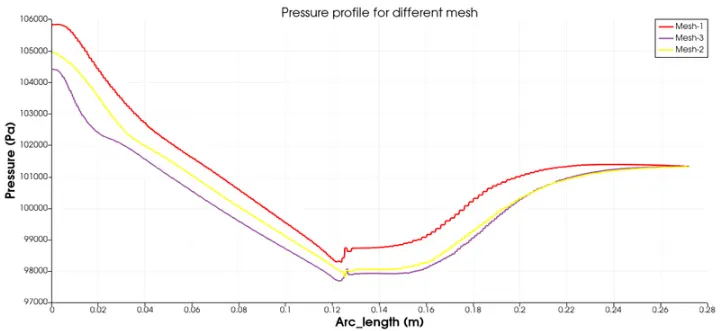
pressure:
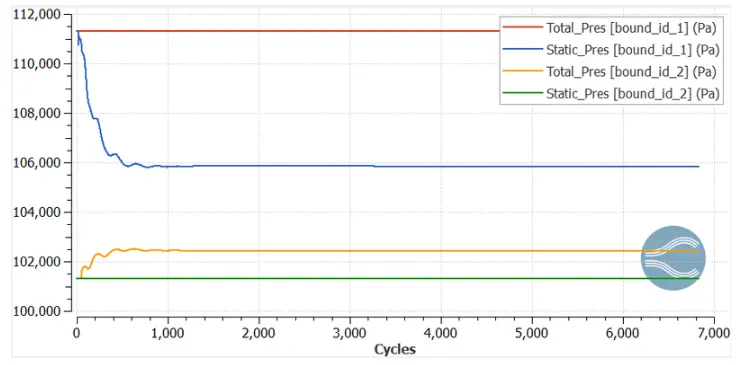
Mass flow rate:
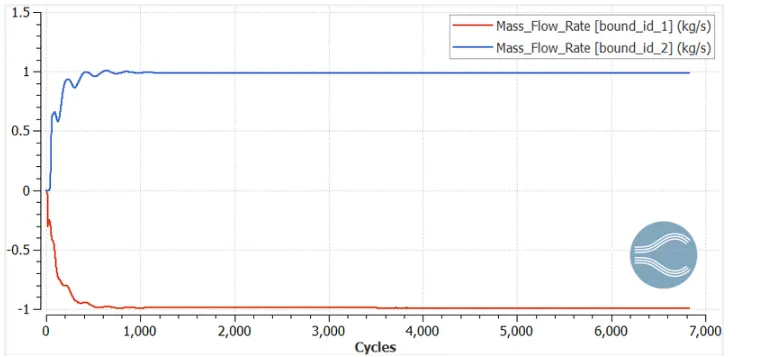
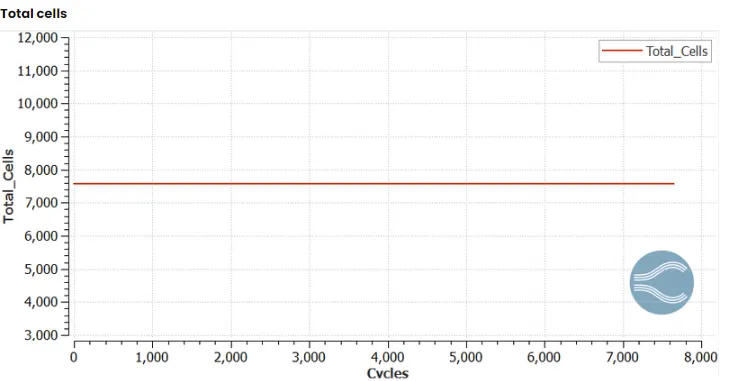
Total cells:
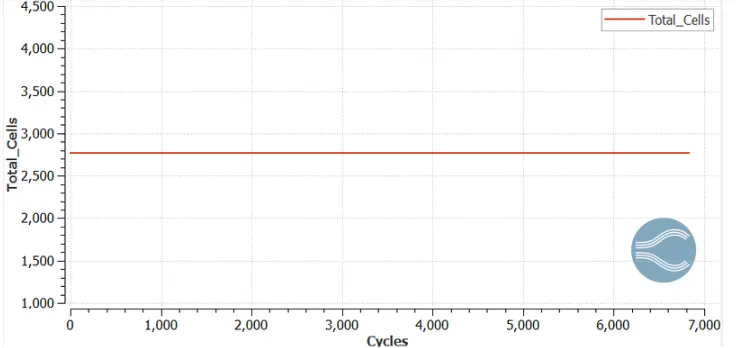
Mesh -2
Velcioty:
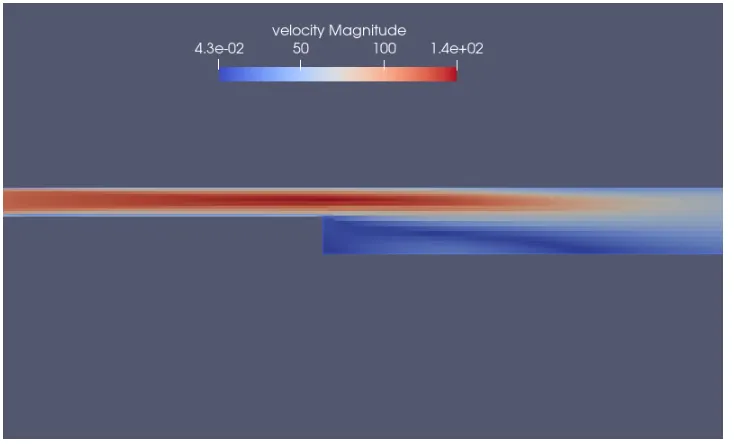
pressure:
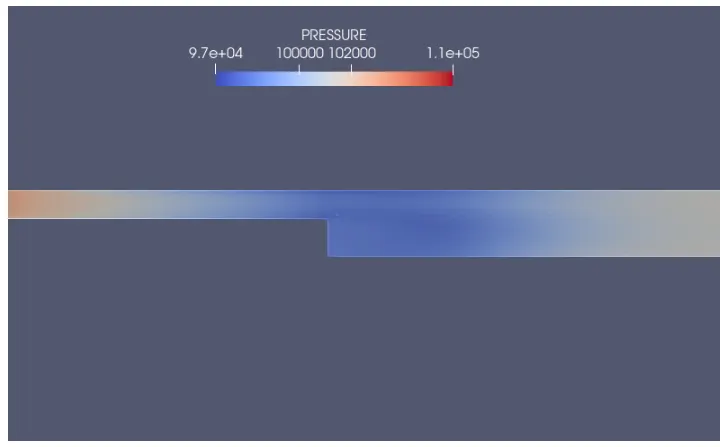
Mass flow rate:
Mesh - 3:
velocity plot:
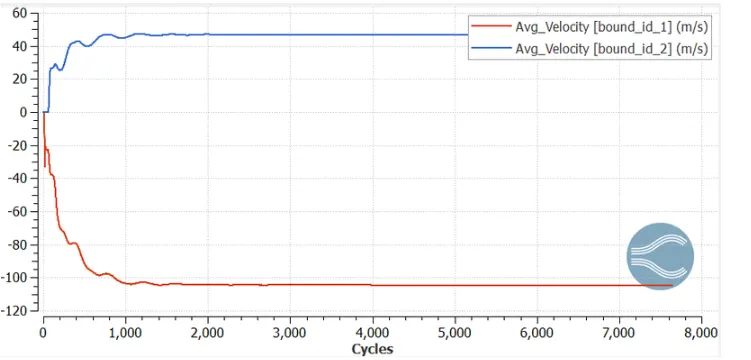
Pressure plot:
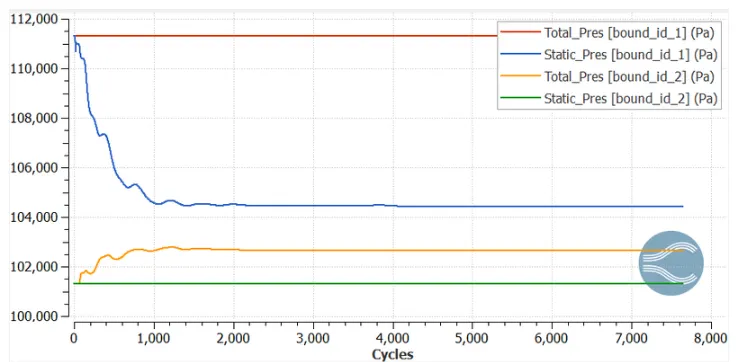
Mass flow rate:
Total cells:
Velocity plot at different sizes:
pressure plots at different sizes:
separate region
Mesh -3