Week 3.2 - 2R Robotic Arm Challenge
2R Robotic Arm Challenge
Aim:
To Write a program in Matlab to simulate the forward kinematics of a 2R Robotic Arm
Introduction:
MATLAB® combines a desktop environment tuned for iterative analysis and design processes with a programming language that expresses matrix and array mathematics directly. It includes the Live Editor for creating scripts that combine code, output, and formatted text in an executable notebook.
A robotic arm is a type of mechanical arm, usually programmable, with similar functions to a human arm; the arm may be the sum total of the mechanism or may be part of a more complex robot. The links of such a manipulator are connected by joints allowing either rotational motion (such as in an articulated robot) or translational (linear) displacement. The links of the manipulator can be considered to form a kinematic chain. The terminus of the kinematic chain of the manipulator is called the end effector and it is analogous to the human hand.
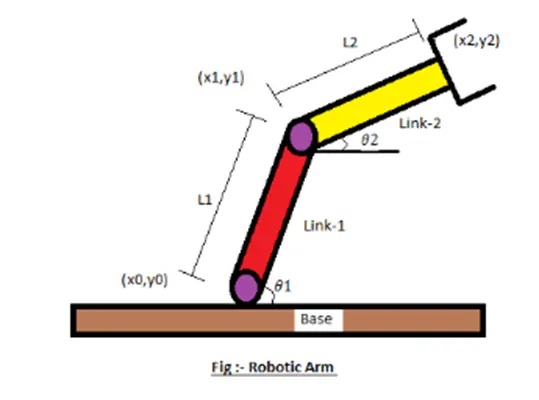
- Let, l1 & l2 be length of the link -1 & link-2 respectively.
- Let, theta 1 > be the angle formed by link-1 with horizontal.
- Let, theta 2 > be the angle formed by link-2 with horizontal.
- Let, the starting and end co-ordinates of link - 1 to be (x0, y0) and (x1, y1).
- Let, the starting and end co-ordinates of link - 2 to be (x1, y1) and (x2, y2).
Code Explanation:
- Used a programming language online Matlab
- Starting the program by using commands
- Providing an input variable like predetermining the length/values of the robotic arms.
- Adding the Cr (compression ratio) value as a specific digit.
- Calculating the position of Link-1. From the fixed Support, the initial value of X and Y for the Link-1 (X0, Y0) and the final value is (X1, Y1)
- Calculating the position of the Link-2. For Link-2 starting point is the Ending point if the Link-1 ie (X1, Y1) and the Ending point is (X2, Y2)
- Providing the values for theta1 and theta2 using the linspace command. where, theta = 0 to 90 degree for 14 values.
- Providing the equation for the x1,y1,x2, and y2 for defining the coordinates of both robotic arms.
- Providing the axis number and plotting all coordinate values.
- All figures are assigned to a variable M_, one at a time using compression ratio.
- Use the pause command to make the plot authentic look.
- Ended the 'for' loop twice.
- using the movie command to combine all the plotted images saved in the M_ file to create a movie.
- Finally, the movie is saved in the .avi format.
MAIN CODE:
%Write a program in Matlab to simulate the forward kinematics of a 2R Robotic Arm

clear all
close all
clc
l1 = 1;%length of arm 1
l2 = 0.5;%length of arm 2
theta1 = linspace(0,90,10);% angle variation for arm 1
theta2 = linspace(0,90,90);%angle variation for arm 2

ct = 1; %initialization of ct to capture animation frames

for i = 1:length(theta1)%for loop for inserting 1st arm angle
    THETA1 = theta1(i);%assigning index value theta1 to THETA1 for every value of i
    for j = 1:length(theta2)% nested for loop for inserting 2nd arm angle
        THETA2 = theta2(j);%assigning index value theta2 to THETA2 for every value of j
        x0 = 0;%initial point of arm 1
        y0 = 0;%initial point of arm 1
        x1 = l1*cosd(THETA1);%end co-ordinate of x of arm 1
        y1 = l2*sind(THETA1);%end co-ordinate of y of arm 1

        x2 = x1 + l2*cosd(THETA2);%end co-ordinate of x of arm 2
        y2 = y1 + l2*sind(THETA2);%end co-ordinate of y of arm 2
        plot([x0 x1],[y0 y1],[x1 x2],[y1 y2],'LineWidth',3)%plotting
        axis([-0.1,1.5,0,1.5])%difining axis
        pause(0.01)%pause for 0.01 sec after each iteration
        m(ct)=getframe(gcf);%geting each frame if iteration for creating animation
        ct = ct+1;%updating frame count
    end%end of nested loop
end%end of for loop
%creating animation
movie(m)
videofile = VideoWriter('Robotic_arm.avi','Uncompressed AVI');
open(videofile)
writeVideo(videofile,m)
close(videofile)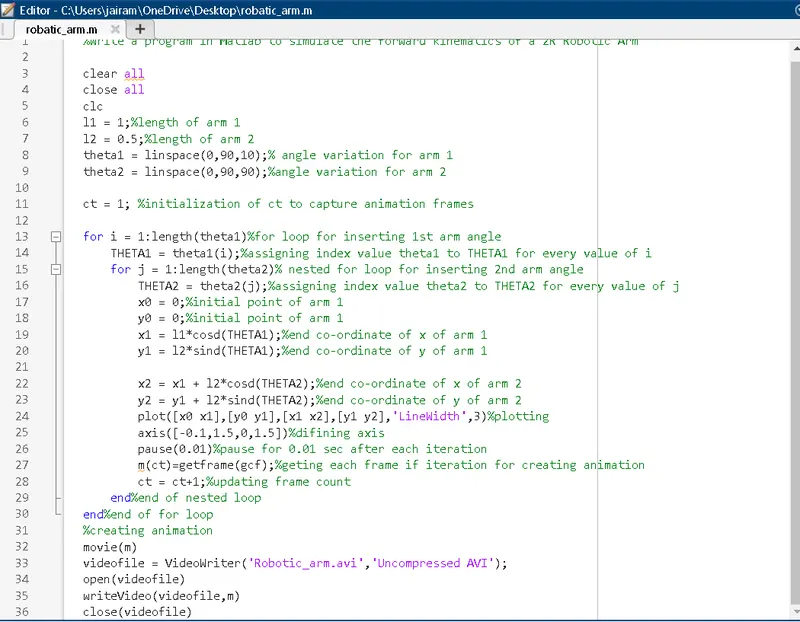
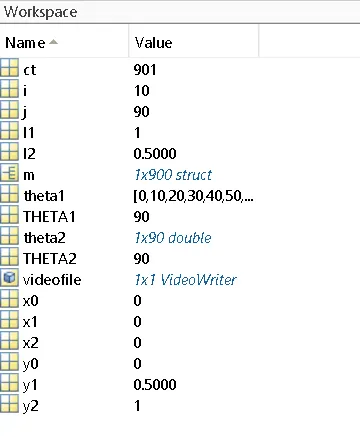
OUTPUT:
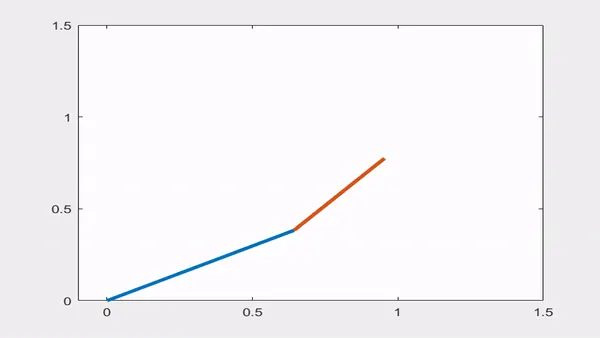
RESULT:
hence the animation forward motion of the robotic arm I get it.
CONCLUSION:
I learn the new loop which is using two loops at a time in the same program and the creation of the animation I have done in the given program.