Week 3.2 - 2R Robotic Arm Challenge
AIM:
Program to run animation of 2R Robotic Arm Challenge
SOFTWARE USED:
MatLab
PROGRAM CODE:1(WITH ERROR):
%Program to run animation of 2R Robotic Arm Challenge
clear all; % clear all variables in workspace
close all;% close all plots
clc;%clear command window
%Inputs
l1=1;%length of arm1/link1 set to 1m
l2=0.5;%length of arm2/link2 set to 0.5m
ct=1 %Counter variable ct intialized to 1
theta1=linspace(0,90,10); %Initialize theta1 to 0 to 90 degrees with 10 degree gap
theta2=linspace(0,90,10); %Initialize theta2 to 0 to 90 degrees with 10 degree gap

for i=1:length(theta1) %For loop for i varying from 1 to length of theta1 i.e 90
    THETA1=theta1(i) %assign value of theta(i) to THETA1,initially theta(1)=0 will be assigned to THETA1
    for j=1:length(theta2) %For loop for j varying from 1 to length of theta1 i.e 90
    THETA2=theta2(j) %assign value of theta(i) to THETA1,initially theta(1)=0 will be assigned to THETA1

    %Coordinates
    x0=0; % Initialize first x coordinate of first link/arm
    y0=0; % Initialize first y coordinate of first link/arm
    x1=l1*cosd(THETA1); % Initialize second x coordinate of first link/arm, this will first coordinate of second link/arm
    y1=l1*sind(THETA1); % Initialize second x coordinate of first link/arm, this will first coordinate of second link/arm

    x2=x1+l2*cosd(THETA2); % Initialize second x coordinate of second link/arm
    y2=y1+l2*sind(THETA2); % Initialize second y coordinate of second link/arm

    %Plotting

    plot([x0 x1],[y0 y1],[x1 x2],[y1 y2],'linewidth',3) %Plotting all 3 points and giving linewidth of 3 pts
    axis([-0.1 1.5 0 1.5]) %Setting axis to new position for more visibility
    pause(0.03) % pause each frames for 0.03 seconds
    xlabel('X position of 2R Robotic Arm')
    ylabel('Y position of 2R Robotic Arm')
    title('Animation of 2R Robotic Arm')
    legend('Prepared by Harikrishnan.B')
    ct=ct+1 %increase counter value to next after each iteration
    M(ct)=getframe(gcf) %Initialiszing M variable to capture each frames by getframe() command with gcf being figure

    end
end
movie(M) %Creating movie of M variable
videofile=VideoWriter('forward_kinematics_challenge.avi','Uncompressed AVI')%Initializing a new variable as videofile and write name and type of video
open(videofile) %opening vidoefile
write(videofile,M) %Writing contents of M to videofile
close(videofile)%Close videofile
PROGRAM WITH ERROR
%Program to run animation of 2R Robotic Arm Challenge
clear all; % clear all variables in workspace
close all;% close all plots
clc;%clear command window
%Inputs
l1=1;%length of arm1/link1 set to 1m
l2=0.5;%length of arm2/link2 set to 0.5m
ct=1 %Counter variable ct intialized to 1
theta1=linspace(0,90,10); %Initialize theta1 to 0 to 90 degrees with 10 degree gap
theta2=linspace(0,90,10); %Initialize theta2 to 0 to 90 degrees with 10 degree gap
for i=1:length(theta1) %For loop for i varying from 1 to length of theta1 i.e 90
THETA1=theta1(i) %assign value of theta(i) to THETA1,initially theta(1)=0 will be assigned to THETA1
for j=1:length(theta2) %For loop for j varying from 1 to length of theta1 i.e 90
THETA2=theta2(j) %assign value of theta(i) to THETA1,initially theta(1)=0 will be assigned to THETA1
%Coordinates
x0=0; % Initialize first x coordinate of first link/arm
y0=0; % Initialize first y coordinate of first link/arm
x1=l1*cosd(THETA1); % Initialize second x coordinate of first link/arm, this will first coordinate of second link/arm
y1=l1*sind(THETA1); % Initialize second x coordinate of first link/arm, this will first coordinate of second link/arm
x2=x1+l2*cosd(THETA2); % Initialize second x coordinate of second link/arm
y2=y1+l2*sind(THETA2); % Initialize second y coordinate of second link/arm
%Plotting
plot([x0 x1],[y0 y1],[x1 x2],[y1 y2],'linewidth',3) %Plotting all 3 points and giving linewidth of 3 pts
axis([-0.1 1.5 0 1.5]) %Setting axis to new position for more visibility
pause(0.03) % pause each frames for 0.03 seconds
xlabel('X position of 2R Robotic Arm')
ylabel('Y position of 2R Robotic Arm')
title('Animation of 2R Robotic Arm')
legend('Prepared by Harikrishnan.B')
ct=ct+1 %increase counter value to next after each iteration
M(ct)=getframe(gcf) %Initialiszing M variable to capture each frames by getframe() command with gcf being figure
end
end
movie(M) %Creating movie of M variable
videofile=VideoWriter('forward_kinematics_challenge.avi','Uncompressed AVI')%Initializing a new variable as videofile and write name and type of video
open(videofile) %opening vidoefile
write(videofile,M) %Writing contents of M to videofile
close(videofile)%Close videofile
OUTPUT (ONLY ERRORS):
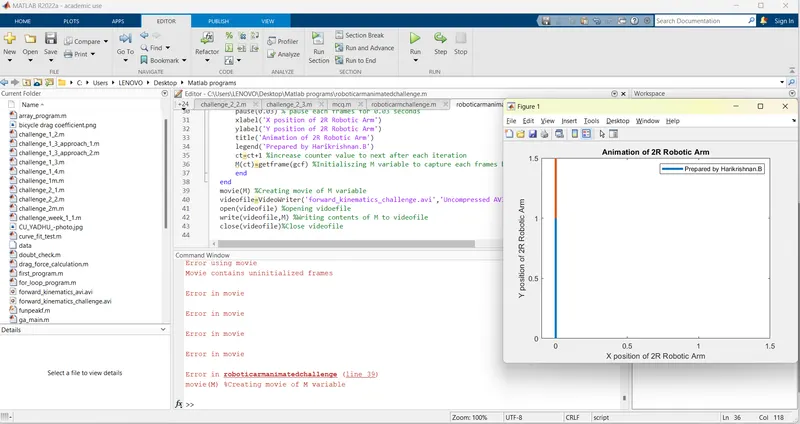
Error using movie
Movie contains uninitialized frames % ERROR OCCURRED SINCE COUNTER 1 WAS NOT CAPTURED AND COUNTER 2 WAS INITIALIZED BEFORE CT1.
Error in movie
Error in movie
Error in movie
Error in movie
Error in roboticarmanimatedchallenge (line 39) %SO MOVIE WAS NOT CREATED SINCE ERRORS OCCURED
movie(M) %Creating movie of M variable S
OVERCOME MEASURES:
Initially, ct=ct+1 was set before M(ct)=getframe(gcf). This created an error since counter variable ct was incremented before frame was copied to M(ct). This error is corrected by setting ct=ct+1 after M(ct)=getframe(gcf)
PROGRAM CODE:2(WITH ERROR):
%Program to run animation of 2R Robotic Arm Challenge
clear all; % clear all variables in workspace
close all;% close all plots
clc;%clear command window
%Inputs
l1=1;%length of arm1/link1 set to 1m
l2=0.5;%length of arm2/link2 set to 0.5m
ct=1 %Counter variable ct intialized to 1
theta1=linspace(0,90,10); %Initialize theta1 to 0 to 90 degrees with 10 degree gap
theta2=linspace(0,90,10); %Initialize theta2 to 0 to 90 degrees with 10 degree gap

for i=1:length(theta1) %For loop for i varying from 1 to length of theta1 i.e 90
    THETA1=theta1(i) %assign value of theta(i) to THETA1,initially theta(1)=0 will be assigned to THETA1
    for j=1:length(theta2) %For loop for j varying from 1 to length of theta1 i.e 90
    THETA2=theta2(j) %assign value of theta(i) to THETA1,initially theta(1)=0 will be assigned to THETA1

    %Coordinates
    x0=0; % Initialize first x coordinate of first link/arm
    y0=0; % Initialize first y coordinate of first link/arm
    x1=l1*cosd(THETA1); % Initialize second x coordinate of first link/arm, this will first coordinate of second link/arm
    y1=l1*sind(THETA1); % Initialize second x coordinate of first link/arm, this will first coordinate of second link/arm

    x2=x1+l2*cosd(THETA2); % Initialize second x coordinate of second link/arm
    y2=y1+l2*sind(THETA2); % Initialize second y coordinate of second link/arm

    %Plotting

    plot([x0 x1],[y0 y1],[x1 x2],[y1 y2],'linewidth',3) %Plotting all 3 points and giving linewidth of 3 pts
    axis([-0.1 1.5 0 1.5]) %Setting axis to new position for more visibility
    pause(0.03) % pause each frames for 0.03 seconds
    xlabel('X position of 2R Robotic Arm')
    ylabel('Y position of 2R Robotic Arm')
    title('Animation of 2R Robotic Arm')
    legend('Prepared by Harikrishnan.B')
    M(ct)=getframe(gcf) %Initialiszing M variable to capture each frames by getframe() command with gcf being figure
    ct=ct+1 %increase counter value to next after each iteration
    end
end
movie(M) %Creating movie of M variable
videofile=VideoWriter('forward_kinematics_challenge.avi','Uncompressed AVI')%Initializing a new variable as videofile and write name and type of video
open(videofile) %opening vidoefile
write(videofile,M) %Writing contents of M to videofile
close(videofile)%Close videofile
OUTPUT (ONLY ERRORS);
>>
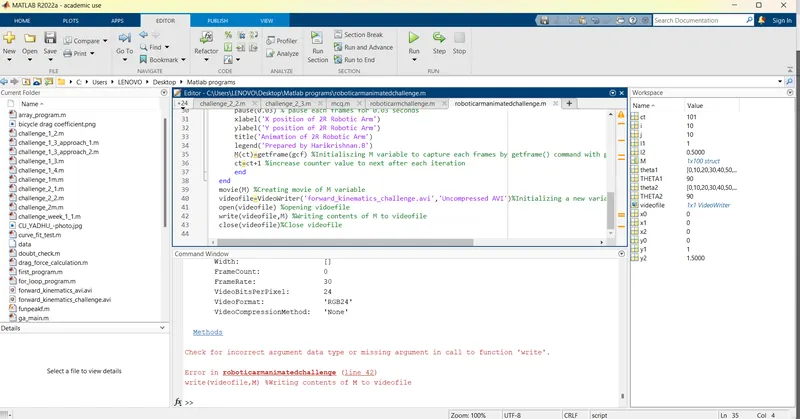
Check for incorrect argument data type or missing argument in call to function 'write'.video
Error in roboticarmanimatedchallenge (line 42) % ERROR OCCURRED SINCE WRITE IS WRONG COMMAND, SHOULD BE REPLACED WITH writeVideo(videofile,M)
write(videofile,M) %Writing contents of M to videofile
>>
OUTCOME MEASURES
Error occured since 'write' is wrong command. It should be replaced with writeVideo().
PROGRAM CODE(CORRECTED):
%Program to run animation of 2R Robotic Arm Challenge
% clear all variables in workspace
clear all;
close all;% close all plots
clc;%clear command window
%Inputs
l1=1;%length of arm1/link1 set to 1m
l2=0.5;%length of arm2/link2 set to 0.5m
ct=1 %Counter variable ct intialized to 1
theta1=linspace(0,90,10); %Initialize theta1 to 0 to 90 degrees with 10 degree gap
theta2=linspace(0,90,10); %Initialize theta2 to 0 to 90 degrees with 10 degree gap
for i=1:length(theta1) %For loop for i varying from 1 to length of theta1 i.e 90
THETA1=theta1(i) %assign value of theta(i) to THETA1,initially theta(1)=0 will be assigned to THETA1
for j=1:length(theta2) %For loop for j varying from 1 to length of theta1 i.e 90
THETA2=theta2(j) %assign value of theta(i) to THETA1,initially theta(1)=0 will be assigned to THETA1
%Coordinates
x0=0; % Initialize first x coordinate of first link/arm
y0=0; % Initialize first y coordinate of first link/arm
x1=l1*cosd(THETA1); % Initialize second x coordinate of first link/arm, this will first coordinate of second link/arm
y1=l1*sind(THETA1); % Initialize second x coordinate of first link/arm, this will first coordinate of second link/arm
x2=x1+l2*cosd(THETA2); % Initialize second x coordinate of second link/arm
y2=y1+l2*sind(THETA2); % Initialize second y coordinate of second link/arm
%Plotting
plot([x0 x1],[y0 y1],[x1 x2],[y1 y2],'linewidth',3) %Plotting all 3 points and giving linewidth of 3 pts
axis([-0.1 1.5 0 1.5]) %Setting axis to new position for more visibility
pause(0.03) % pause each frames for 0.03 seconds
xlabel('X position of 2R Robotic Arm')
ylabel('Y position of 2R Robotic Arm')
title('Animation of 2R Robotic Arm')
legend('Prepared by Harikrishnan.B')
M(ct)=getframe(gcf) %Initialiszing M variable to capture each frames by getframe() command with gcf being figure
ct=ct+1 %increase counter value to next after each iteration
end
end
movie(M) %Creating movie of M variable
videofile=VideoWriter('forward_kinematics_challenge.avi','Uncompressed AVI')%Initializing a new variable as videofile and write name and type of video
open(videofile) %opening vidoefile
writeVideo(videofile,M) %Writing contents of M to videofile
close(videofile)%Close videofile
PROGRAM WITH ERROR
%Program to run animation of 2R Robotic Arm Challenge
clear all; % clear all variables in workspace
close all;% close all plots
clc;%clear command window
%Inputs
l1=1;%length of arm1/link1 set to 1m
l2=0.5;%length of arm2/link2 set to 0.5m
ct=1 %Counter variable ct intialized to 1
theta1=linspace(0,90,10); %Initialize theta1 to 0 to 90 degrees with 10 degree gap
theta2=linspace(0,90,10); %Initialize theta2 to 0 to 90 degrees with 10 degree gap
for i=1:length(theta1) %For loop for i varying from 1 to length of theta1 i.e 90
THETA1=theta1(i) %assign value of theta(i) to THETA1,initially theta(1)=0 will be assigned to THETA1
for j=1:length(theta2) %For loop for j varying from 1 to length of theta1 i.e 90
THETA2=theta2(j) %assign value of theta(i) to THETA1,initially theta(1)=0 will be assigned to THETA1
%Coordinates
x0=0; % Initialize first x coordinate of first link/arm
y0=0; % Initialize first y coordinate of first link/arm
x1=l1*cosd(THETA1); % Initialize second x coordinate of first link/arm, this will first coordinate of second link/arm
y1=l1*sind(THETA1); % Initialize second x coordinate of first link/arm, this will first coordinate of second link/arm
x2=x1+l2*cosd(THETA2); % Initialize second x coordinate of second link/arm
y2=y1+l2*sind(THETA2); % Initialize second y coordinate of second link/arm
%Plotting
plot([x0 x1],[y0 y1],[x1 x2],[y1 y2],'linewidth',3) %Plotting all 3 points and giving linewidth of 3 pts
axis([-0.1 1.5 0 1.5]) %Setting axis to new position for more visibility
pause(0.03) % pause each frames for 0.03 seconds
xlabel('X position of 2R Robotic Arm')
ylabel('Y position of 2R Robotic Arm')
title('Animation of 2R Robotic Arm')
legend('Prepared by Harikrishnan.B')
M(ct)=getframe(gcf) %Initialiszing M variable to capture each frames by getframe() command with gcf being figure
ct=ct+1 %increase counter value to next after each iteration
end
end
movie(M) %Creating movie of M variable
videofile=VideoWriter('forward_kinematics_challenge.avi','Uncompressed AVI')%Initializing a new variable as videofile and write name and type of video
open(videofile) %opening vidoefile
write(videofile,M) %Writing contents of M to videofile
close(videofile)%Close videofile
PROGRAM WITHOUT ERROR
%Program to run animation of 2R Robotic Arm Challenge
clear all; % clear all variables in workspace
close all;% close all plots
clc;%clear command window
%Inputs
l1=1;%length of arm1/link1 set to 1m
l2=0.5;%length of arm2/link2 set to 0.5m
ct=1 %Counter variable ct intialized to 1
theta1=linspace(0,90,10); %Initialize theta1 to 0 to 90 degrees with 10 degree gap
theta2=linspace(0,90,10); %Initialize theta2 to 0 to 90 degrees with 10 degree gap

for i=1:length(theta1) %For loop for i varying from 1 to length of theta1 i.e 90
    THETA1=theta1(i) %assign value of theta(i) to THETA1,initially theta(1)=0 will be assigned to THETA1
    for j=1:length(theta2) %For loop for j varying from 1 to length of theta1 i.e 90
    THETA2=theta2(j) %assign value of theta(i) to THETA1,initially theta(1)=0 will be assigned to THETA1

    %Coordinates
    x0=0; % Initialize first x coordinate of first link/arm
    y0=0; % Initialize first y coordinate of first link/arm
    x1=l1*cosd(THETA1); % Initialize second x coordinate of first link/arm, this will first coordinate of second link/arm
    y1=l1*sind(THETA1); % Initialize second x coordinate of first link/arm, this will first coordinate of second link/arm

    x2=x1+l2*cosd(THETA2); % Initialize second x coordinate of second link/arm
    y2=y1+l2*sind(THETA2); % Initialize second y coordinate of second link/arm

    %Plotting

    plot([x0 x1],[y0 y1],[x1 x2],[y1 y2],'linewidth',3) %Plotting all 3 points and giving linewidth of 3 pts
    axis([-0.1 1.5 0 1.5]) %Setting axis to new position for more visibility
    pause(0.03) % pause each frames for 0.03 seconds
    xlabel('X position of 2R Robotic Arm')
    ylabel('Y position of 2R Robotic Arm')
    title('Animation of 2R Robotic Arm')
    legend('Prepared by Harikrishnan.B')
    M(ct)=getframe(gcf) %Initialiszing M variable to capture each frames by getframe() command with gcf being figure
    ct=ct+1 %increase counter value to next after each iteration
    end
end
movie(M) %Creating movie of M variable
videofile=VideoWriter('forward_kinematics_challenge.avi','Uncompressed AVI')%Initializing a new variable as videofile and write name and type of video
open(videofile) %opening vidoefile
writeVideo(videofile,M) %Writing contents of M to videofile
close(videofile)%Close videofile
SYNTAX OF CODE:
%Inputs
l1=1;%length of arm1/link1 set to 1m
l2=0.5;%length of arm2/link2 set to 0.5m
ct=1 %Counter variable ct intialized to 1
theta1=linspace(0,90,10); %Initialize theta1 to 0 to 90 degrees with 10 degree gap
theta2=linspace(0,90,10); %Initialize theta2 to 0 to 90 degrees with 10 degree gap
for i=1:length(theta1) %For loop for i varying from 1 to length of theta1 i.e 90
THETA1=theta1(i) %assign value of theta(i) to THETA1,initially theta(1)=0 will be assigned to THETA1
for j=1:length(theta2) %For loop for j varying from 1 to length of theta1 i.e 90
THETA2=theta2(j) %assign value of theta(i) to THETA1,initially theta(1)=0 will be assigned to THETA1
%Coordinates
x0=0; % Initialize first x coordinate of first link/arm
y0=0; % Initialize first y coordinate of first link/arm
x1=l1*cosd(THETA1); % Initialize second x coordinate of first link/arm, this will first coordinate of second link/arm
y1=l1*sind(THETA1); % Initialize second x coordinate of first link/arm, this will first coordinate of second link/arm
x2=x1+l2*cosd(THETA2); % Initialize second x coordinate of second link/arm
y2=y1+l2*sind(THETA2); % Initialize second y coordinate of second link/arm
%Plotting
plot([x0 x1],[y0 y1],[x1 x2],[y1 y2],'linewidth',3) %Plotting all 3 points and giving linewidth of 3 pts
axis([-0.1 1.5 0 1.5]) %Setting axis to new position for more visibility
pause(0.03) % pause each frames for 0.03 seconds
xlabel('X position of 2R Robotic Arm')
ylabel('Y position of 2R Robotic Arm')
title('Animation of 2R Robotic Arm')
legend('Prepared by Harikrishnan.B')
M(ct)=getframe(gcf) %Initialiszing M variable to capture each frames by getframe() command with gcf being figure
ct=ct+1 %increase counter value to next after each iteration
end
end
movie(M) %Creating movie of M variable
videofile=VideoWriter('forward_kinematics_challenge.avi','Uncompressed AVI')%Initializing a new variable as videofile and write name and type of video
open(videofile) %opening vidoefile
writeVideo(videofile,M) %Writing contents of M to videofile
close(videofile)%Close videofile
OUTPUT(CORRECTED):
ct =
1
THETA1 =
0
THETA2 =
0
M =
struct with fields:
cdata: [525×700×3 uint8]
colormap: []
ct =
2
THETA2 =
10
M =
1×2 struct array with fields:
cdata
colormap
ct =
3
THETA2 =
20
M =
1×3 struct array with fields:
cdata
colormap
ct =
4
THETA2 =
30
M =
1×4 struct array with fields:
cdata
colormap
ct =
5
THETA2 =
40
M =
1×5 struct array with fields:
cdata
colormap
ct =
6
THETA2 =
50
M =
1×6 struct array with fields:
cdata
colormap
ct =
7
THETA2 =
60
M =
1×7 struct array with fields:
cdata
colormap
ct =
8
THETA2 =
70
M =
1×8 struct array with fields:
cdata
colormap
ct =
9
THETA2 =
80
M =
1×9 struct array with fields:
cdata
colormap
ct =
10
THETA2 =
90
M =
1×10 struct array with fields:
cdata
colormap
ct =
11
THETA1 =
10
THETA2 =
0
M =
1×11 struct array with fields:
cdata
colormap
ct =
12
THETA2 =
10
M =
1×12 struct array with fields:
cdata
colormap
ct =
13
THETA2 =
20
M =
1×13 struct array with fields:
cdata
colormap
ct =
14
THETA2 =
30
M =
1×14 struct array with fields:
cdata
colormap
ct =
15
THETA2 =
40
M =
1×15 struct array with fields:
cdata
colormap
ct =
16
THETA2 =
50
M =
1×16 struct array with fields:
cdata
colormap
ct =
17
THETA2 =
60
M =
1×17 struct array with fields:
cdata
colormap
ct =
18
THETA2 =
70
M =
1×18 struct array with fields:
cdata
colormap
ct =
19
THETA2 =
80
M =
1×19 struct array with fields:
cdata
colormap
ct =
20
THETA2 =
90
M =
1×20 struct array with fields:
cdata
colormap
ct =
21
THETA1 =
20
THETA2 =
0
M =
1×21 struct array with fields:
cdata
colormap
ct =
22
THETA2 =
10
M =
1×22 struct array with fields:
cdata
colormap
ct =
23
THETA2 =
20
M =
1×23 struct array with fields:
cdata
colormap
ct =
24
THETA2 =
30
M =
1×24 struct array with fields:
cdata
colormap
ct =
25
THETA2 =
40
M =
1×25 struct array with fields:
cdata
colormap
ct =
26
THETA2 =
50
M =
1×26 struct array with fields:
cdata
colormap
ct =
27
THETA2 =
60
M =
1×27 struct array with fields:
cdata
colormap
ct =
28
THETA2 =
70
M =
1×28 struct array with fields:
cdata
colormap
ct =
29
THETA2 =
80
M =
1×29 struct array with fields:
cdata
colormap
ct =
30
THETA2 =
90
M =
1×30 struct array with fields:
cdata
colormap
ct =
31
THETA1 =
30
THETA2 =
0
M =
1×31 struct array with fields:
cdata
colormap
ct =
32
THETA2 =
10
M =
1×32 struct array with fields:
cdata
colormap
ct =
33
THETA2 =
20
M =
1×33 struct array with fields:
cdata
colormap
ct =
34
THETA2 =
30
M =
1×34 struct array with fields:
cdata
colormap
ct =
35
THETA2 =
40
M =
1×35 struct array with fields:
cdata
colormap
ct =
36
THETA2 =
50
M =
1×36 struct array with fields:
cdata
colormap
ct =
37
THETA2 =
60
M =
1×37 struct array with fields:
cdata
colormap
ct =
38
THETA2 =
70
M =
1×38 struct array with fields:
cdata
colormap
ct =
39
THETA2 =
80
M =
1×39 struct array with fields:
cdata
colormap
ct =
40
THETA2 =
90
M =
1×40 struct array with fields:
cdata
colormap
ct =
41
THETA1 =
40
THETA2 =
0
M =
1×41 struct array with fields:
cdata
colormap
ct =
42
THETA2 =
10
M =
1×42 struct array with fields:
cdata
colormap
ct =
43
THETA2 =
20
M =
1×43 struct array with fields:
cdata
colormap
ct =
44
THETA2 =
30
M =
1×44 struct array with fields:
cdata
colormap
ct =
45
THETA2 =
40
M =
1×45 struct array with fields:
cdata
colormap
ct =
46
THETA2 =
50
M =
1×46 struct array with fields:
cdata
colormap
ct =
47
THETA2 =
60
M =
1×47 struct array with fields:
cdata
colormap
ct =
48
THETA2 =
70
M =
1×48 struct array with fields:
cdata
colormap
ct =
49
THETA2 =
80
M =
1×49 struct array with fields:
cdata
colormap
ct =
50
THETA2 =
90
M =
1×50 struct array with fields:
cdata
colormap
ct =
51
THETA1 =
50
THETA2 =
0
M =
1×51 struct array with fields:
cdata
colormap
ct =
52
THETA2 =
10
M =
1×52 struct array with fields:
cdata
colormap
ct =
53
THETA2 =
20
M =
1×53 struct array with fields:
cdata
colormap
ct =
54
THETA2 =
30
M =
1×54 struct array with fields:
cdata
colormap
ct =
55
THETA2 =
40
M =
1×55 struct array with fields:
cdata
colormap
ct =
56
THETA2 =
50
M =
1×56 struct array with fields:
cdata
colormap
ct =
57
THETA2 =
60
M =
1×57 struct array with fields:
cdata
colormap
ct =
58
THETA2 =
70
M =
1×58 struct array with fields:
cdata
colormap
ct =
59
THETA2 =
80
M =
1×59 struct array with fields:
cdata
colormap
ct =
60
THETA2 =
90
M =
1×60 struct array with fields:
cdata
colormap
ct =
61
THETA1 =
60
THETA2 =
0
M =
1×61 struct array with fields:
cdata
colormap
ct =
62
THETA2 =
10
M =
1×62 struct array with fields:
cdata
colormap
ct =
63
THETA2 =
20
M =
1×63 struct array with fields:
cdata
colormap
ct =
64
THETA2 =
30
M =
1×64 struct array with fields:
cdata
colormap
ct =
65
THETA2 =
40
M =
1×65 struct array with fields:
cdata
colormap
ct =
66
THETA2 =
50
M =
1×66 struct array with fields:
cdata
colormap
ct =
67
THETA2 =
60
M =
1×67 struct array with fields:
cdata
colormap
ct =
68
THETA2 =
70
M =
1×68 struct array with fields:
cdata
colormap
ct =
69
THETA2 =
80
M =
1×69 struct array with fields:
cdata
colormap
ct =
70
THETA2 =
90
M =
1×70 struct array with fields:
cdata
colormap
ct =
71
THETA1 =
70
THETA2 =
0
M =
1×71 struct array with fields:
cdata
colormap
ct =
72
THETA2 =
10
M =
1×72 struct array with fields:
cdata
colormap
ct =
73
THETA2 =
20
M =
1×73 struct array with fields:
cdata
colormap
ct =
74
THETA2 =
30
M =
1×74 struct array with fields:
cdata
colormap
ct =
75
THETA2 =
40
M =
1×75 struct array with fields:
cdata
colormap
ct =
76
THETA2 =
50
M =
1×76 struct array with fields:
cdata
colormap
ct =
77
THETA2 =
60
M =
1×77 struct array with fields:
cdata
colormap
ct =
78
THETA2 =
70
M =
1×78 struct array with fields:
cdata
colormap
ct =
79
THETA2 =
80
M =
1×79 struct array with fields:
cdata
colormap
ct =
80
THETA2 =
90
M =
1×80 struct array with fields:
cdata
colormap
ct =
81
THETA1 =
80
THETA2 =
0
M =
1×81 struct array with fields:
cdata
colormap
ct =
82
THETA2 =
10
M =
1×82 struct array with fields:
cdata
colormap
ct =
83
THETA2 =
20
M =
1×83 struct array with fields:
cdata
colormap
ct =
84
THETA2 =
30
M =
1×84 struct array with fields:
cdata
colormap
ct =
85
THETA2 =
40
M =
1×85 struct array with fields:
cdata
colormap
ct =
86
THETA2 =
50
M =
1×86 struct array with fields:
cdata
colormap
ct =
87
THETA2 =
60
M =
1×87 struct array with fields:
cdata
colormap
ct =
88
THETA2 =
70
M =
1×88 struct array with fields:
cdata
colormap
ct =
89
THETA2 =
80
M =
1×89 struct array with fields:
cdata
colormap
ct =
90
THETA2 =
90
M =
1×90 struct array with fields:
cdata
colormap
ct =
91
THETA1 =
90
THETA2 =
0
M =
1×91 struct array with fields:
cdata
colormap
ct =
92
THETA2 =
10
M =
1×92 struct array with fields:
cdata
colormap
ct =
93
THETA2 =
20
M =
1×93 struct array with fields:
cdata
colormap
ct =
94
THETA2 =
30
M =
1×94 struct array with fields:
cdata
colormap
ct =
95
THETA2 =
40
M =
1×95 struct array with fields:
cdata
colormap
ct =
96
THETA2 =
50
M =
1×96 struct array with fields:
cdata
colormap
ct =
97
THETA2 =
60
M =
1×97 struct array with fields:
cdata
colormap
ct =
98
THETA2 =
70
M =
1×98 struct array with fields:
cdata
colormap
ct =
99
THETA2 =
80
M =
1×99 struct array with fields:
cdata
colormap
ct =
100
THETA2 =
90
M =
1×100 struct array with fields:
cdata
colormap
ct =
101
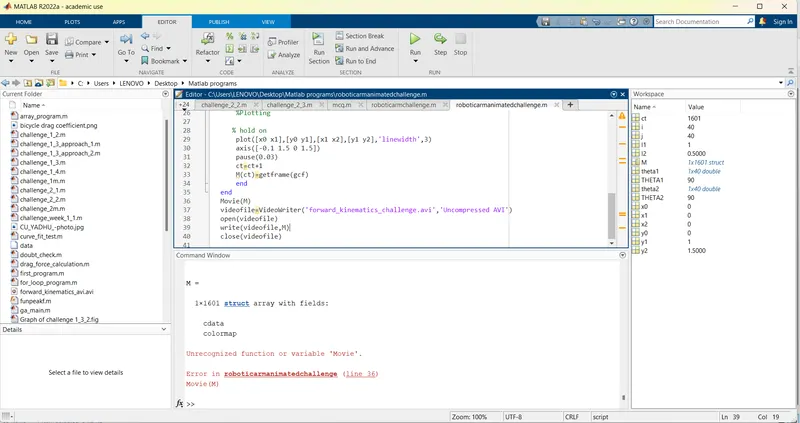
videofile =
VideoWriter
General Properties:
Filename: 'forward_kinematics_challenge.avi'
Path: 'C:\Users\LENOVO\Desktop\Matlab programs'
FileFormat: 'avi'
Duration: 0
Video Properties:
ColorChannels: 3
Height: []
Width: []
FrameCount: 0
FrameRate: 30
VideoBitsPerPixel: 24
VideoFormat: 'RGB24'
VideoCompressionMethod: 'None'
Methods
>>YOUTUBE LINK: https://youtu.be/H1mvMvYhfWs
>>
INFERENCE:
Here in this program I have learned to use and create animation from plots and stiching each to make different frames.