Week 3.2 - 2R Robotic Arm Challenge
Aim:
To write a program in matlab to simulate the forward kinematics of a 2R Robotic Arm.
Objective:
1- write a program to simulate forward kinematics of a 2R Robotic Arm.
2- To create a Movie/Animation from the plots obtained from the program.
% Forward kinematics of a 2R robotic arm manipulator
clear all
close all
clc

% inputs
L1 = 1;
L2 = 0.5;

theta1 = linspace(0,90,10);
theta2 = linspace(0,90,10);

ct = 1;
for i = 1:length(theta1)
   THETA1 = theta1(i);
   for j = 1:length(theta2)
       THETA2 = theta2(j);
          x0 = 0;
          y0 = 0;

          x1 = L1*cosd(THETA1);
          y1 = L1*sind(THETA1);


          x2 = x1+L2*cosd(THETA2);
          y2 = y1+L2*sind(THETA2);

        % plotting
        plot([x0,x1],[y0,y1],[x1,x2],[y1,y2],'LineWidth',2);
        axis([-0.1 1.5 0 1.5]);
        pause(0.03);
        M(ct)=getframe(gcf);
        ct=ct+1;
   end

end
% movie commands
movie(M)
Videofile = VideoWriter ('forward_kinematics.avi','Uncompressed AVI');
open(Videofile)
writeVideo(Videofile,M)
close(Videofile)
Explanation:
for loop:
A loop in general,refers to anything whose start and end points are connected. That is once you begin from the start point a proceed further,you will reach the finish line just to find that it once again guides you to the same point where you started.Proceeding further means that you are repeating your same action again & again.
Nested for loop:
Nested for loops places one for loop inside another for loop. The inner loop is repeated for each iteration of the outer loop.we are going to finish introduce the concept of nested control structures. Nesting is a concept that places one item inside of another.
Code explanation:
1-clear all data
2-clear figure/plot
3-clear all data in the command window
4-enter the input value from the equation
5-assuming the length of link 1
6-assuming the length of link 2
7-angle of traverse of first link
8-angle of traverse of second link
9-initialize the counter command
10-to move the robotic arm continuously using for loop
11-the value i is going to change from 1 to length of θ1
12-the value j is going to change from 1 to length of θ2
13-enter the value of co-ordinates
14-enter the plot value
15-axis command is used for fixing axes - changing x - limits and y - limits
16-pause command used for slow down the output
17-use getframe command to get individual frame and stored in variable M
18-the incrementing the counter value by 1
19-end command is used to end the for loops
20-movie command we can create with the help of individual frame
21-different individual frames a new uncompressed avi file is created using video file command
22-we are opening the videofile using the open command
23-closing the videofile using close command
% Forward kinematics of a 2R robotic arm manipulator
clear all
close all
clc
% inputs
L1 = 1;
L2 = 0.5;
theta1 = linspace(0,90,10);
theta2 = linspace(0,90,10);
ct = 1;
for i = 1:length(theta1)
THETA1 = theta1(i);
for j = 1:length(theta2)
THETA2 = theta2(j);
x0 = 0;
y0 = 0;
x1 = L1*cosd(THETA1);
y1 = L1*sind(THETA1);
x2 = x1+L2*cosd(THETA2);
y2 = y1+L2*sind(THETA2);
% plotting
plot([x0,x1],[y0,y1],[x1,x2],[y1,y2],'LineWidth',2);
axis([-0.1 1.5 0 1.5]);
pause(0.03);
M(ct)=getframe(gcf);
ct=ct+1;
end
end
% movie commands
movie(M)
Videofile = VideoWriter ('forward_kinematics.avi','Uncompressed AVI');
open(Videofile)
writeVideo(Videofile,M)
close(Videofile)
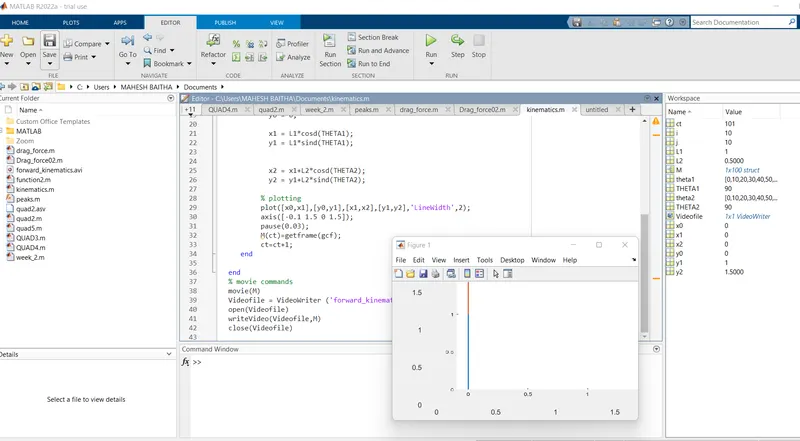
2R Robotics Arm:
The links of the manipulator can be considered to form a kinematic chain. The terminus of the kinematic chain of the manipulator is called end to end effector and it is analogous to the human hamd. A 2R robotic arm represents a robotic arm with two rotations.The robotic arm used for protect the human body injury.