Week 3.2 - 2R Robotic Arm Challenge
2R Robotic Arm Challenge:
Aim:
To write a program in Matlab to simulate the forward kinematics of a 2R Robotic Arm, as shown in the video and upload simulation video on google drive.
Solution:
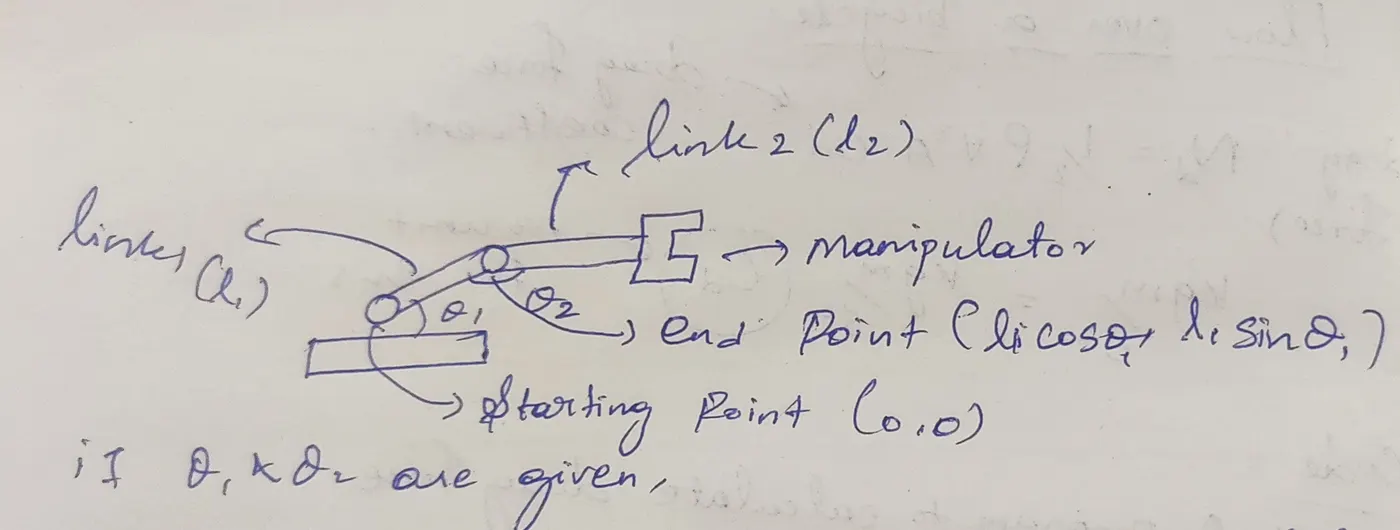
- In this challenge we need to find the position of manipulator.
- Step 1:
- For that we need to calculate position of link 1
- Step 2:
- Then we need to calculate the position of link 2
- Step 3:
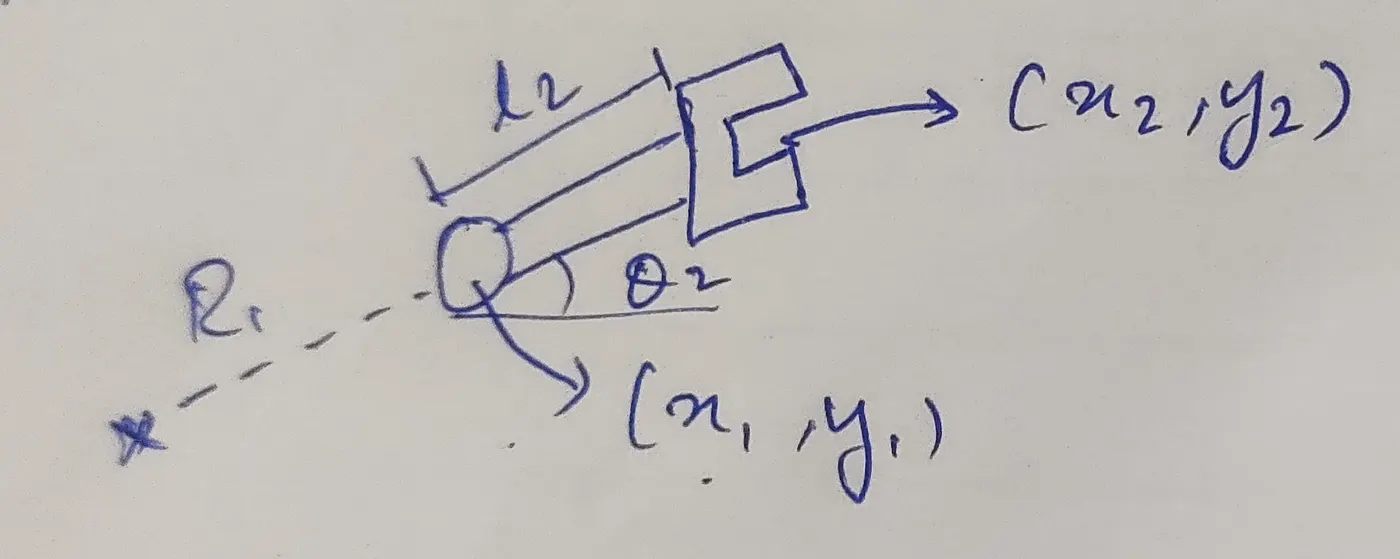
- By above mentioned diagrams we need to define [X0,Y0],[X1,Y1] and [X2,Y2].And execute the given below expression to find the position of the links.
- X0 = 0;Y0 = 0;X1 = l1 * cosd (THETA1);Y1 = l1 * sind (THETA1);X2 = X1 + l2 * cosd (THETA2);Y2 = Y1 + l2 * sind (THETA2);
Pseudocode for 2R Robotic arm challenge:
- First we need to get l1 and l2 input from the user,here l1,l2 is link 1 and link 2.
- Then assign the theta arrays like theta1 and theta2 which is starts from 0 deg and end with 90 deg with 10 intervals by using linspace logic.
- Then assign ct=1 it is used for increment process at the plotting area for simulation.
- Using 'for' operator for assigning theta values at number of intervals with using of Variable called THETA1 and THETA2.
- X0 = 0; Y0 = 0;
- X1 = l1 * cosd (THETA1);
- Y1 = l1 * sind (THETA1);
- X2 = X1 + l2 * cosd (THETA2);
- Y2 = Y1 + l2 * sind (THETA2);
- Then come into plotting area for theta 1 and theta 2 we get the values from for loop and that is converterted into graph with line width of 3mm for that we do the expression in single line that plot ([X0 X1],[Y0 Y1],[X1 X2],[Y1 Y2],LineWidth=3).
- Then assign the coordinate axis for graph starts from -0.1 to 1.5 and 0 to 1.5.
- And end the for loop.
- Then assigning the link coordinates starting from X0,Y0 and X1,Y1.
- Then give the input of our mathematical expression for link movement,That
- Then we slow the motion in the graph video for that we use the pause for 0.3 sec.
- Then by using gcf function we get the current figure that for plotting the graph.
- Then increment that ct values for collecting current figure.
- Then using movie function we create the avi formate of that video of the simulation,during this time we can adjust the speed and interval of the plot movement.
CODE:
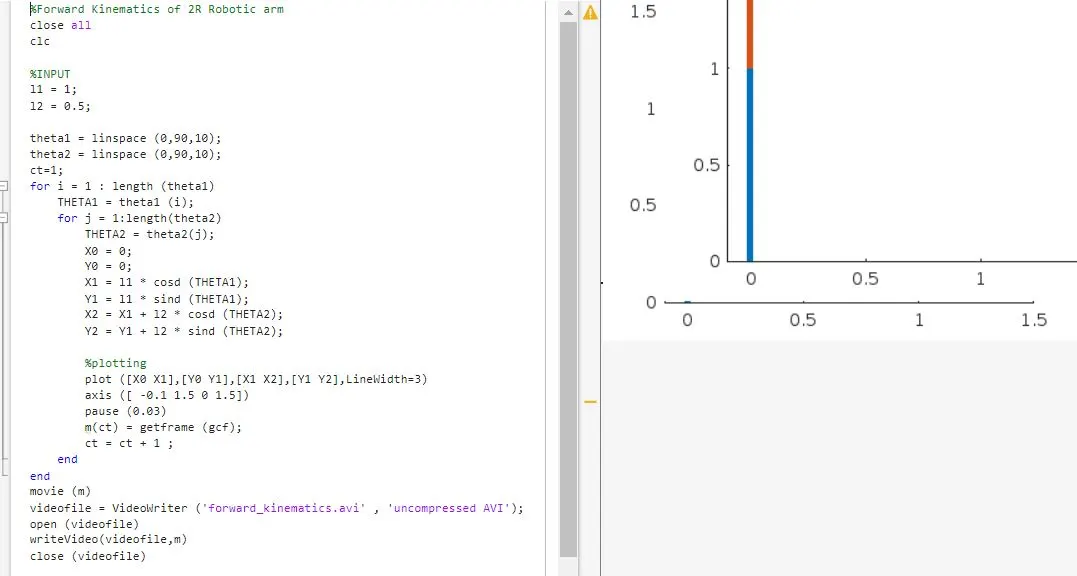
%Forward Kinematics of 2R Robotic arm
close all
clc
%INPUT
l1 = 1;
l2 = 0.5;
theta1 = linspace (0,90,10);
theta2 = linspace (0,90,10);
ct=1;
for i = 1 : length (theta1)
THETA1 = theta1 (i);
for j = 1:length(theta2)
THETA2 = theta2(j);
X0 = 0;
Y0 = 0;
X1 = l1 * cosd (THETA1);
Y1 = l1 * sind (THETA1);
X2 = X1 + l2 * cosd (THETA2);
Y2 = Y1 + l2 * sind (THETA2);
%plotting
plot ([X0 X1],[Y0 Y1],[X1 X2],[Y1 Y2],LineWidth=3)
axis ([ -0.1 1.5 0 1.5])
pause (0.03)
m(ct) = getframe (gcf);
ct = ct + 1 ;
end
end
movie (m)
videofile = VideoWriter ('forward_kinematics.avi' , 'uncompressed AVI');
open (videofile)
writeVideo(videofile,m)
close (videofile)
%Forward Kinematics of 2R Robotic arm
close all
clc
Google drive link for simulation of 2r robotic arm:
Code line by line explaination:
%INPUT
l1 = 1; // Get l1 input
l2 = 0.5; // Get l2 input
theta1 = linspace (0,90,10); //Assign the array theta 1
theta2 = linspace (0,90,10); //Assign the array theta 1
ct=1; //Assign the Ct value as 1.
for i = 1 : length (theta1) //using for loop give i = 1 and assign the theta 1 length
THETA1 = theta1 (i);//Then give the THETA Variable for save the length of theta 1.
for j = 1:length(theta2) //same as assign j = 1 and get the length of theta 2 array.
THETA2 = theta2(j); // Then save the values inside the THETA2 Variable.
X0 = 0;//Then come to mathematical expression first assign x0 =0.
Y0 = 0; //Assign Y0 = 0,These are starting values of the link
X1 = l1 * cosd (THETA1); //Then find the angle of x1 by using this expression,by this we find horizontal angle of theta 1
Y1 = l1 * sind (THETA1);// same as to find the angle of Y1 by using this expression,by this we find Vertical angle of theta 1
X2 = X1 + l2 * cosd (THETA2);//This expression for X2 Angle.
Y2 = Y1 + l2 * sind (THETA2);//This is for Y2 Angle
%plotting
plot ([X0 X1],[Y0 Y1],[X1 X2],[Y1 Y2],LineWidth=3) //This line is used for plot the x0,y0 and x1,y1 links.
axis ([ -0.1 1.5 0 1.5])//This is for making the coordinate axis
pause (0.03)// This is used for slow the speed of video
m(ct) = getframe (gcf);//By this expression we can get the current figure.
ct = ct + 1 ; //By this line we are increament the ct value.
end //This is for end the j for loop
end //This is for end the i for loop
movie (m) //This is used for get the movie output of the plot.
videofile = VideoWriter ('forward_kinematics.avi' , 'uncompressed AVI'); //This is used for save the file formate in .avi
open (videofile) //This is for open the video file
writeVideo(videofile,m) //This for save the file
close (videofile) // This is for close the file
Conclusion:
From this challenge I learned about mechanism of 2R robotic arm and how to program for that using matlab.