Week 3.2 - 2R Robotic Arm Challenge
Here we are going to write down a program in matlab to simulate forward kinematics of 2R robotic arm.
Robotic Arm :
Robotic arm is a mechanical arm which is usually programmable & do have similar functions as a human arm.
The most simplest form of robotic arm do have the components like the base, arms/links & end effector. These are joined together with the joints to move either in linear or rotational motion.
Here attached an image for the better understanding.
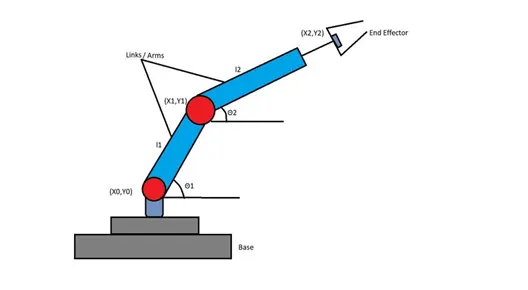
In robotic arm showen in the fig. above we can see that it consists of 2 links/arms & two rotational joints. These links will have the motion according to the programming. & at the end there is maipulator is attached which will perform the require task.
Now, Let us discuss the components of robotic arm in a little bit of detail.
Base : Base is the solid structure on which the robotic arm is rested.
Arm/Link : This component is same as that of human arm. These arms/links are joined together so that the required motion can be achieved.
End Effector : As the name suggests end effector is the end portion of the robotic arm which interacts with the environment & its structure depends on the application of the robot.
Now let us proceed further towards coding.
Here as per our image we do have a robotic arm with two links l1 & l2 & the origin point of link 1 is (X0,Y0) & end point is (X1,Y1). For link 2 origin point is (X1,Y1) & end point is (X2,Y2).
Link 1 makes angle Theta1(Θ1) with respect to horizontal axis & Link 2 makes angle Theta2(Θ2) with respect to horizontal axis.
Now let us consider the values of the length of links as per given below.
l1 = 2
l2 = 1
For values of co-ordinates,
Values of X0 & Y0 will be (0,0) as it is considered as the origin point
X0 = 0
Y0 = 0
values of X1 & Y1 will be
X1 = l1*cosd(Theta1)
Y1 = l1*sind(Theta1)
values of X2 & Y2 will be
X2 = X1 + l2*cosd(Theta2)
Y2 = Y1 + l2*sind(Theta2)
clear all
close all
clc
% length of the robotic arms
l1 = 2;
l2 = 1;
% values of angles
theta1 = linspace(0,90,10);
theta2 = linspace(0,90,10);
%for loop for 2R robotic arm
ct = 1;
for i = 1:length(theta1)
Theta1 = theta1(i);
for j = 1:length(theta2)
Theta2 = theta2(j);
%Values of X0 & Y0 will be
X0 = 0
Y0 = 0
%values of X1 & Y1 will be
X1 = l1*cosd(Theta1)
Y1 = l1*sind(Theta1)
%values of X2 & Y2 will be
X2 = X1 + l2*cosd(Theta2)
Y2 = Y1 + l2*sind(Theta2)
%To plot the graph of 2R robotic arm
plot([X0 X1],[Y0 Y1],'linewidth',3,'color','r');
line([X1 X2],[Y1 Y2],'linewidth',3,'color','b');
axis([-0.1 4 0 4])
pause(0.1)
M(ct) = getframe(gcf);
ct = ct+1;
end
end
%For the conversion of plot into movie
movie(M)
Videofile = VideoWriter('robitic_arm.avi','Uncompressed AVI');
open(Videofile)
writeVideo(Videofile,M)
close(Videofile)
Explaination:
1. First of all we have considered values of the length of the robotic arms.
<!-- [if !supportLists]-->2. <!--[endif]-->After that we have considered the values of theta from 0 to 90 degree with 10 iteration with linspace command
<!-- [if !supportLists]-->3. <!--[endif]-->Then we have created a for loop for the ten values of theta1 & theta2 we are going to get 10 another values of Theta1 & Theta2 with consideration of variable i & j.
<!-- [if !supportLists]-->4. <!--[endif]-->Values of X0 & Y0 are considered (0,0) as it is considered as origin point.
<!-- [if !supportLists]-->5. <!--[endif]-->After that in next steps values of X1,Y1 & X2,Y2 are calculated.
<!-- [if !supportLists]-->6. <!--[endif]-->Then all three points are plotted with the help of plot & line command & an AVI file is generated .
<iframe src="//www.youtube.com/embed/MOjMGgy2Vxc" allowfullscreen="allowfullscreen"></iframe>
Error observed during programming
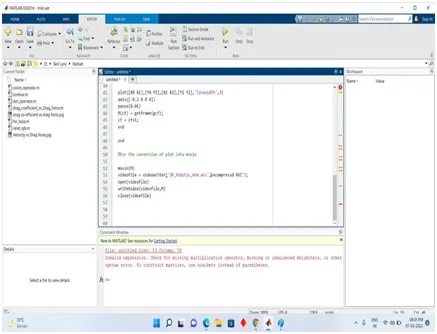
Untitled Line observed due to the missing apostrophe in line no. 53, before uncompressed command. So I have added the apostrophe to resolve the issue.