Week 3.2 - 2R Robotic Arm Challenge
%2R Robotic Arm Challenge
clear all
close all
clc
%inputs
%length of the links
l1=1;
l2=0.8;

%angles in terms of theta
theta1= linspace(0,90,10); %angle for link1
theta2= linspace(0,90,20); %angle for link2

%coordinates for link1 start point
x0=0;
y0=0;

cuntr=1;
for i=1:length(theta1)
  THETA1= theta1(i);
  for j=1:length(theta2)
    THETA2= theta2(j);
    %coordinates for link1 end point also link2 start point
    x1=l1*cosd(THETA1);
    y1=l1*sind(THETA1);
    %coordinates for link2 end point
    x2=x1+l2*cosd(THETA2);
    y2=y1+l2*sind(THETA2);

  %plotting

    plot([x0 x1],[y0 y1],'linewidth',3,[x1 x2],[y1 y2],'linewidth',3);
    axis([-0.1 2 0 2]);
    pause(0.03);
    m(cuntr)=getframe(gcf);
##    f=sprintf("f%d.png",cuntr);
##    saveas(gca,file_text);
    cuntr=cuntr+1;

  end
end

%movie creation
movie(m)
videofile=VideoWriter('Robotc_Arm.avi','Uncompressed AVI');
open(videofile)
writeVideo(videofile,m)
close(videofile)
Explanation:
- clear all, close all, clc: These commands clear the workspace, close all open figures, and clear the command window.
- l1 and l2 are the Lengths of the first link and second link of the robotic arm.
- Defined the angles theta1 and theta2, for the robotic arm. The linspace function generates linearly spaced values between the specified range.
- Initialize the counter variable cuntr to keep track of frames for creating the animation.
- Nested loops to iterate over the angles theta1 and theta2.
- The coordinates for the start point of link1, x0 and y0 are both zero.
- Assigned the current angles theta1(i) and theta2(j) to THETA1 and THETA2 variables.
- Calculated the coordinates for the end point of link1 (x1 and y1) using trigonometric functions and the lengths of the links.
- Calculated the coordinates for the end point of link2 (x2 and y2) by adding the end point of link1 to the corresponding offset of link2.
- Plot the first link ([x0 x1], [y0 y1]) and the second link ([x1 x2], [y1 y2]) using the plot function. The linewidth parameter sets the thickness of the lines.
- Set the x and y axis limits using axis to keep the plot within a specified range.
- Pause for a short duration (0.03) to create an animation effect.
- Capture the current frame using getframe and store it in the m array.
- After the loops, create the movie by passing the captured frames (m) to the movie function, which displays the animation in a figure.
- Create a VideoWriter object named videofile to write the frames into a video file named "Robotc_Arm.avi". The 'Uncompressed AVI' option specifies the video format.
- Open the videofile using open(videofile).
- Write the frames to the video file using writeVideo(videofile, m).
- Close the videofile using close(videofile).
Error detection
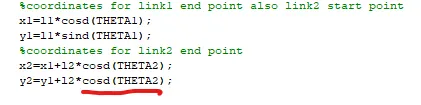
In the underlined code i have in plce of sind i have put cosd which resulted in srinking of the link 2.
The error is rectified by changing it back to sind.
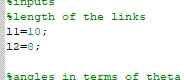
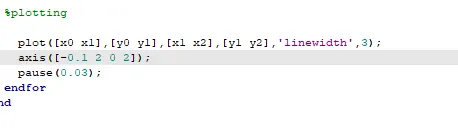
In this error, since I have put l1 =11 and l2=8 and while plotting i have used the limits of x-axis from -0.1 to 2 and y-axis to be from 0 to 2 which resulted in wrong formation of the graph.
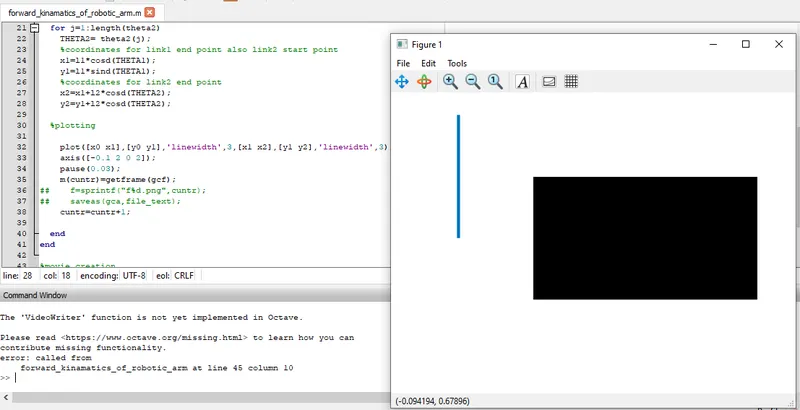
Since i am using octave so this error was shown. i followed the document provided in the video but i was not able to resolve it.
I consulted with a mentor and he suggested me to use online metlab to run the code.
In online matlab was able to generate the video and hance solved the problem.
Link to the video of robotic arm: https://drive.google.com/file/d/1J4neBUfsGcv5ADvggyxDMT5pE2Adh5DR/view?usp=share_link