Week 3.2 - 2R Robotic Arm Challenge
%A program in Matlab to simulate the forward kinematics of a 2R Robotic Arm
clear all
close all
clc

%Inputs

l1 = 1; % length of link1
l2 = 0.5; % length of link2
theta1 = linspace(0,90,10); % angle between base and link1
theta2 = linspace(0,90,10); % angle between base and link2

 ct=1;
for i=1:length(theta1) % this loop is for link1 array to define the angle
    THETA1 = theta1(i); % defining the new variable for the looping
    for j=1:length(theta2)% this loop is for link2 array to define the angle
        THETA2 = theta2(j); % defining the new variable for the looping
        % coordinates
        x0 = 0; % base coordinate of x
        y0 = 0; % base coordinate of y

        x1 = l1*cosd(THETA1); % coordinate of x1 of link1
        y1 = l1*sind(THETA1); % coordinate of y1 of link1

        x2 = x1 + l2*cosd(THETA2); % coordinate of x2 of link2
        y2 = y1 + l2*sind(THETA2); % coordinate of y2 of link2

        % plotting

        plot([x0 x1],[y0 y1],[x1 x2],[y1 y2],'linewidth',3)
        axis([-0.5 1.5 0 1.5])
        pause(0.3)
        M(ct) = getframe(gcf); % to get the frame to store it in the M array which is created
        ct=ct+1;

    end
end


% saving the animation in file directory
movie(M)
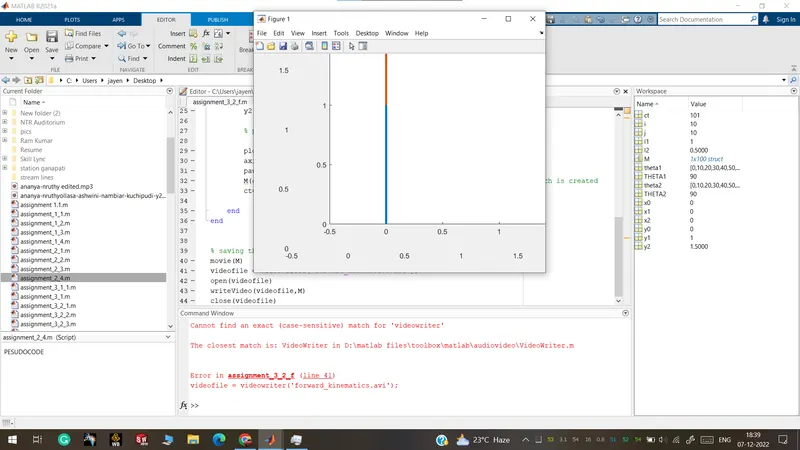
videofile = VideoWriter('forward_kinematics.avi');
open(videofile)
writeVideo(videofile,M)
close(videofile)
Errors that occurred in the code were spelling errors in "videowriter" which needs to write like "VideoWriter".
Animation video: Simulate the forward kinematics of a 2R Robotic Arm