Week -2
AIM
To create a Simulink model of a doorbell using solenoid block with listed parameters and to use a thermistor to sense the temperature of a heater & turn on or turn off the fan as per the given conditions.
INTRODUCTION
1. SIMULINK:
Simulink is a MATLAB-based graphical programming environment for modeling, simulating, and analyzing multidomain dynamical systems. Its primary interface is a graphical block diagramming tool and a customizable set of block libraries. It offers tight integration with the rest of the MATLAB environment and can either drive MATLAB or be scripted from it. Simulink is widely used in automatic control and digital signal processing for multidomain simulation and model-based design. [1]
2. DOORBELL THEORY:
An electric bell is a mechanical or electronic bell that functions by means of an electromagnet. When an electric current is applied, it produces a repetitive buzzing, clanging, or ringing sound. Electromechanical bells have been widely used at railroad crossings, in telephones, fire and burglar alarms, as school bells, doorbells, and alarms in industrial plants, since the late 1800s, but they are now being widely replaced with electronic sounders. An electric bell consists of one or more electromagnets, made of a coil of insulated wire around an iron bar, which attract an iron strip armature with a clapper. When an electric-current flows through the coils, the electromagnet creates a magnetic field which pulls the armature towards it, causing the hammer to strike the bell. [2]
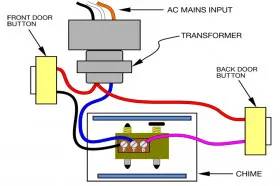
In most wired systems, a button on the outside next to the door, located around the height of the doorknob, activates a signaling device (usually a chime, bell, or buzzer) inside the building. Pressing the doorbell button, a single-pole, single-throw (SPST) pushbutton switch momentarily closes the doorbell circuit. One terminal of this button is wired to a terminal on a transformer. A doorbell transformer steps down the 120 or 240-volt AC electrical power to a lower voltage, typically 10 to 24 volts. The transformer's other terminal connects to one of three terminals on the signaling device. Another terminal is connected to a wire that travels to the other terminal on the button. Some signaling devices have a third terminal, which produces a different sound. If there is another doorbell button (typically near a back door), it is connected between the transformer and the third terminal. The transformer primary winding, being energized continuously, does consume a small amount (about 1 to 2 W) of standby power constantly; systems with lighted pushbutton switches may consume a similar amount of power per switch. The tradeoff is that the wiring to the button carries only safe, low voltage isolated from earth ground. A common signaling device is a chime unit consisting of two flat metal bar resonators, which are struck by plungers operated by two solenoids. The flat bars are tuned to two pleasing notes. When the doorbell button is pressed, the first solenoid's plunger strikes one bar, and when the button is released, a spring on the plunger pushes the plunger up, causing it to strike the other bar, creating a two-tone sound ("ding-dong"). If a second doorbell button is used, it is wired to the other solenoid, which strikes only one of the bars, to create a single-tone ("ding") sound. [3]
1. THERMISTOR THEORY:
A thermistor is a type of resistor whose resistance is strongly dependent on temperature, more so than in standard resistors. The word is a combination of thermal and resistor. Thermistors are widely used as inrush current limiters, temperature sensors (negative temperature coefficient or NTC type typically), self-resetting overcurrent protectors, and self-regulating heating elements (positive temperature coefficient or PTC type typically).
Thermistors are of two opposite fundamental types:
- With NTC thermistors, resistance decreases as temperature rises usually due to an increase in conduction electrons bumped up by thermal agitation from valency band. An NTC is commonly used as a temperature sensor, or in series with a circuit as an inrush current limiter.
- With PTC thermistors, resistance increases as temperature rises usually due to increased thermal lattice agitations particularly those of impurities and imperfections. PTC thermistors are commonly installed in series with a circuit, and used to protect against overcurrent conditions, as resettable fuses.
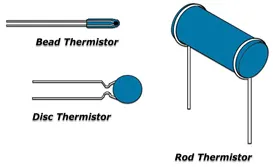
Thermistors are generally produced using powdered metal oxides. With vastly improved formulas and techniques over the past 20 years , NTC thermistors can now achieve accuracies over wide temperature ranges such as ±0.1 °C or ±0.2 °C from 0 °C to 70 °C with excellent long-term stability. NTC thermistor elements come in many styles such as axial-leaded glass-encapsulated (DO-35, DO-34 and DO-41 diodes), glass-coated chips, epoxy-coated with bare or insulated lead wire and surface-mount, as well as rods and discs. The typical operating temperature range of a thermistor is −55 °C to +150 °C, though some glass-body thermistors have a maximal operating temperature of +300 °C. Thermistors differ from resistance temperature detectors (RTDs) in that the material used in a thermistor is generally a ceramic or polymer, while RTDs use pure metals. The temperature response is also different; RTDs are useful over larger temperature ranges, while thermistors typically achieve a greater precision within a limited temperature range, typically −90 °C to 130 °C. [4]
OBJECTIVES
- To create a Simulink model of a doorbell using solenoid block with listed parameters
- To use a thermistor to sense the temperature of a heater & turn on or turn off the fan as per the given conditions.
PROBLEM SPECIFICATION AND SOLVING:
PROBLEM STATEMENT I:
It is required to create a Simulink model of a doorbell using solenoid block with listed parameters:
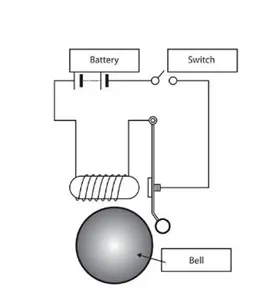
- In the given arrangement, when the switch is closed the electromagnet receives electrical power from the battery and pulls the metal arm to hit the bell producing sound.
- It is required to create a situation where the switch is closed for 2 seconds and then released. Observe the physical movement of the plunger.
- Assume remaining parameters.
EXPLANATION AND OBSERVATION:
- Initially the working of the doorbell is thoroughly understood as detailed in the previous section.
- The first step in constructing a doorbell is the requirement of a power source which is clearly mentioned as the battery in the problem statement.
BATTERY: This is a behavioral battery model which represents a simple battery model. Basic model that does not output battery charge level or simulate thermal effects. This modeling variant is the default. [5]
Representation:

- The battery has two terminals namely positive and a negative terminal, like a conventional battery. In the current model, the negative terminal is connected to one of the inputs of the switch and the positive terminal is connected to the negative end of the solenoid.
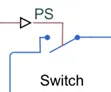
SWITCH: Switch controlled by external physical signal. The Switch block models a switch controlled by an external physical signal. If the external physical signal PS is greater than the value specified in the Threshold parameter, then the switch is closed, otherwise the switch is open. Electrical switches add discontinuities to the model, and therefore it remains the choice of the solver ti influence the model behavior. [6]
Representation:
SOLENOID: Electrical characteristics and generated force of solenoid. The Solenoid block represents the electrical characteristics and generated force for the solenoid in the following figure:
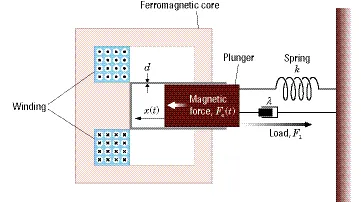
The return spring is optional. To remove the effects of this spring from the model, set the Spring constant parameter to 0. [7]
Representation:
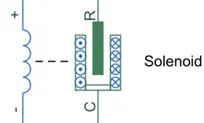
- The positive end of the solenoid is connected to the output of the switch.
- The switch takes two inputs, one from the battery and the conditional input given by a pulse generator. A pulse generator is used in this model to pause the working of the bell for every 2 seconds.
PULSE GENERATOR: Generate square wave pulses at regular intervals. The Pulse Generator block generates square wave pulses at regular intervals. The block waveform parameters, Amplitude, Pulse Width, Period, and Phase delay determine the shape of the output waveform. The following diagram shows how each parameter affects the waveform:
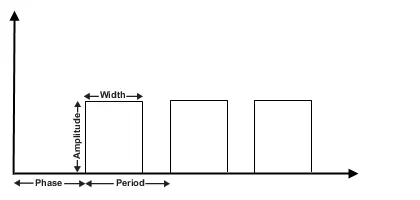
The Pulse Generator block can emit scalar, vector, or matrix signals of any real data type. To emit a scalar signal, use scalars to specify the waveform parameters. To emit a vector or matrix signal, use vectors or matrices, respectively, to specify the waveform parameters. Each element of the waveform parameters affects the corresponding element of the output signal. For example, the first element of a vector amplitude parameter determines the amplitude of the first element of a vector output pulse. All the waveform parameters must have the same dimensions after scalar expansion. The data type of the output is the same as the data type of the Amplitude parameter. The block output can be generated in time-based or sample-based modes, determined by the Pulse type parameter.
Time-Based Mode:
In time-based mode, Simulink® computes the block output only at times when the output actually changes. This approach results in fewer computations for the block output over the simulation time period. Activate this mode by setting the Pulse type parameter to Time based. The block does not support a time-based configuration that results in a constant output signal. Simulink returns an error if the parameters Pulse Width and Period satisfy either of these conditions:
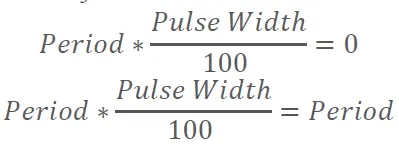
Depending on the pulse waveform characteristics, the intervals between changes in the block output can vary. For this reason, a time-based Pulse Generator block has a variable sample time. The sample time color of such blocks is brown (see View Sample Time Information for more information).Simulink cannot use a fixed-step solver to compute the output of a time-based pulse generator. If you specify a fixed-step solver for models that contain time-based pulse generators, Simulink computes a fixed sample time for the time-based pulse generators. Then the time-based pulse generators simulate as sample based. [8]
Representation:
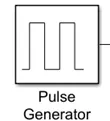
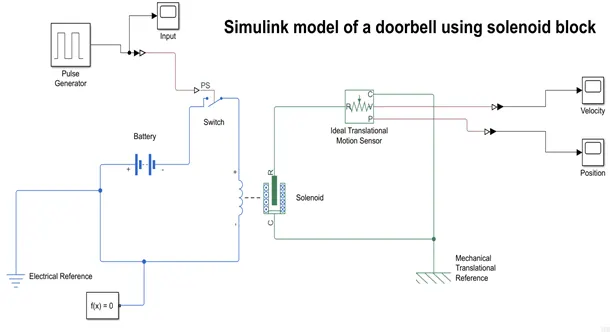
Based on the information of the description of the Pulse generator, the following inputs are given:
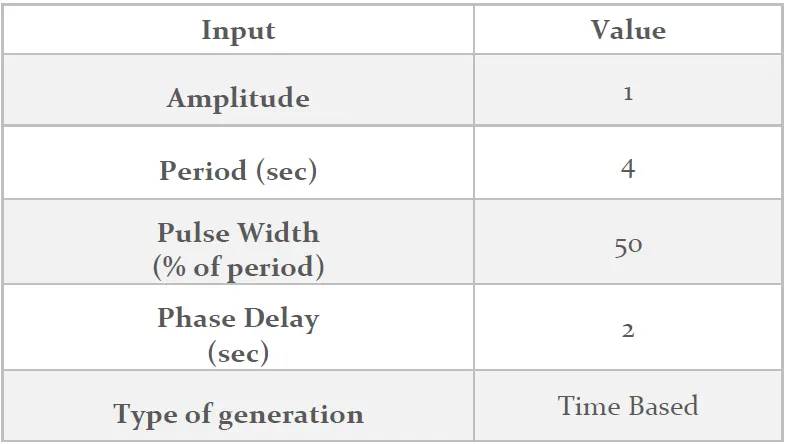
- The pulse generator develops an output that is in the Simulink form. It needs to be converted into a form of a physical signal. Therefore, Simulink to PS Converter is used.
SIMULINK TO PS CONVERTER: It converts the Simulink input signal to a physical signal. The Simulink-PS Converter block converts the input Simulink® signal into a physical signal. Use this block to connect Simulink sources or other Simulink blocks to the inputs of a Physical Network diagram. To convey signal conversion while taking up minimal canvas space, the block icon changes dynamically based on whether it is connected to other blocks. [9]
Representation:

- A scope block is added to understand the nature of the output from the pulse generator which can also be perceived as the input to the solenoid.
- The R-end of the Solenoid is connected to the Ideal translational motion sensor.
IDEAL TRANSLATIONAL MOTION SENSOR: The Ideal Translational Motion Sensor block represents a device that converts an across variable measured between two mechanical translational nodes into a control signal proportional to velocity or position. You can specify the initial position (offset) as a block parameter. The sensor is ideal since it does not account for inertia, friction, delays, energy consumption, and so on. Connections R and C are mechanical translational conserving ports that connect the block to the nodes whose motion is being monitored. Connections V and P are physical signal output ports for velocity and position, respectively. The block positive direction is from port R to port C. This means that the velocity is measured as v = vR – vC, where vR, vC are the absolute velocities at ports R and C, respectively. [10]
Representation:
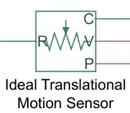
- The V and P ports on the ideal translational motion sensor give out a physical signal which are converted into Simulink signal using PS to Simulink converter and the outputs are obtained on Scope block, individually given.
PS TO SIMULINK CONVERTER: The PS-Simulink Converter block converts a physical signal into a Simulink® output signal. Use this block to connect outputs of a Physical Network diagram to Simulink scopes or other Simulink blocks. To convey signal conversion while taking up minimal canvas space, the block icon changes dynamically based on whether it is connected to other blocks. [11]
Representation:

- In the solenoid circuit, a mechanical translational reference is installed.
MECHANICAL TRANSLATIONAL REFERENCE: Reference connection for mechanical translational ports. The Mechanical Translational Reference block represents a reference point, or frame, for all mechanical translational ports. All translational ports that are rigidly clamped to the frame (ground) must be connected to a Mechanical Translational Reference block. [12]
Representation:

- The batter switch circuit are attached with electrical reference and a solver configurator.
ELECTRICAL REFERENCE: The Electrical Reference block represents an electrical ground. Electrical conserving ports of all the blocks that are directly connected to ground must be connected to an Electrical Reference block. A model with electrical elements must contain at least one Electrical Reference block. [13]
Representation:
SOLVER CONFIGURATION: Physical Networks environment and solver configuration. Each physical network represented by a connected Simscape™ block diagram requires solver settings information for simulation. The Solver Configuration block specifies the solver parameters that your model needs before you can begin simulation. Each topologically distinct Simscape block diagram requires exactly one Solver Configuration block to be connected to it. [14]
Representation:
- The pulse generator’s input is also studied by connecting it to the scope.
- The resultant layout of the doorbell in Simulink is as follows:
PROBLEM STATEMENT II:
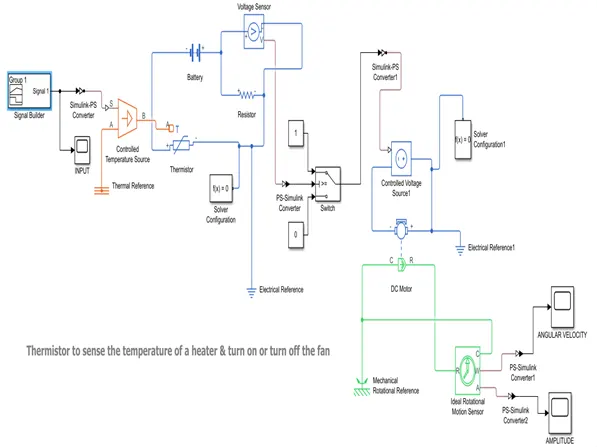
By using a thermistor, it is required to sense the temperature of the heater and turn on and turn off the fan as per the following conditions:
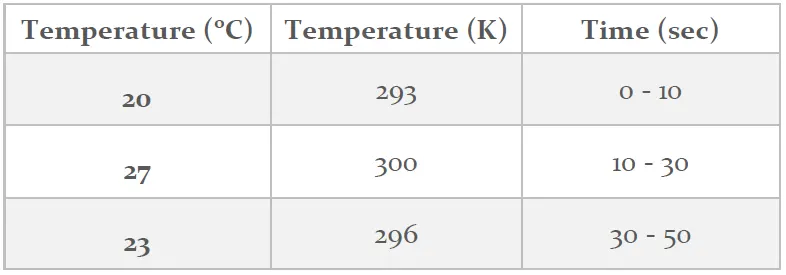
- Temperature source variation is as follows:
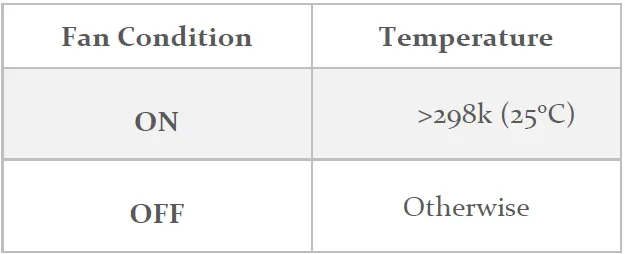
- Fan conditions are as follows:
EXPLANATION AND OBSERVATION:
- Initially the working of the Thermistor is thoroughly understood as detailed in the previous section.
- As mentioned in the problem statement, the temperature is varied with respect to time. To achieve this, signal builder block is used.
SIGNAL BUILDER: This is used to create and generate interchangeable groups of signals whose waveforms are piecewise linear. The Signal Builder block allows one to create interchangeable groups of piecewise linear signal sources and use them in a model. One can quickly switch the signal groups into and out of a model to facilitate testing. In the Signal Builder window, create signals and define the output waveforms. To open the window, double-click the block. [15]
Representation:
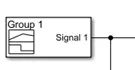
- The Y axis is set to 310 and the T axis is set to 50 seconds. The three horizontal arms are set to different Y (temperature) values as listed in the problem statement. As a result, the desired input is obtained.
- The output of the input signal is captured by a scope block and also is given as the input to the Controlled Temperature Source. This only takes physical signal as an input therefore, the input signal from signal builder is converted from Simulink signal to a physical signal using Simulink-PS converter block.
CONTROLLED TEMPERATURE SOURCE: This is used as a Variable source of thermal energy, characterized by temperature. The Controlled Temperature Source block represents an ideal source of thermal energy that is powerful enough to maintain specified temperature difference across the source regardless of the heat flow consumed by the system. Connections A and B are thermal conserving ports corresponding to the source inlet and outlet, respectively. Port S is a physical signal port, through which the control signal that drives the source is applied. One can use the entire variety of Simulink® signal sources to generate the desired heat flow variation profile. The temperature differential across the source is directly proportional to the signal at the control port S. The block positive direction is from port A to port B. This means that the temperature differential is determined as TB – TA, where TB and TA are the temperatures at source ports. [16]
Representation:
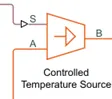
- A thermal reference is added to the constant temperature source through port A.
THERMAL REFERENCE: This is used as reference connection for thermal ports. The Thermal Reference block represents a thermal reference point, that is, a point with an absolute zero temperature, with respect to which all the temperatures in the system are determined. The block has one thermal conserving port. [17]
Representation:
- The port B of the constant temperature source is connected to port A of the thermistor, a temperature measuring device.
THERMISTOR: It is used to give negative temperature coefficient thermistor using B-parameter equation. The Thermistor block represents an NTC thermistor using the B-parameter equation. The resistance at temperature T is:
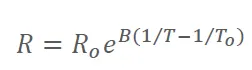
where:
R0 is the nominal resistance at the reference temperature T0. B is the characteristic temperature constant.
The following equation describes the thermal behavior of the block:
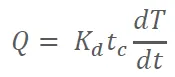
where:
Q is the net heat flow into port A. Kd is the Dissipation factor parameter value. tc is the Thermal time constant parameter value. dT/dt is the rate of change of the temperature. [18]
Representation:
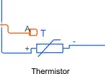
- Thermistor has two terminals, positive and negative which are connected to battery and resistor, respectively. To its connection to resistor, the thermistor is connected to solver configuration and electrical reference.
RESISTOR: It is used as a linear resistor in electrical systems. The Resistor block models a linear resistor, described with the following equation:
Connections + and – are conserving electrical ports corresponding to the positive and negative terminals of the resistor, respectively. By convention, the voltage across the resistor is given by V(+) – V(–), and the sign of the current is positive when flowing through the device from the positive to the negative terminal. This convention ensures that the power absorbed by a resistor is always positive. [19]
Representation:

- The voltage sensor and resistor are connected in parallel and to which one of the ends is connected to the batter the other end to the thermistor.
VOLTAGE SENSOR: Voltage sensor in electrical systems. The Voltage Sensor block represents an ideal voltage sensor, that is, a device that converts voltage measured between two points of an electrical circuit into a physical signal proportional to the voltage. Connections + and – are electrical conserving ports through which the sensor is connected to the circuit. Connection V is a physical signal port that outputs the measurement result. [20]
Representation:

- The voltage sensor has two electric ports and one and a physical signal output port which is connected to an electric switch through a PS to Simulink converter.
SWITCH: The Switch block models a switch controlled by an external physical signal. If the external physical signal PS is greater than the value specified in the Threshold parameter, then the switch is closed, otherwise the switch is open. Electrical switches add discontinuities to your model, and therefore your choice of the solver can influence the model behavior. [21]
Representation:
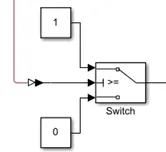
- The idea behind using the switch is to give it a threshold voltage of 5.981 V that corresponds to the voltage at 25oC across the resistor as read by the voltage sensor. The temperature and voltage are directly proportional and as the temperature increases, the voltage increases, and the switch remains open. Otherwise, the switch remains closed. Therefore, a two constant inputs with numerical values of 1 and 0 are given to the switch. The value of 1 is processed when the input voltage is greater than the threshold and the switch closes allowing the current to pass to the fan.
- When the signal is above the threshold value, the flow of current is allowed to the controlled voltage source that powers a DC motor which in turn drives the fan.
CONTROLLED VOLTAGE SOURCE: It is an ideal voltage source driven by input signal. The Controlled Voltage Source block represents an ideal voltage source that is powerful enough to maintain the specified voltage at its output regardless of the current flowing through the source. The output voltage is V = Vs, where Vs is the numerical value presented at the physical signal port. [22]
Representation:
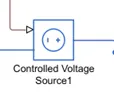
- The controlled voltage source is connected to a DC motor that is assumed to mount a fan. The DC motor is connected to an electrical reference.
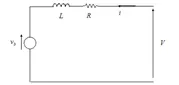
DC MOTOR: This block represents a DC motor model with electrical and torque characteristics and fault modeling. The DC Motor block represents the electrical and torque characteristics of a DC motor using the following equivalent circuit model: [23]
Representation:

- The mechanical end of the DC Motor represented by R and C are joined to Ideal Rotational motion sensor and a Mechanical Rotational Reference, respectively.
IDEAL ROTATIONAL MOTION SENSOR: Motion sensor in mechanical rotational systems. The Ideal Rotational Motion Sensor block represents an ideal mechanical rotational motion sensor, that is, a device that converts an across variable measured between two mechanical rotational nodes into a control signal proportional to angular velocity or angle. One can specify the initial angular position (offset) as a block parameter. The sensor is ideal since it does not account for inertia, friction, delays, energy consumption, and so on. Connections R and C are mechanical rotational conserving ports that connect the block to the nodes whose motion is being monitored. Connections W and A are physical signal output ports for velocity and angular displacement, respectively. The block positive direction is from port R to port C. This means that the velocity is measured as ω = ωR – ωC, where ωR, ωC are the absolute angular velocities at ports R and C, respectively.
The Wrap angle to [0, 2*pi] parameter lets the user control the angular displacement output range. When set to On, it keeps angular displacement within the range from 0 to 2π radians (360 degrees), regardless of the number of revolutions performed by the object and the direction of rotation. When set to Off, the output range is unrestricted. [24]
Representation:

MECHANICAL ROTATIONAL REFERENCE: The Mechanical Rotational Reference block represents a reference point, or frame, for all mechanical rotational ports. All rotational ports that are rigidly clamped to the frame (ground) must be connected to a Mechanical Rotational Reference block. [25]
Representation:

- The C port of the ideal rotational sensor is connected to the mechanical rotational reference. The rotational sensor has two outputs that contain the information of angular velocity from port W and amplitude through port A. The output from these ports is a physical signal. Therefore, the signal is converted into Simulink signal using PS-Simulink converter and are in turn connected to scope to understand the nature of the signal.
RESULTS
- Plots of modelled Doorbell:
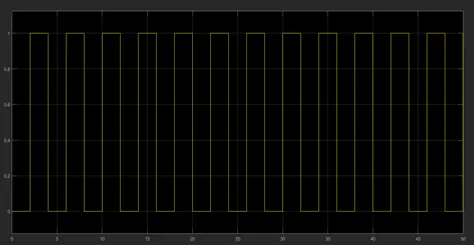
Figure 1. The input signal to the doorbell.
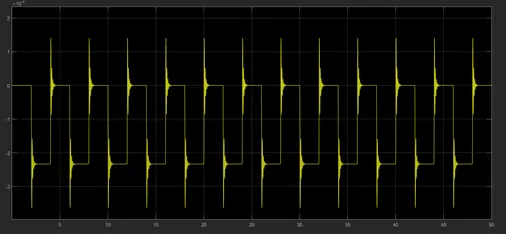
Figure 2. The output amplitude signal of the doorbell.
It can be observed that the bell is rung for every two seconds as required by the problem statement. This can be clearly understood by the sudden increase in the amplitude which are in the multiples of two over a span of 50 seconds. It can be observed that the magnitude of the amplitude over various time intervals is same and this is because of the lack of irreversibilities in the problem consideration.
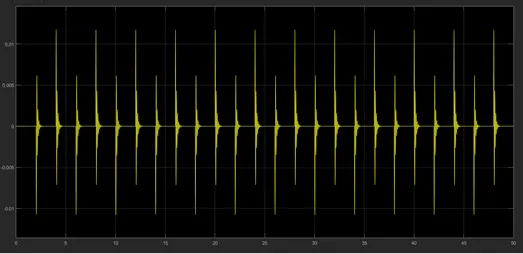
Figure 3. The output velocity signal of the doorbell.
- The plots of the thermistor experiment are as follows:
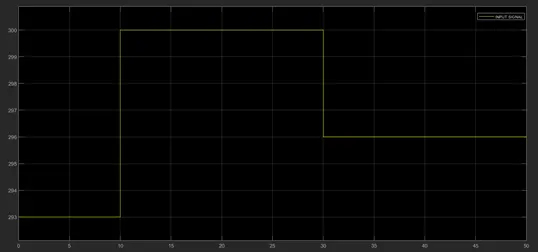
Figure 4. The input signal to the thermistor.
The input signal to the thermistor is given through signal builder. The signal is built by varying the temperature with time as per the problem statement. Therefore, the layout is as observed in the figure 4.
The figure 5 describes the amplitude of the end effector that uses the input from the thermistor. i.e., encompasses the movement of the fan in terms of amplitude. It can be seen that the for the first ten seconds the amplitude is constant as amounts to the value zero. This is because of the implemented logic as per the problem statement II. There is a change in the amplitude for the time period 10-30 and thereon, it remains constant from 30 – 50 seconds. The maximum amplitude lies between 2.9 x 10⁴ and 3 x 10⁴ . The linear nature of the graph from 10 – 30 seconds and is an indicative that the fan runs in this region.
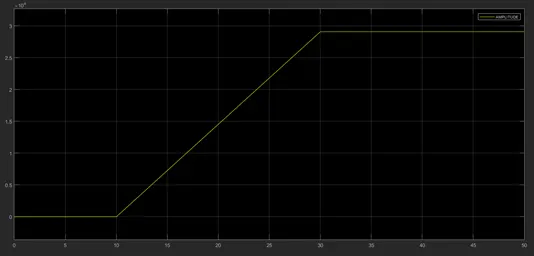
Figure 5. The output amplitude signal of the thermistor fan system.
Similarly, the variation of the angular velocity has been plotted as a function of time and the plot is obtained in the Figure 6. The plot remains parallel to time axis with a value of angular velocity zero for the time interval of 0 – 10 seconds. The angular velocity reaches the value of around 1440 (approximately) from 10 – 30 seconds and the value drop to zero for the next time interval i.e., 30 – 50 seconds.
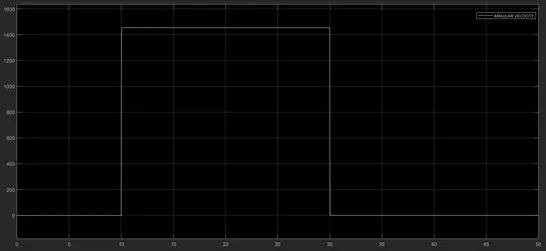
Figure 6. The output angular velocity signal of the thermistor fan system.
CONCLUSION
The required problems have been solved and justified with appropriate results. Working of doorbell using solenoid and the working of thermistor-fan system is well received.
BIBLIOGRAPHY
- https://en.wikipedia.org/wiki/Simulink#:~:text=Simulink%20is%20a%20MATLAB%2Dbased,customizable%20set%20of%20block%20libraries.
- https://en.wikipedia.org/wiki/Electric_bell
- https://en.wikipedia.org/wiki/Doorbell
- https://en.wikipedia.org/wiki/Thermistor
- https://in.mathworks.com/help/physmod/sps/ref/battery.html
- https://in.mathworks.com/help/physmod/simscape/ref/switch.html
- https://in.mathworks.com/help/physmod/sps/ref/solenoid.html
- https://in.mathworks.com/help/simulink/slref/pulsegenerator.html
- https://in.mathworks.com/help/physmod/simscape/ref/simulinkpsconverter.html
- https://in.mathworks.com/help/physmod/simscape/ref/idealtranslationalmotionsensor.html
- https://in.mathworks.com/help/physmod/simscape/ref/pssimulinkconverter.html
- https://in.mathworks.com/help/physmod/simscape/ref/mechanicaltranslationalreference.html
- https://in.mathworks.com/help/physmod/simscape/ref/electricalreference.html
- https://in.mathworks.com/help/physmod/simscape/ref/solverconfiguration.html
- https://in.mathworks.com/help/simulink/slref/signalbuilder.html
- https://in.mathworks.com/help/physmod/simscape/ref/controlledtemperaturesource.html
- https://in.mathworks.com/help/physmod/simscape/ref/thermalreference.html
- https://in.mathworks.com/help/physmod/sps/ref/thermistor.html
- https://in.mathworks.com/help/physmod/simscape/ref/resistor.html
- https://in.mathworks.com/help/physmod/simscape/ref/voltagesensor.html
- https://in.mathworks.com/help/physmod/simscape/ref/switch.html
- https://in.mathworks.com/help/physmod/simscape/ref/controlledvoltagesource.html
- https://in.mathworks.com/help/physmod/sps/ref/dcmotor.html
- https://in.mathworks.com/help/physmod/simscape/ref/idealrotationalmotionsensor.html
- https://in.mathworks.com/help/physmod/simscape/ref/mechanicalrotationalreference.html