Week -2
Introduction to Physical Modeling using Simscape
AIM:
1.To Make a Simulink model of Doorbell using solenoid block.
2.To Use a thermistor to sense the temperature of a heater & turn on or turn off the fan as per the below conditions:
Temperature source: 20 °C from 0 to 10 seconds, 27 °C from 10 to 30 seconds, 23 °C from 30 to 50 seconds Fan conditions: ON if the temperature above 25 °C, OFF otherwise
PART 1:
- First open simulink in MATLAB and save the DOOR BELL file.
- Study the door bell circuti and understan the concept befor building the blocks.
- Now we set up the Simulink and simscape block setup for the solenoid doorbell. We need to understand what are the blocks involved and why they are involved. What are their characteristics and what role they play in the doorbell simulation.
- Pulse generator: is an analog input that has amplitude and frequency with which the input is transmitted.
- PS-Simulink and Simulink-PS converter: These are basically the converter from Physical systems to Simulink signals and vice versa.
- The Switch is a device the completes the electric circuit for current flow and can be controlled manually or automatically depends on the type of switch required.
- Battery: is a device that has a negative and positive terminal for the electric circuit to be completed for an electric flow.
- The Switch is a device the completes the electric circuit for current flow and can be controlled manually or automatically depends on the type of switch required.
- Solver Configuration: It's a type of block that acts as a complete equation for where f(x) = 0 where we find the value of x and generate the output which represents the block diagram as an equation.
- Electrical and Mechanical references: is a reference block with which the system has a ground source as a base.
- Solenoid: is an electromagnetic device that is represented as a block here.
- Ideal Translated motion sensor: It's a type of sensor which provides the position or velocity input for the system to generate output.
- Scopes: Gives the plot of the output
- Display: It displays the output value
- After using all the blocks and creacting the block diagaram we have been given a condition apply that condition and run program and obtain the result.
- GIVEN CONDITION: Create a situation where the switch is closed for 2 seconds and then released. Observe the physical movement of the plunger.
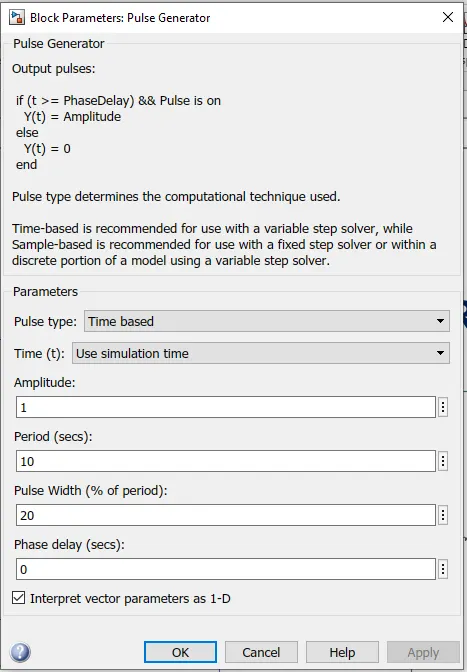
INPUT:
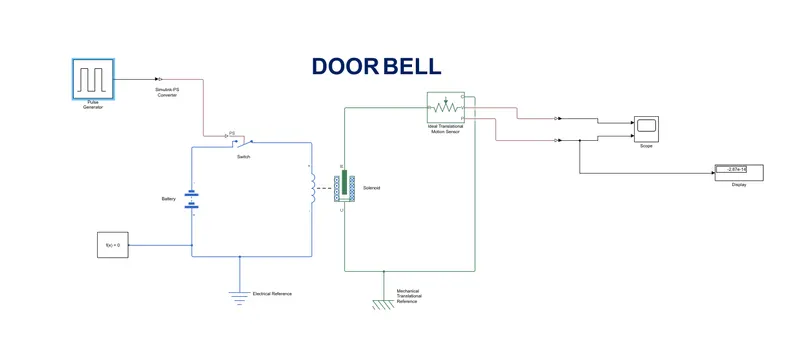
OUTPUT:
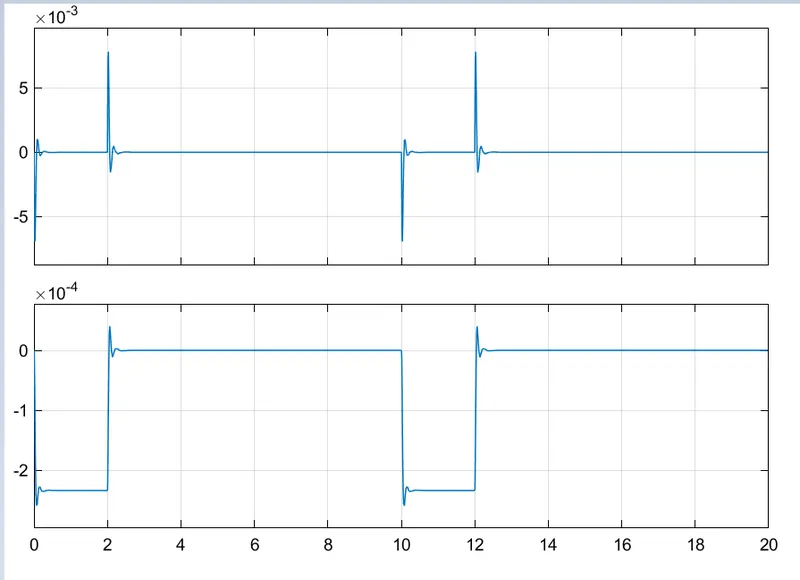
PART 2:
2.To Use a thermistor to sense the temperature of a heater & turn on or turn off the fan as per the below conditions:
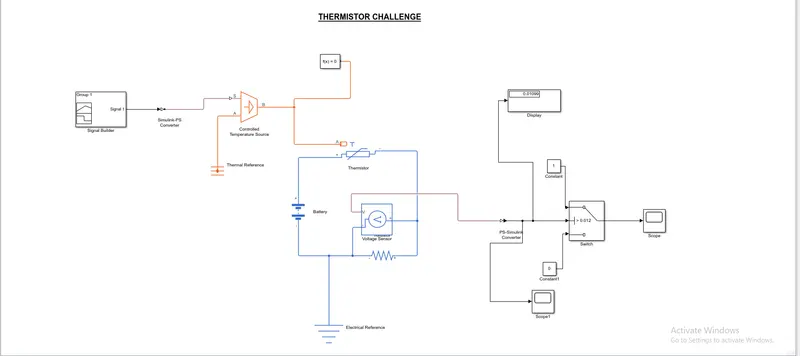
Temperature source: 20 °C from 0 to 10 seconds, 27 °C from 10 to 30 seconds, 23 °C from 30 to 50 seconds Fan conditions: ON if the temperature above 25 °C, OFF otherwise
- First open Simulink in MATLAB and save the simulink file.
- Now, understand the question which is given.
- Now, use the blocks which are required to draw the block diagaram.
- Signal Builder - to generate the signal according to the input condition given.
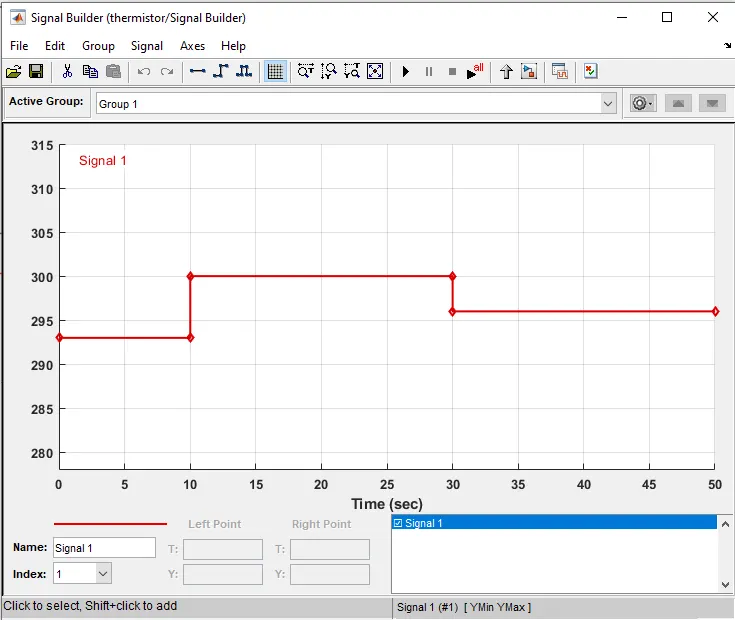
- Convert all your temperature in signal builder while creating input to their respective kelvin values as all the thermal blocks will be in kelvin by default.
- PS-Simulink converter: Converts Simulink signals to the respective physical signal.
- Filtering is required to the PS-SIMULINK converter.
- Controlled temperature source: (CTS) Provide a temperature physical output based on the condition given to port S.
- Thermal reference: Thermal reference block provides the required initial conditions to the connected thermal block for the solver.
- Thermistor: Thermistor block which shows us the NTC thermistor relation between temperature and resistance.
- Battery: Battery is a storage device that provides the required voltage based on the parameter given. We can use DC voltage source blocks too.
- Resistor: Resistor which provides the opposing nature of current in a circuit.
- Voltage sensor: This is used to measure the voltage or potential difference across any electrical component and it should connect in parallel only.
- Electrical Reference: These domain-specific electrical reference blocks will provide the required initial conditions to the connected thermal block for the solver.
- Solver Configuration: The Solver Configuration block specifies the solver parameters that your model needs before you can begin simulation and this is mandatory for all simscape designs.
- PS-Simulink Converter: Converts physical signals to the respective Simulink signal.
- Constant: Provides a constant output value
- Switch: This block is used from the library Simulink / Signal Routing where it has three inputs namely Port1, Port2, and Port3. Port2 is a control input where the signal given to port2 is satisfied with the condition and threshold of the switch block then it passes Port1 as output and if it is not satisfied then it will pass Port3 as output.
- Scope: This is an output block that shows the signal with respective time in an X-axis.
- Run the model and obtain the result.
INPUT:
OUTPUT:
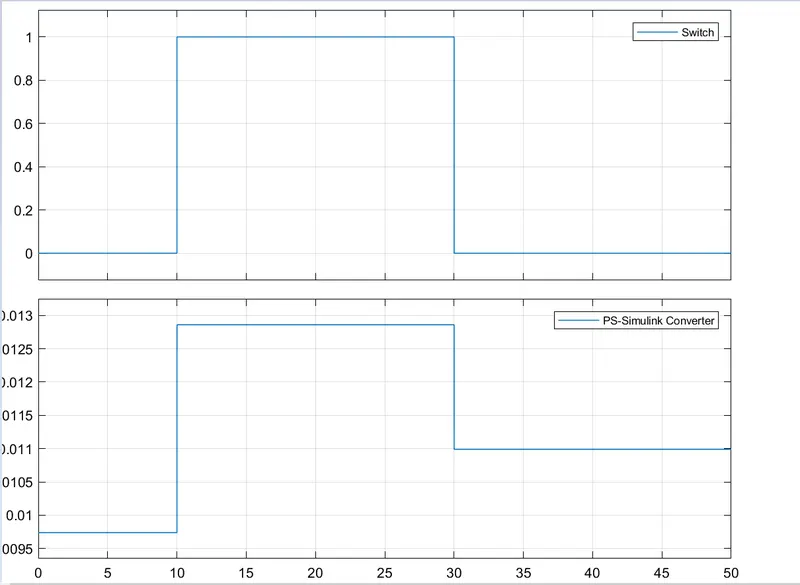
CONCLUSION:
- To Make a Simulink model of Doorbell using solenoid block is done according to the given conditions.
- To Use a thermistor to sense the temperature of a heater & turn on or turn off the fan as per the below conditions is done.
GOOGLE LINKS:
DOORBELL: https://drive.google.com/file/d/1tzYFmO_-Cp4G2ds4riGqn7Saw6xpr8eI/view?usp=sharing
THERMISTOR: https://drive.google.com/file/d/1UwPmex5XjDUOu2kKqhwAlmPY76P9lj9B/view?usp=sharing