Week 2- 2R Robotic Arm Challenge
Aim
To Create the simulation of Forward kinematics of a 2R robotic arm using matlab
objective
Robot kinematics is the study of motion of robots. Here a robotic arm is to be created using matlab coding. A robotic arm consisting of two links in which both links makes each angle with the base. A robotic arm is created in which positions of the links changes with changing the angles.
Theory
Robotic arm is made up of using mechanical linkages.The links are joined in such a way that to create rotational and translatory motion. A robotic arm is also known as manipulator.It consists of base,Joints,links. The main obejective is to create the simulation of 2R Robotic arm and visualize the maximum reach of the robot arm by varying the angle of the links with respect to the base.
% To stimulate the Forward kinematics of a 2R robotic arm
clear all
close all
clc

% inputs
l1 = 1;
l2 = 0.5;
theta1 = linspace(0,90,20);
theta2 = linspace(0,90,20);
ct = 1;
for i = 1:length(theta1)
    THETA1 = theta1(i);
    for j = 1 : length(theta2)
    THETA2 = theta2(j);
    % coordinates
x0 = 0;
y0 = 0;

x1 = l1*cosd(THETA1);
y1 = l1*sind(THETA1);

x2 = x1 + l2*cosd(THETA2);
y2 = y1 + l2*sind(THETA2);

% plotting
plot([x0 x1],[y0 y1],[x1 x2],[y1 y2],'linewidth',3)
axis([-0.1  1.5 0 1.5])
pause(0.01)
M(ct) = getframe(gcf);
ct=ct+1;
    end
end
movie(M)
videofile = VideoWriter('forward_kinematics_of_robotic_arm.avi','Uncompressed AVI');
open(videofile)
writeVideo(videofile,M)
close
Explanation
- At first place i have mentioned the inputs which are,
- Length of first and second link
- Angle between base and link 1
- Angle between base and link 2
linspace command is used to vary both of the angle from 0 to 90 degree and in between having 20 values.
2. I have defined two 'for' loops for controlling the values of theta1 and theta2.
3. Coordinates of both links has been given.Initial position of first link is set at (0,0), final position of first link and final position of second link are found out using trigonometric relations.
4.plot command is used to plot graph. Both the links are shown in the same graph.
5.The ‘getframe(gcf)’ command is used inside the second ‘for’ loop to get the current frame and stored it as an image into the array ‘M’.
6.counter command is used for incrementing the each frame resulting as an animation.
7.The ‘VideoWriter’ command creates an empty video file by the name ‘forward_kinematics_of_robotic_arm’ in.avi format and it is stored in the variable videofile.
8.The ‘writevideo’ command insert the frames stored in the array ‘M’ into the videofile.
Errors occured
I have used the videowriter command to create videofile, but as i try to run the programme error occured .it is attached below
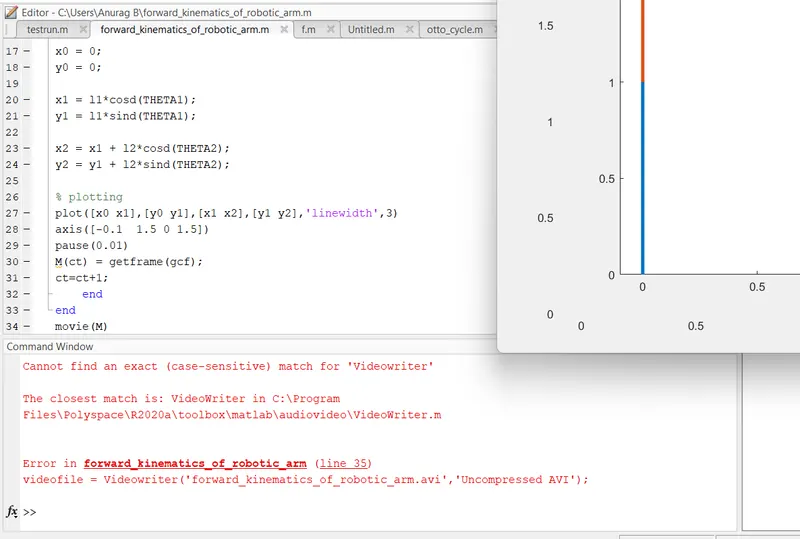
here the 'VideoWriter' command is case sensitive. At first i wrote it as 'videowriter' which is not recognised and then corrected to right spelling.
Result
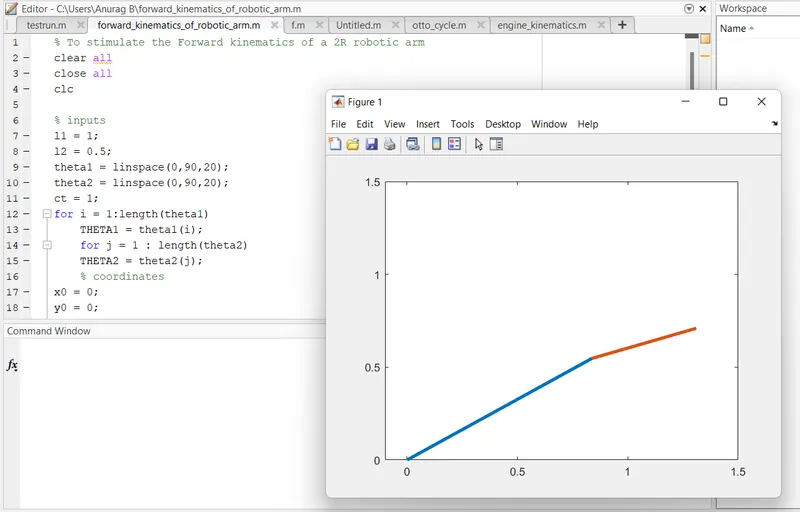
video playback link
https://drive.google.com/file/d/1Q1Vx272kDKY4HUdAJRpskog-9QrhMt3Y/view?usp=sharing