Week 2- 2R Robotic Arm Challenge
WRITE A PROGRAM IN MATLAB TO SIMULATE THE FORWARD KINEMATICS OF A 2R ROBOTIC ARM
AIM:
To write a program in matlab to simulate the forward kinematics of a 2R robotic arm.
OBJECTIVE:
- write a program to simulate forward kinematics of a 2R robotic arm
- to design a movie or animation from the plots obtained from the program
THEORY:
A robotic arm is a genre of mechanical arm habitually configurable with similar functions to a human arm.
The arm possibly the all summation of the mechanism or mayhap part of a more compound robot.
The tieups of such a manipulator are connected by joints permitting either rotational motion(eloquent robot) or translational displacement(linear). The linkage of the manipulator can be considered to form a kinematic chain.
The boundary of the kinematic chain of the manipulator is called the end effector and it is kindred to the human hand.
here we examine a 2R robotic arm. A 2R robotic arm constitutes a robotic arm with 2 rotations. i.e., it has 2 links which rotate or work over a 2D plane with each of links having a single degree of freedom.
All the links here are cramped to a 90° rotation with respect to the axes.
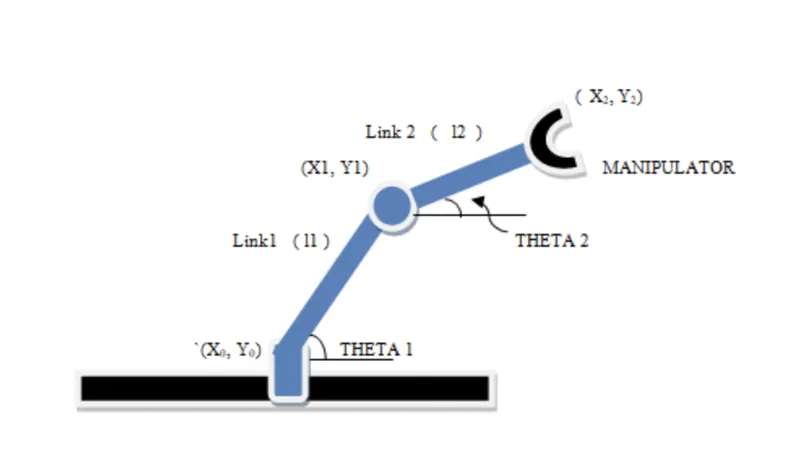
let, l1 lengths of the link 1
l2 lengths of the link 2.
let, θ1 be the angle formed by link 1 with the horizontal
θ2 be the angle formed by link 2 with the horizontal.
link 1:
start coordinates (x0,y0)
end coordinates (x1,y1)
link 2:
start coordinates (x1,y1)
end coordinates (x2,y2)
CODE EXPLANATION:
programming language used matlab
starting the program by using comments
length values of the robotic arm i.e., l1 & l2.
values of theta1 and theta2 are been provided using linspace command for theta = 0 to 90° for 10 values.
providing the Cr value as a specific digit (compression ratio)
using "for" command for giving movement to the 2nd robotic arm
depicting the coordinates of both the robotic arms.
plot all the coordinate values and providing the axis number.
pause command - makes the plot look lifelike.
boosting the Cr value by +1 everytime it executes for loop.
all the figures are assigned to a variable "R" one at a time using Cr.
for loop will be ended twice.
using movie commands to combine all the figures saved in the R file to make an animation/movie.
save the movie in .mov format at the end.
MATLAB CODE:
% program for a 2R robotic arm challenge
%inputs
l1 = 1;
l2 = 0.5;
theta1 = linspace(0,90,10);
theta2 = linspace(0,90,10);
ct = 1;
for i = 1 : length(theta1)
THETA1 = theta1(i);
for j = 1 : length(theta2)
THETA2 = theta2(j);
x0=0;
y0=0;
x1 = l1*cosd(THETA1);
y1 = l1*sind(THETA1);
x2 = x1 + l2*cosd(THETA2);
y2 = y1 + l2*sind(THETA2);
%plotting
plot([x0,x1],[y0,y1] , [x1,x2],[y1,y2],'linewidth',3)
axis ([-0.1 2 0 1.6])
pause(0.02)
R(ct)=getframe(gcf);
ct = ct + 1;
end
end
errors:
no errors were shown during the output.
conclusion:
here we have the simulated 2R robotic arm using the matlab programming and so produced a movie or animation from the plots obtained from the program.
output of the above program is given below.(both image and movie)