Week 2- 2R Robotic Arm Challenge
* AIM:-
Develop a matlab program that stimulates the forward movement of a 2R Robotic Arm, like the one in the video,
and create an animation of it.
* OBJECTIVE:-
1.Prepare a program for stimulating forward movement of a 2R Robotic Arm.
2.Animated and developed a movie based on the plot obtained from the program.
* THEORY:-
1.An application was written to solve forward kinematics of a 2-R Robotic arm manipulator.
2.The field of robotics is growing as mechanical engineers learn how to stimulate robotic arms is a useful skill set.
3.You will learn about kinematic linkages in robotics at the first stage by writing a simple explanation of how a robot moves.
What is 2-R Robotic Arm?
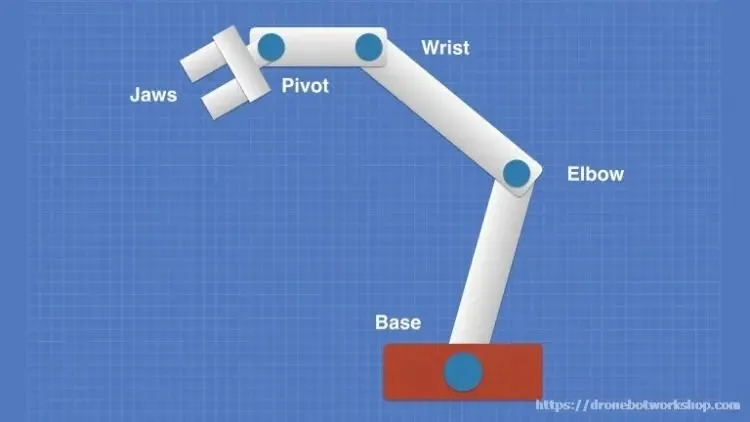
A robotic arm, so named because they are like human arms, is usually mounted on a base.The arm is made of
multiple joint that are used as axes that afford some degree of movement. The more joints arobotic arm contains
the greater its freedom of movement.
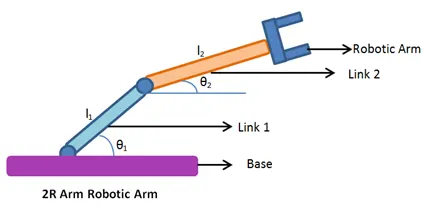
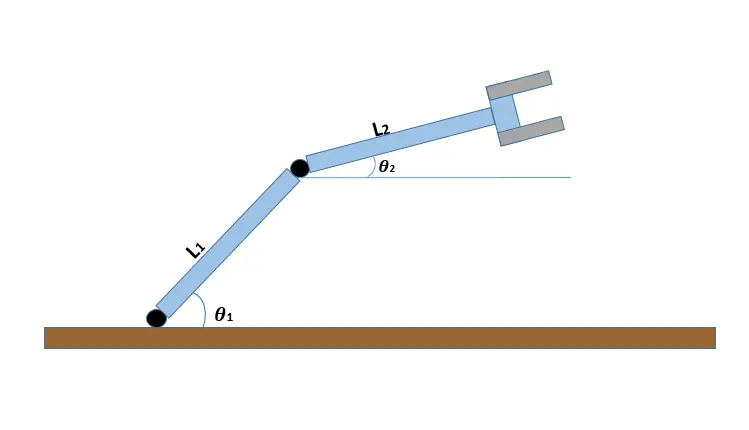
- L1:- Length of link 1
- L2:- Length of link 2
- Theta1:- Angle made by link 1 with x-axis
- Theta2:- Angle made by link 2 with y-axis
1. 2-Arm robotic arm consists of two links and two rotational joints.
* Link 1 is going to make theta 1 and with respect to the x-axis.
* Link 2 is going to make theta 2 and with respect to the y-axis.
* Length of link 1 is L1 and Length of link 2 is L2 with respect to the forward kinematics.
- "What if Theta 1 and Theta 2 is given what will be the final position of manipulator" ?
According to the application, the manipulator can be neither a filling tool nor a machining tool, this problem is
also called forward kinematic.
- How did we deal with the problem?
* First step is to calculate position of link 1
* Link 1 has two points the statrting point and ending point and the starting point is base fixed to the robot and
ending point is connected to link 2
* The co-ordination of starting point is (0,0) and the co-ordinate of end point of the first link (Lcosθ and Lsinθ)
where θ = 0
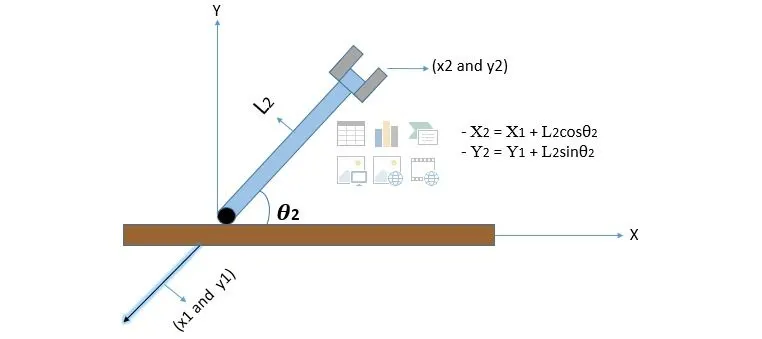
-X2 = L2cosθ and Y2 = L2sinθ Where [θ = θ2]
- (X0,Y0) = Starting point of link 1
- (X1,Y1) = Starting point of link 2
- (X2,Y2) = Ending point of link 2
2. Now we must compute the position of link 2.
* To do that, we have to draw a separate link 2 and we're going to represent link 1 has an imaginative line.
* Note [ End point of link 1 is straight point of link 2] And let's attribute to coordinate from x1 and y1 at this
particular point.
* So far we have determined through three point[Origin point,End point of the first link (or) starting point of secound link] and
finally the end point of link 2 [X0 , Y0] [X1 , Y1] [X2 , Y2]
*These three coordinates are capable of drawing these links and writing a program with a necessary animation and determinig the workspace.
CODE:-
-1(A) PROGRAM FOR FORWARD KINEMATICS OF ROBOTIC ARM:-
1.% Forward kinematics of a 2r rootic arm manipulator
2. clear all
3. close all
4. clc
5.
6. % Inputs
7. l1 = 1;
8. l2 = 0.5;
9.
10. theta = 45;
11. theta = 30;
12.
13. % coordinates
14. xθ = 0;
15. yθ = 0;
16.
17. x1 = l1*cosd(theta1);
18. y1 = l1*sind(theta1);
19.
20. x2 = x1 + l2*cosd(theta2);
21. y2 = y1 + l2*sind(theta2);
22.
23. % Plotting
24. line([xθ x1],[y
25. line([x1 x2],[y1 y2],'linewidth',3,'color','r')
- 1(B) RESULTS:-
% Forward kinematics of a 2R robotic manipulator
clear all
close all
clc

% Inputs
l1 = 1;
l2 = 0.5;

Theta1 = 50;
Theta2 = 20;

% Coordinates
x0 = 0;
y0 = 0;

x1 = l1*cosd(Theta1);
y1 = l2*sind(Theta1);

x2 = x1 + l2*cosd(Theta2);
y2 = y1 + l2*sind(Theta2);

% Plotting
line([x0 x1],[y0 y1],'linewidth',0.4,'color','g')
line([x1 x2],[y1 y2],'linewidth',0.4,'color','y')
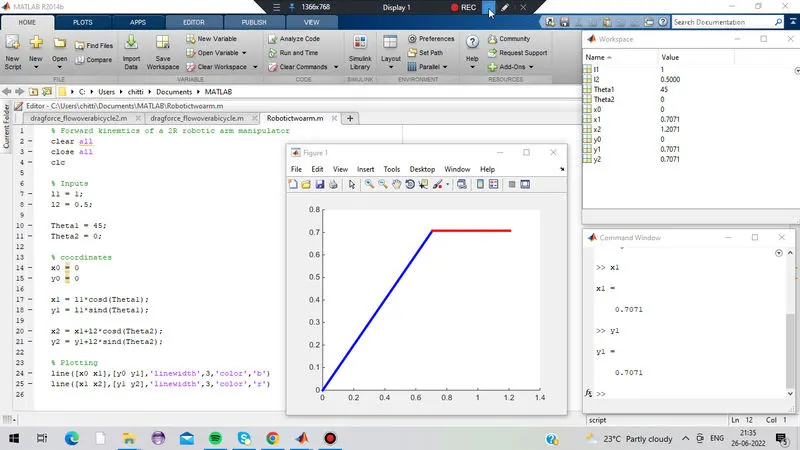
-1(C) DESCRIPTION OF A BODY'S CONTENT FORWARD KINEMATIC OF ROBOTIC ARM MANIPULATOR:-
1.Using the following program,intially we must define the forward kinematics of a rootic arm manipulator
2.I would like to start with the clear,close and clc commands because they are used to clear the command window.
3.Defining some inputs such as l1 as length of the first link that is said to be 1 meter
4.Defining some inputs such as l2 as length of the secound link that is said to be 0.5 meter
5. Next command we need to have (θ1)theta 1 and (θ2)theta 2θ
6. θ1 is said to be 45degree and θ2 is said to be 30 degree u can change the values to according to your requirements.
7.As far as my co-ordinates are concern i have three co-ordinates Xo = 0 and Yo = 0 and these are the standard points from link number 1 and base of the robot going to be fixed
8.Determine the end point of link 2 x2 ,y2 and now excute the program and you get the values in workspace.
9.Make the plot to vizualize the links line(x0 x1),(y0 y1) and use a linewidth parameter giving 3mm for thickness and with the color and wich represent the 1st link.
10.X1 and X2 are said to be the x-coordinates will plot this and now enter colour red will get the secound link and secound link is shorter than the first link l2 is said to be 0.5 and link 2 makes to respect of x-axis than the link 1 .
- 2(A) WRITING A PROGRAM WHICH MAKES AN ANIMATION OF ROBOTIC ARM BY USING FOR LOOP:-
% Forward Kinematics of a 2R Robotic arm manipulator
1.clear all
2.close all
3.clc
4.
5.% Inputs
6.l1 = 1;
7.l2 = 0.5;
8.
9.Theta1 = linspace(0,90,40);
10.Theta2 = linspace(0,90,40);
11.
12.ct = 1;
13.for i = 1:length(theta1)
14. Theta1 = theta1(i);
15.fro j = 1:length(theta2)
16. Theta2 = theta2(j);
17.xθ = 0;
18.yθ = 0;
19.
20.x1 = l1*cosd(THETA1);
21.y1 = l1*sind(THETA1);
22.
23.
24.x2 = x1 + l2*cosd(THETA2)
25.y2 = x2 + l2*sind(THETA2)
26.
27.% Plotting
28
29.
30. Plot([xθ x1],[yθ y1],[x1 x2],[y1 y2],'linewidth',3)
31. axis([-0.1 1.5 0 1.5])
32. pause(0.03)
33. M(ct) = getframe(gcf)
34. ct = ct + 1;
35. end
36.end
37.
38.Movie(M)
39.Videofile = videowriter('forward_kinematics.avi','Uncompressed AVI');
40.open(videofile)
41.write(videofile,M)
42.close(videofile)
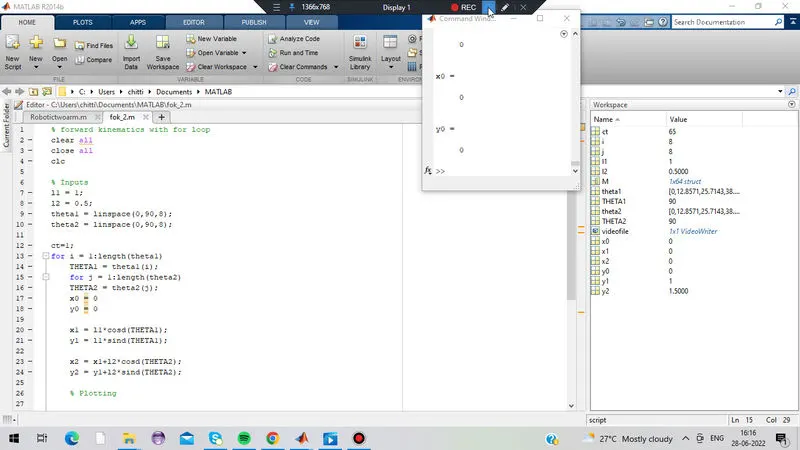
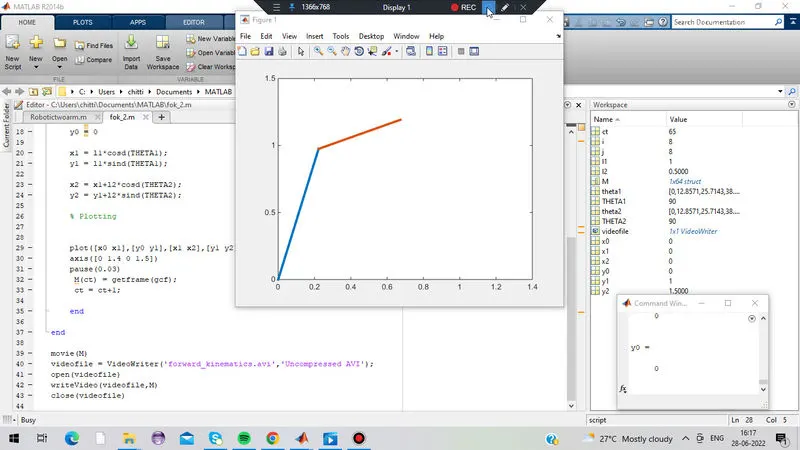
- 2(B) RESULTS:-
% forward kinematics with for loop
clear all
close all
clc

% Inputs
l1 = 1;
l2 = 0.5;
theta1 = linspace(0,90,8);
theta2 = linspace(0,90,8);

ct=1;
for i = 1:length(theta1)
    THETA1 = theta1(i);
    for j = 1:length(theta2)
    THETA2 = theta2(j);
    x0 = 0
    y0 = 0

    x1 = l1*cosd(THETA1);
    y1 = l1*sind(THETA1);

    x2 = x1+l2*cosd(THETA2);
    y2 = y1+l2*sind(THETA2);

    % Plotting


    plot([x0 x1],[y0 y1],[x1 x2],[y1 y2],'linewidth',3)
    axis([0 1.4 0 1.5])
    pause(0.03)
     M(ct) = getframe(gcf);
     ct = ct+1;

    end

end

movie(M)
videofile = VideoWriter('forward_kinematics.avi','Uncompressed AVI');
open(videofile)
writeVideo(videofile,M)
close(videofile)
-2(C) DESCRIPTION OF A BODY'S CONTENT FOR FORWARD KINEMATICS USING FOR LOOP:-
1.Using the following program,intially we must define the forward kinematics of a rootic arm manipulator
2.I would like to start with the clear,close and clc commands because they are used to clear the command window.
3.Descriing the given inputs that were stored in the variables.
4.Defining the length of the first link said to be 1m
5.Defining the length of thr secoud link siad to be 0.5m
6.The angle of inclination is defined as an array using linspace()
7.Use for commands to iterate the values of the desired variables.
8.From link one is initially set, for each link 1 iteration, link 2 can perform its own orientation. Therefore.we will define
another loop inside the first for the loop with iteration from 1 to the length of the link2 tilt angle table.
9.Again using the control to make sure movement to the robotic arm shaking.
10.record the origin (x1 y1) theta 1 and articulation (x2 y2) theta 2 values.With the linewidth of thickness 3mm
11.As the direction of the two routes changes, the axes also change, and therefore for reasons of coherence.we are going to
define a common axis for the orientation of the links using the axis() Also a pause().
12.to do animations we will store all the images obtained from each oreintation in an array M. Also to know the iterations,
we will set a counter variable.
13.Develop a movie file using the matlab commands for the rasters obtained from the above for the loops.
14.To build a video file, the matlab function requires a variable to store the file name and format.
15.The variable is opened with open() and the images are converted to video format using movie()
16.last record of the file in the given destination directory.
* USING MATLAB SOFTWARE:-
-1(A) MATLAB PROGRAM TO ANALYZE THE FORWARD KINEMATICS OF ROBOTIC ARM:-
- 2(A) PROGRAM THAT USES FOR LOOPS TO CREATE AN ANIMATION OF A ROBOTIC ARM:-
* HOW DO WE OVERCOME THE ERRORS WE FACE WHILE USING PROGRAM:-
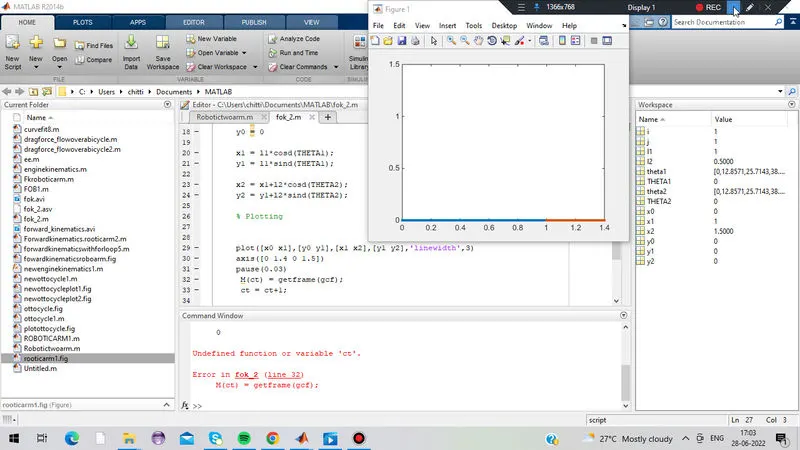
Many errors occur because uppercase and lowercase letters are not correctly taken into account when performing a function.
* Instead of 'THETA2' i had written as 'theta2' in the line 20
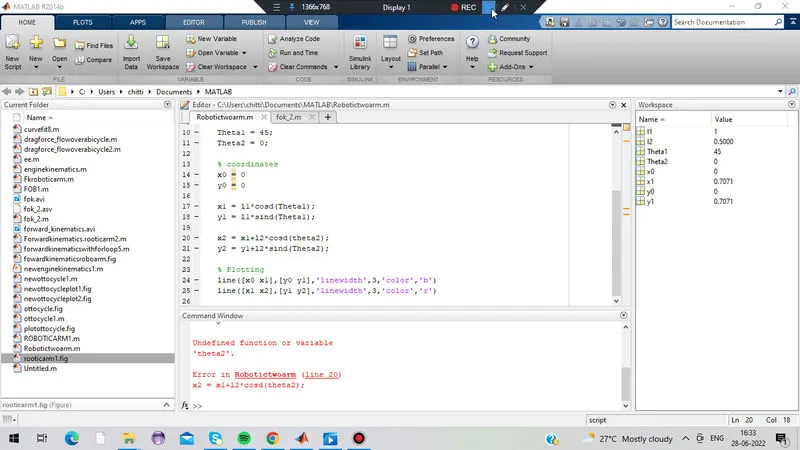
* Undefined function or variable 'ct' and It didn't occur to me to add ct=1; in line 19
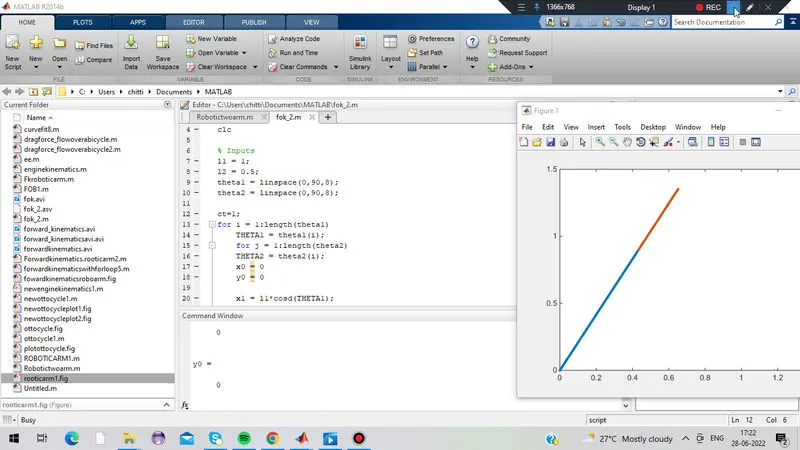
* Movie(M) has been substituted for movie(M)
* There is a slight mistake in line 16 where you should put j instead of i
* CONCLUSION:-
The matlab program for 2R Robotic Arm Simulation has been successfully completed. Errors were made, however those
errors have been eliminated.
* REFRENCE LINKS:-
3. https://ieeexplore.ieee.org/document/7139567.
4.https://www.robots.com/faq/what-is-a-robot-manipulator.
* VIDEO REFRENCES LINK :-
1. Program for forward kinemtics of robotic arm manipulator.
https://drive.google.com/file/d/1ydPWZBOmcYgxL2nfIXRhOGQltIMiP_WB/view?usp=sharing
2. Forward Kinematics using for loop.
https://drive.google.com/file/d/1o9SvfeFWmKaQswTbryVDotFZvIhyEFnS/view?usp=sharing
3. A video of the final output for the robotic 2-arm manipulator.
https://drive.google.com/file/d/17CzTnAyxB5COi8EdMgc4V3RwJdZ-9KD2/view?usp=sharing.