Week 2- 2R Robotic Arm Challenge
REPORT
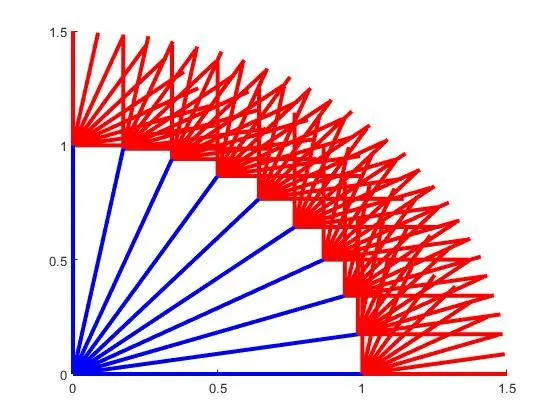
AIM: A program in Matlab to simulate the forward kinematics of a 2R Robotic Arm.
GOVERNING EQUATIONS: x1 = l1*cosd(THETA1)
y1 = l1*sind(THETA1)
x2 = x1 + l2*cosd(THETA2)
y2 = y1 + l2*sind(THETA2)
CODE:
% Forward Kinematics of a robotic arm
clear all
close all
clc
% Inputs
l1 = 1;
l2 = 0.5;
ct = 1
theta1 = linspace(0,90,10);
theta2 = linspace(0,90,10);

videofile = VideoWriter('anim.avi','Uncompressed AVI');
videofile.FrameRate = 10;
open(videofile);

for i = 1:length(theta1)
    THETA1=theta1(i);
    for j=1:length(theta2)
        THETA2 = theta2(j);
        x0 = 0;
        y0 = 0;
        x1 = l1*cosd(THETA1);
        y1 = l1*sind(THETA1);
        x2 = x1 + l2*cosd(THETA2);
        y2 = y1 + l2*sind(THETA2);
        % Plotting
        plot([x0 x1],[y0 y1],[x1 x2],[y1 y2],'linewidth',3)
        axis([-0.1 1.5 0 1.5])
        pause(0.1)
        M(ct) = getframe(gcf);
        writeVideo(videofile,M(ct));
        ct = ct + 1;
    end
end
videofile.close();
EXPLANATION:
Here we are considering a robot with 2 links of lengths l1 & l2 and l2 is connected to the end effector. The angles made by l1 and l2 with the horiziontal are theta 1 and theta 2 which are varied from 0 to 90 with a range of 10 values (hence we used the linspace command). A simple for loop is used to to take the various values ranging from 0 to 90 and for each value, the points (coordinates of joints (x0,y0), (x1,y1), (x2,y2)) are computed. Then we plot the values, and capture (gcf command) each frame within a duration of 0.1 seconds. The frame is captured for every count (ct) and is being updated by 1( for the next frame). A movie file is made inorder to save the contents of the plots, using the videowriter command.
https://drive.google.com/file/d/1aZwGMAB_WgrWVNZ-HI35EzIO0Dr0QnE-/view?usp=sharing
RESULTS: