Forward Kinematics of a 2R robot arm using MATLAB.
Report on :
- Matlab to simulate the forward kinematics of a 2R Robotic Arm.
- VIDEO LINK :(google drive link)https://drive.google.com/file/d/161CnFnXhaNa67gKVmYc9i9Vx3dChWpqb/view?usp=sharing
- MATLAB CODE:(Forword Kinematics of a 2R robot arm)
% write a program for forword kinematics of 2R robot using for loop
clear all
close all
clc
% input data
l1=1;
l2=0.5;
theta1=linspace(0,90,10);
theta2=linspace(0,90,30);
ct=1;

% using loop function to get different position of link 2 w.r.t link 1

for  i= 1:length(theta1)
     THETA1=theta1(i)
     for j=1:length(theta2)
         THETA2 =theta2(j)

         x0=0;
         y0=0;
         x1= l1*cosd(THETA1);
         y1= l1*sind(THETA1);
         x2=x1+l2*cosd(THETA2);
         y2=y1+l2*sind(THETA2);

         plot([x0 x1],[y0 y1],[x1 x2],[y1 y2],'linewidth',3)
         axis([0 2 0 2])
         pause (0.003)
         M(ct) = getframe(gcf);
         ct=ct+1;

     end
end

movie(M)
videofile = VideoWriter('forword_kinematics_for_2R_robot.avi','Uncompressed AVI')
open(videofile)
writeVideo(videofile,M)
close(videofile)- Result : Showing the code has been succesfully executed
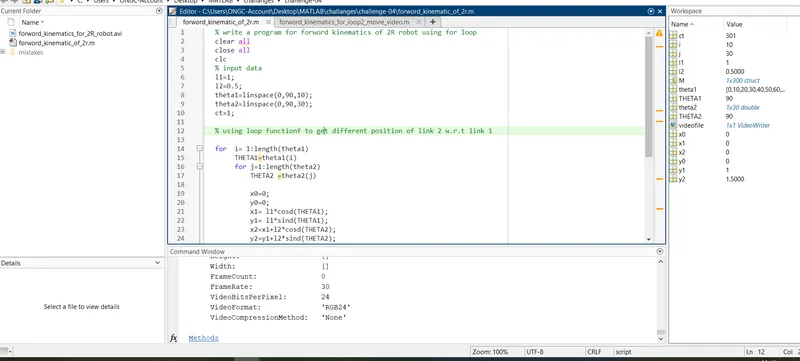
- LINE BY LINE EXPLAINATION FOR THE WRITTEN CODE:
% write a program for forword kinematics of 2R robot using for loop- title written in comment
clear all - to clear all previous code data if any
close all - to close all previous plots
clc- to clear workspace window
% input data
l1=1; - length taken for 1st link
l2=0.5; -length taken for 2nd link
theta1=linspace(0,90,10);-linspace command is used to get 10 postion for link 1 in 90 degree angle from x axis
theta2=linspace(0,90,30);-linspace command is used to get 30 postion for link 2 in 90 degree angle from x axis
ct=1; - initisl counter value taken is 1
% using loop function to get different position of link 2 w.r.t link 1- to get various positions of link 2 wrt link 1 for loop is used
for i= 1:length(theta1) -range operator used for specific no. of link 1 positions
THETA1=theta1(i) -THETA1 is the value return for the positions of link 1
for j=1:length(theta2)-range operator used for specific no. of link 2 positions
THETA2 =theta2(j)-THETA2 is the value return for the positions of link 2
x0=0;- initial space coordinate( X,Y) of 2R robot link no,. 1
y0=0;
x1= l1*cosd(THETA1); final space coordinate (X,Y) of 2R robot link no. 1= initial space (X,Y) coordinate of 2R robot link no. 2
y1= l1*sind(THETA1);
x2=x1+l2*cosd(THETA2);final space coordinate (X,Y) of 2R robot link no. 2
y2=y1+l2*sind(THETA2);
plot([x0 x1],[y0 y1],[x1 x2],[y1 y2],'linewidth',3) - a grapgh to be plotted by taking the all obtained coordiates points ,showing the diff. position of link 1 and link 2, linewidth value taken is 3
axis([0 2 0 2]) -boundary condtion taken for x and y axis respectively
pause (0.003) -a pause of 0.003 sec is taken for thr visualization of each frame
M(ct) = getframe(gcf); - getframe command gets all current fig. window and stores in a array called M(ct)
ct=ct+1; - an increament of 1 frame is given after each frame is obtaining
end -this end command is used to end for-loop taken for link no. 2 i.e 2nd for function
end-this end command is used to end for-loop taken for link no. 1 i.e 1st for function
movie(M)- matlab will generate a movie by taking frames through matrix called 'M'
videofile = VideoWriter('forword_kinematics_for_2R_robot.avi','Uncompressed AVI')- videofile of .avi (extension)is created and stored by using Videowriter command, and the file name also assigned
open(videofile)- matlab will opens the videofile
writeVideo(videofile,M)-matlab will write the given video file by using given command instruction and play the video
close(videofile)- matlab will automatically close the videofile once the video will end
- Errors faced while execution of the program and methods to eliminate it:
1. Error 1.
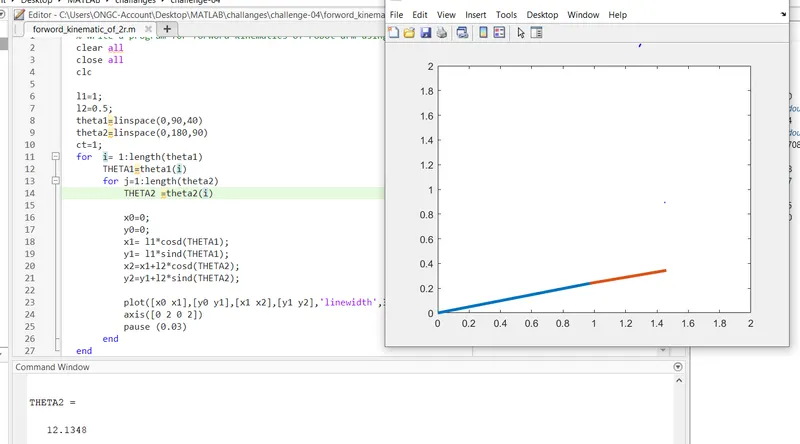
Here, in line 14 THETA2 =theta(i) is taken due to which only 1 position of link 2 was obtaining w.r.t link 1 position
further that error is eliminated by replacing 'i' by 'j'.
2. Error 2
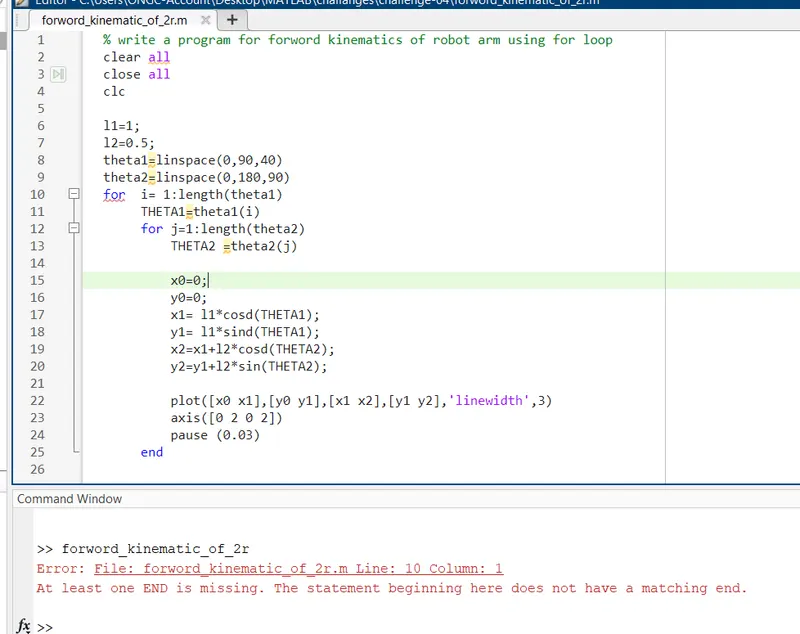
Here, one end was missing to close second for loop
further by adding one more end function at the end of loop the givern error gets eliminated.
3.Error 3
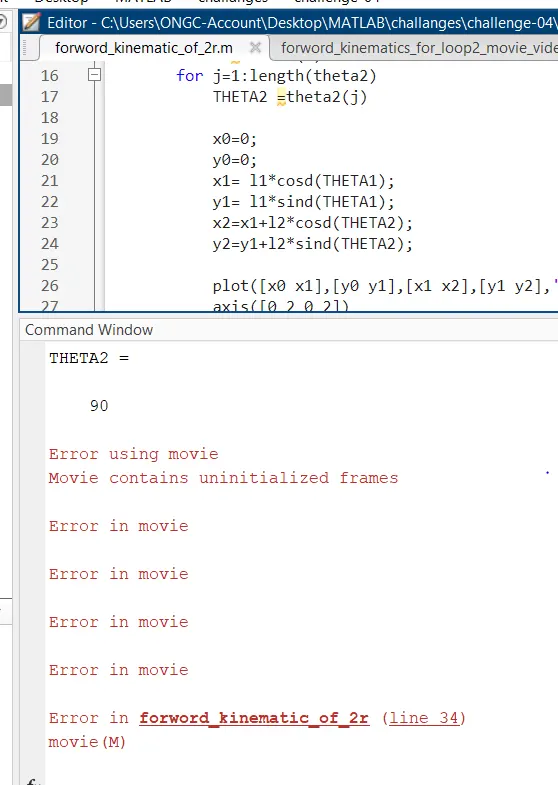
Here, the error came as ct= ct+1 is wrriten before M(ct) = getframe(gcf); command because matlab unable to store multiple frame in an array 'M'.
This error gets eliminated just interchaning the row sequence as given below.
ct= ct+1;
M(ct) = getframe(gcf);