Week 2- 2R Robotic Arm Challenge
AIM:
To simulate the forward kinematics of a 2R Robotic Arm using MATLAB Program.
OBJECTIVES:
1. Write a program in Matlab to simulate the forward kinematics of a 2R Robotic Arm
2. Create an animation file of the plot
THEORY:
Forward kinematics refers to the use of the kinematic equations of a robot to compute the position of end effector from specified values for the joint parameters
Robotic arms used in various industrial applications such as drilling,welding,metal cutting, Painting etc.
A 2R robotic arm represents a robotic arm with two rotations. i.e. it has two links which rotate or work over a two-dimensional plane with each of links having a single degree of freedom.
Here we have a 2R Robotic arm as shown in the below figure.
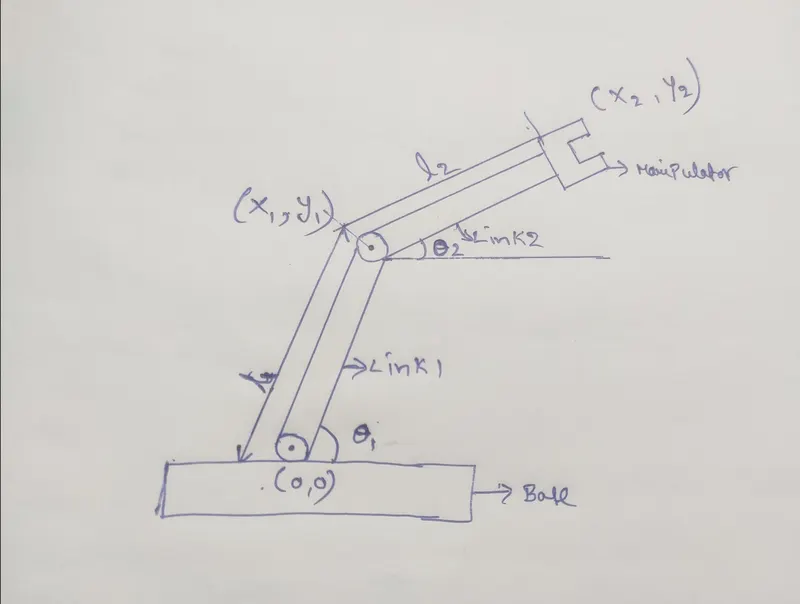
It consists of Base,two arms and two rotational joints
the link one will make an angle theta1 with respect to base,Similarly link two will make an angle theta2.
so we need to create a plot at various angular positions upto these arms can move.For this we need to findout the coordinates involved at the joints.
At the base the coordinates will be (0,0), at the end of the first link and starting of the second link the coordinates are (x1,y1), and finally at the manipulator coordinates are(x2,y2).
where as
Initial value at base
x0= 0, y0= 0
Calculating the position of link-1
x1 = l1*cosd(theta1)
y1= l1*sind(theta1)
Calculating the position of link-2
x2= x1 + cosd(theta2)
y2 = y1+sind(theta2)
PROGRAM:
% A program to simulate the forward kinematics of a 2R  Robotic Arm
clear all
close all
clc


% inputs
% length of link-1(l1) and length of link-2(l2) in meter
l1 = 1;
l2 = 0.5;

% Angle of link-1 with the horizontal axis in degrees( theta_1)
theta_1 = linspace(0,90,10);

% Angle of link-2 with the horizontal axis in degrees( theta_2)
theta_2 = linspace(0,90,10);

% Initial Base coordinates of link_1

x0 = 0;
y0 = 0;
ct = 1;
for i= 1:length(theta_1)
    % taking particular values of angle traced by link_1 in order
THETA_1 =theta_1(i);
 % iterating all values of theta_2 for particular value of theta_1
for j = 1:length(theta_2)
    % taking particular values of angle traced by link_2 in order
THETA_2 = theta_2(j);

% Calculating the coordinates of end point of link_1

x1= l1*cosd(THETA_1);
y1= l1*sind(THETA_1);

% Calculating the coordinates of end point of link_2
% End coordinates of link_1 are the start coordinates of link_2

x2= x1 +l2*cosd(THETA_2);
y2= y1 +l2*sind(THETA_2);

%plotting the robotic arm for simulation

plot([x0 x1],[y0 y1], [x1 x2],[y1 y2], 'linewidth',3);
axis([-0.1 1.5 0 1.5]);

%Pausing the current plot for a while before moving to next plot
pause(0.03);

% Capturing the current plot to combine later

M(ct) = getframe(gcf);

% Incrementing ct  to capture each frame in M
ct=ct+1;
end

end

%Making a movie from collected frames

movie(M)

% Creating a video file of '.avi' format to save the animation
videofile = VideoWriter('forward_kinematics.avi','Uncompressed AVI');
open(videofile)

%Writing the movie in the videofile created
writeVideo(videofile,M)
close(videofile)
PROGRAM EXPLANATION:
- Starting the program by using comments
- Providing the input variables
- defining the length of robotic arms(l1 and l2)
- Providing the values of theta_1 & theta_2 by using linspace command( for theta = 0 to 90degrees for 10values)
- Providing ct value as a specific digit
- Using for command to take particular values of angle traced by link_1 in order
- Again using for command to iterating all values of theta2 for particular value of theta_1
- Defining the coordinates of both arms by providing equations( x1,y1,x2,y2)
- Plotting all coordinates
- Providing the axis no
- Using the pause command to make the plot realistic
- All figures are assigned to a variable M
- Incrementing the ct value+1 each item by for loop
- Ending the 'for' loop twice
- By using movie command to combine all figures saved in the M file to make movie/animation
- At end saving the movie in .avi format.
ERRORS:
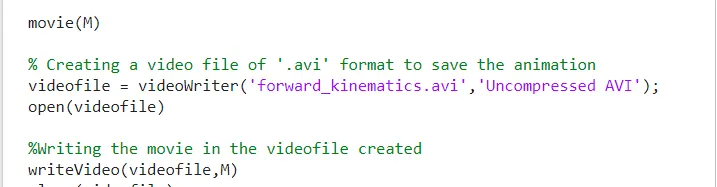
Unrecognized function or variable 'videowriter'.

I used small letter v in videowriter instead of capital V.
once changed to capital letter problem solved
CONCLUSION:
We simulated the 2R Robotic arm by using matlab program and also created a animation from the plots obtained from the program.
This animation can be visited by visiting the below link
https://youtu.be/8wp3olYrRZQ