Week 2- 2R Robotic Arm Challenge
AIM :-
To write a program in matlab to simulate the forward kinematics of a 2R Robotic Arm.
OBJECTIVE :-
* Write a program to simulate forward kinematics of a 2R robotic Arm.
* To create a movie /animation from the obtained from the program
THEORY:-
A robotic arm is a type mechanical arm,usually programmable, with similar functions to a human arm; the arm may be the sum total of the mechanism. The links of such manipulator are connected by joints allowing either rotational motion the or translational displacement . The links of the manipulator can be considered to form a kenimatic chain. the termious of the kinematic chain manipulator is called the end effector and it is analogous to the human hand.
in this the project we consider a 2R robotic arm. A 2R robotic arm represents a robotic arm with two rotations; that is rotate or work over a dimensional plane with each of links having a single degree of freedom. but also the links are resticted to a 90° rotation with respect to the axis.
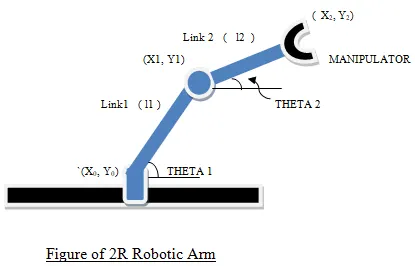
AS SHOWS IN THE FIG 2R ROBOTIC ARM HAVING MANY PARTS AS DESCRIBED
⁕ Let , L1 & L2 be the length of the link - 1 & link-2 Respectively
⁕ Let be the angle formed by link 1 with horizontal.
⁕ Let be the angle formed by link 2 with horizontal.
⁕ Let the starting and end co-ordinates of link-1 to be (X0 y0) & (x1 y1)
⁕ Let the starting and end co-ordinates of link-2 to be (X1 y1) & (x2 y2)
CODE EXPLANATION :-
* Programing language used MATLAB online
* Starting the program by using commands
* Providing the input variables like
* Predefining the length / values of the robotic arm,that is L1 & L2
* Providing the values for theta -1 & theta -2 using linspace command for theta = 0 to 90⁰ for 12 values
* Providing the Cr (compression ratio ) value as a specific digit
* Now using command for interating the value of the desired valuable.
* Again using for command for providing movement to the second robotic arm.
* Providing the equal for the x1,y1,x2,y2 or say defining the co-ordinates of the both the robotic arms.
* Plotting all the co-ordinate values and providing the axis
* Using the pause command to make the plot look realistic
* All figures are assigned to a variable M one the a time using.
* Ending the for loop twice.
* Using movie commandlist to combine all the figures saved in the M file to make an animation /movie.
* At the end saving the moive in .ani format
MATLAB CODES :-
clear all
close all
clc

%inputs

l1 = 1;
l2 =0.5;
theta1 = linspace(0,90,10);
theta2 = linspace(0,90,10);

ct = 1
for i = 1:length(theta1)
    THETA1 = theta1(i);
    for j = 1:length(theta2)
        THETA2 = theta2(j);
        x0 = 0;
        y0 = 0;

        x1 = l1*cosd(THETA1);
        y1 = l1*sind(THETA1);


        x2 = x1 + l2*cosd(THETA2);
        y2 = y1 + l2*sind(THETA2);

        % plotting


        plot([x0 x1],[y0 y1],[x1 x2],[y1 y2],'LineWidth',3)
        axis([-0.1 1.5 0 1.5])
        pause(0.03)
        M(ct) = getframe(gcf);
        ct=ct+1;

    end
end

movie(M)

Videofile = VideoWriter('forward_kinematics.avi','Uncompressed AVI')
open(Videofile)
writeVideo(Videofile,M)
close(Videofile)
ERRORS & COMMAND WINDOW EXICUTION :-
* No errors wew found during exicution
* Use of semi-colon (;) in coding results in no inputs in command window
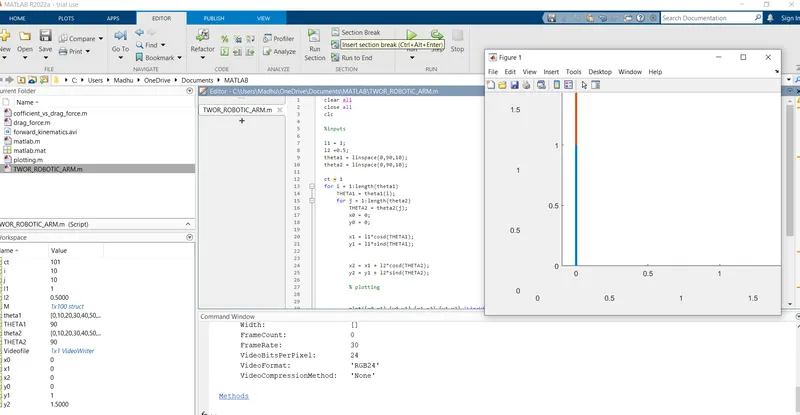
RESULTS/COMCLUSION ;-
Thus we have simulated 2R robotic arm by usng the matlab programming and also created a Movie / Animation of a 2R robotic arm.
https://youtu.be/uTM---8wU_c