Week 2- 2R Robotic Arm Challenge
% Writing a program to simulate the forward kinematics of a 2R Robotic Arm
close all
clear all
clc

% Assume length of link1 & link2 are
l1=1.5;
l2=0.5;

% Assume Angle of Arm 1 & Arm 2 from X axis as a inputs
t1=linspace(0,90,15);
t2=linspace(0,90,15);

% Assume starting postion of Link 1 as a inputs
x0=0;
y0=0;

ct=1;
for i=1:length(t1) % iterating all value of angle t1 w.r.t. origin
    T1=t1(i); % taking perticular value of angle t1 traced in order by link1
    for j=1:length(t2) % iterating all value of angle t2 for w.r.t angle t1
        T2=t2(j); % taking perticular value of angle t2 traced in order by link2

        % calculation of end point coordinate of link1
        x1=x0+l1*cosd(T1);
        y1=y0+l1*sind(T1);

        % calculation of end point cooridinate of link2
        x2=x1+l2*cosd(T2);
        y2=y1+l2*sind(T2);

        % ploting robotic arm for simulation
        plot ([x0 x1],[y0 y1],[x1 x2], [y1 y2],'linewidth',3);

        % define axis to make plot
        axis([-0.5 2 0 2.5]);

        % capture the current plot to combine later
        M(ct)=getframe(gcf);
        % incrementing ct to capture each frame in M
        ct=ct+1;
    end
end

% making movie from collected fram
movie(M);

% capturing video file in .avi formate to save the animation
videofile=VideoWriter('forward_kinematic.avi','Uncompressed AVI');

% open videofile
open(videofile);

% writing movie in created videofile
writeVideo(videofile,M);

%close videofle
close(videofile);
Refer you tube link of animated video generated after run the above program
https://www.youtube.com/watch?v=V9M8wGl6IMo&ab_channel=pravindixit
Step-wise explanation of code-
Step1-
Assumed length of link1 & link2 as a inputs
l1=1.5
l2=0.5
Step2-
Assumed angle of arm1 & arm2 from x-axis as a inputs
t1=linspace(0,90,15)
t2=linspace(0,90,15)
Step3-
Assumed starting position of link1 as a input
x0=0
y0=0
Step4-
Now, two "for loop" used to itterate over the range of angle traced by both link. For each particular angle of link1, link2 is moved over the entire range, to obtain different position of each effector at the angle of link1
Step5-
Calculated end point coordinate of link1
Step6-
Calculated end point coordinate of link2. Not required to calculate start point of link2 as it same as end point of link1
Step7-
Plot each particular position of link1 & link2 with defined axis
Step8-
Capture current plot to combine later & incrementing it to capture each frame
Step9-
End the both "for loop"
Step10-
Making movie from collected frame
Step11-
Captured video file in ".avi" formate to save the animation & opened video file
Step12-
Write movie in created video file & closed it
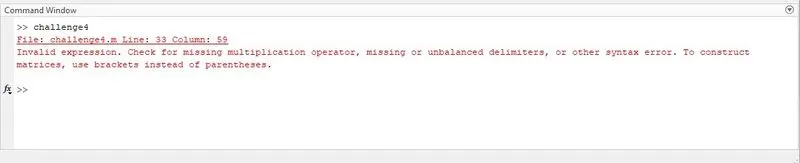
Errors faced while programming
Faced one eeror during run the program as i forgot to write comma (,) between 'linewidth' & 3 in line 33
Steps taken to overcome those errors
After wtiting comma (,) between both 'linewidth' & 3, error got resolved i.e. 'linewidth',3
Screenshots showing errors thrown in command window
Refer attached error screen