Week -2
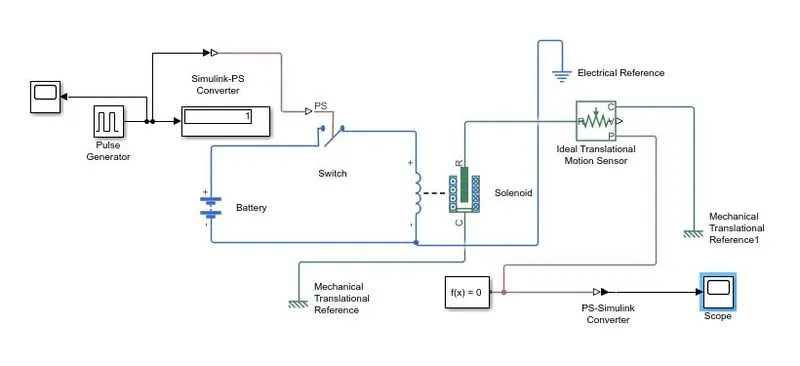
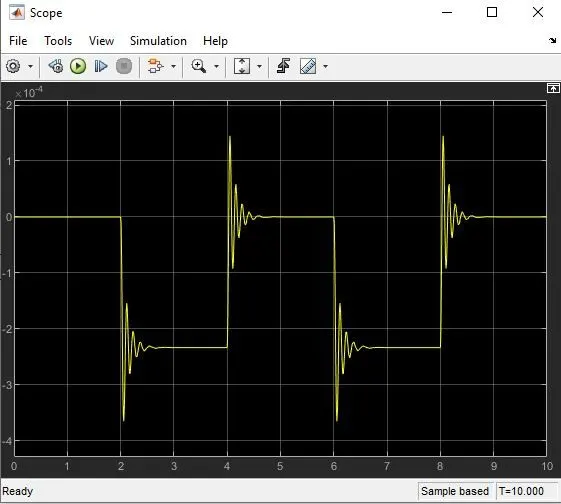
Door Bell - Simulink model explanation -
Step1 - The plug generator is used to create square wave pulse at regular intervals. The block waveform parameters applitude, pulse, width, period & phase delay detmine the shape of output waveform. Taken Aplitude 1, period 4 sec, pulse width 50% & phase delay 2 sec.
Step2- The switch block used is controlled by external physical signal. If the external signal is grether than the thersold parameter than the switch is closed, otherwise switch is open.
Step3- The positive terminal of the switch is connected to switch & the negative terminal is connected to electrical reference.
Step4- The ideal translational sensor is connected with switch & battery and we will get a complete electrical circuit. The port is connected with mechanical reference.
Step5- PS-simulink convertor is used to convert the physical signal to simulink signal
Step6- Solver configuration - each physical network reprasented by a connected simscape block required solver setting information for simulation.
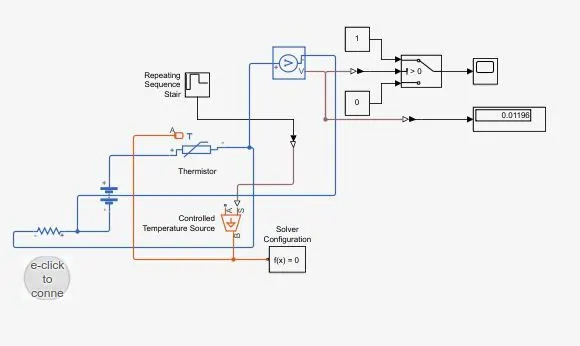
Block used for model
1. Repeting sequance stair
2. Control temperature source
3. Thermistor
4. Voltage sensor
5. Battery
6. Switch
7. Lamp
8. Scope
9. Display
10. PS-Simulink Convertor
11. Simulink-PS covertor
12. Solver configuration