Week 2- 2R Robotic Arm Challenge
PROBLEM STATEMENT:
Write a program in Matlab to simulate the Forward kinematics of a 2R robotic arm.
Equations used-
- x1 = l1*cosd(theta1)
- y1 = l1*sind(theta1)
- x2 = x1 + l2*cosd(theta2)
- y2 = y2 + l2*sind(theta2)
- [x0 y0],[x1 y1],[x2 y2]
d = degree.
% Forward kinematics of 2R robotic arm manipulator

% Inputs
l1 = 1;  % length of first arm
l2 = 0.5;  % length of second arm

theta1 = linspace(0,90,10);  % angle of the first arm
theta2 = linspace(0,90,10);  % angle of the second arm

ct = 1;   % initiate the counter value

% For end loop

for i = 1:length(theta1)
    THETA1 = theta1(i);
    for j = 1:length(theta2)
        THETA2 = theta2(j);

        % Co-ordinates

        x0 = 0;   % starting point of link 1 which the base of the robot and it is fixed
        y0 = 0;

        x1 = l1*cosd(THETA1);   %  end and starting point of link 1 & link 2 respectively
        y1 = l1*sind(THETA1);

        x2 = x1 + l2*cosd(THETA2);   % assigned as end manipulator
        y2 = y1 + l2*sind(THETA2);

        % Plotting

        plot([x0 x1],[y0 y1],[x1 x2],[y1 y2],'linewidth',3);
        axis([-0.1 1.5 0 1.5]);
        pause(0.03);
        M(ct) = getframe(gcf);
        ct = ct + 1;
    end
end

movie(M)
videofile = VideoWriter('kinematics_2r_manipulator.avi','Uncompressed AVI');
open(videofile)
writeVideo(videofile,M)
close(videofile)
The above program is on the Forward kinematics 2R robotic arm.
STEPWISE EXPLANATION:
The code is to define the inputs and their values. Length of arms 1 and 2 both are defined, and theta 1 and theta 2 both are defined as well using the 'linspace' command. linspace function generates spaced vectors, so in this case of theta 1 and theta 2, linspace (0,90,10) means that Matlab will generate a row vector 90 of 10 points linearly spaced between 0 and to include 90.
The next step is to set up a counter. A counter is a variable that counts an event in a loop. A for loop was used for this, a for loop is a repetition control structure that allows you to efficiently write a loop that needs to execute a specific number of times.
Since theta 1 and theta 2 will contain multiple values of the angle within the x-axis, a new variable is needed inside the for loop for both x and y coordinates. THETA 1 and THETA 2 are added to the code, for THETA 2 the variable j is added instead of i as this will give THETA 2 its own respective angle.
The next is to plot the graph with all x and y coordinates. A pause command is used for pausing the command for a certain time, for this 0.03 is used. The M command is used to capture the frame every time the loop runs. The final step of the loop is to add a +1 to the ct variable; this will increment the frame every time the for loop runs. End command is used for the plot and for the for loop to stop both from running.
The final step of the code is to create a movie of the animation of the robotic arm, so the movie command is used. The VideoWriter command is used to assign the video format, for this .avi is used as the format. The open command is used to open the video. The writevideo command is used to write the video with plot frames. Finally, the close command is used to close the video file.
ERRORS:
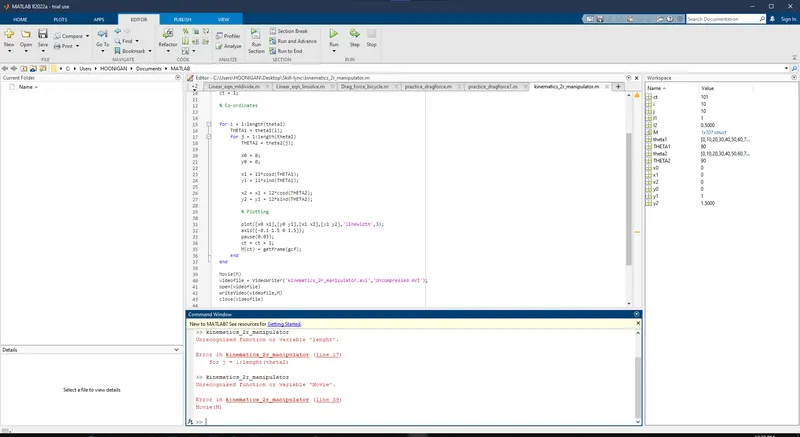
The errors faced are that first I do a typo of writing a wrong spelling of length which I corrected, and then I accidentally typed 'Movie' instead of 'movie' since Matlab is a sensitive program language, commands must be written with care. The error is shown in the above mentioned screenshot.
ANIMATION:
Link - https://drive.google.com/file/d/1MnoSApBCSXFYp2T0mc1r90FxzwAbWJnK/view?usp=sharing