Week 2- 2R Robotic Arm Challenge
AIM:-
To write program in matlab to simulate the forward kinematics of a 2R robotic arm , as shown in the vedio.
OBJECTIVE:-
- To solve the basic consideration used in forward kinematics of a 2R robotics arm along with the each movement of manipulator.
- To create intermediate plots and animation of forward kinematics of a 2R robotics arm using matlab.
THEORY AND FORMULAS:-
The 2R robotic arm is a type of mechanical device which is consists of a base support and tow links making diffrent angles with the axix.
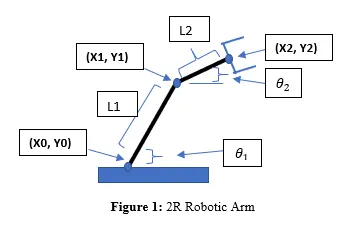
the typical diagram of forward kinematcs of 2R robotic arm is given as follows-
Now we can come to our consideration,
The, length of link1 = `l1`
length of link2 = `l2`
Angle made by the link1 to base support = `theta1`
Angle made by the link2 to base support = `theta2`
To find out the position of each links,
Step1: To calculate position of link1
Starting point of link1[X0,Y0] = [`0 , 0`]
End point of link1 [X1,Y1] = [`l1*costheta1 , l1*sintheta1`]
Step2: To calculate position of link2
Starting point of link2 [X1,Y1] = [`l1*costheta1 , l1*sintheta1`]
End point of link 2 = [`(X1+l2*costheta2) , (Y1+l2*sintheta2)`]
Program to forward kinematics of 2R robotics arm manipulator:-
%forword kinematics of a 2R robotic arm manipulator
clear all
close all
clc

% Inputs
l1 = 1;
l2 = .5;
theta1 = 45;
theta2 = 90;

% Coordinates

x0 = 0;
y0 = 0;

x1 = l1*cosd(theta1);
y1 = l1*sind(theta1);

x2 = x1+l2*cosd(theta2);
y2 = y1+l2*sind(theta2);

% Plotting

line([x0,x1],[y0,y1],'linewidth',3,'color','b');
line([x1,x2],[y1,y2],'linewidth',3,'color','g');
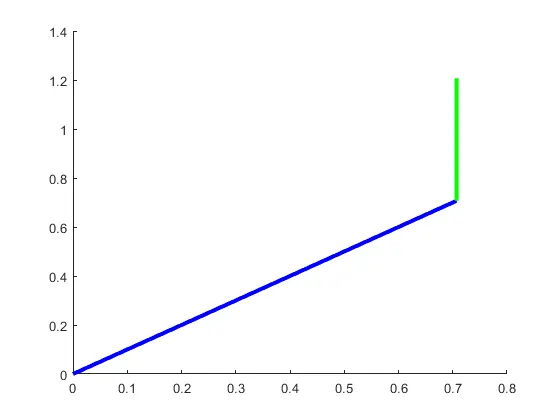
then, i can found out the required plot of 2R robotic arm manipulator-
Plot of forward kinematics of a 2R robotic arm manipulator:-
Now i can come to our 2nd part of the question,
Program to create animation of forward kinematics of a 2R robotics arm manipulator:-
% forword kinematics of a 2R robotic arm with animation

clear all
close all
clc
% Inputs
l1 = 1;
l2 = .5;

theta1 = linspace(0,90,10);
theta2 = linspace(0,90,10);

ct = 1;

for i = 1:length(theta1)
    THETA1 = theta1(i);

    for j = 1:length(theta2)
           THETA2 = theta2(j);

           % Mathematical cosideration

           x0 = 0;
           y0 = 0;

           x1 = l1*cosd(THETA1);
           y1 = l1*sind(THETA1);

           x2 = x1+l2*cosd(THETA2);
           y2 = y1+l2*sind(THETA2);

           % Plotting


           plot([x0 x1],[y0 y1],[x1 x2],[y1 y2],'linewidth',3);
           axis([-.1 1.5 0 1.5])
           pause(.3)
           M(ct) = getframe(gcf);
           ct=ct+1;
    end


end
% commond to create movie
movie(M)
videofile = VideoWriter('abhishek.avi','uncompressed AVI');
open(videofile)
writeVideo(videofile,M)
close(videofile)
Then we can found out our required animation/movie-
LInk of the required movie/animation is given below:-
link of the movie of gogle derive-
https://drive.google.com/file/d/1jFvfkATsd9-Mg3ALM7O4CerupZETNe4b/view?usp=sharing
linke of the youtube of the movie-
https://www.youtube.com/watch?v=boYu0heaQy0
Error faced during the programming:-
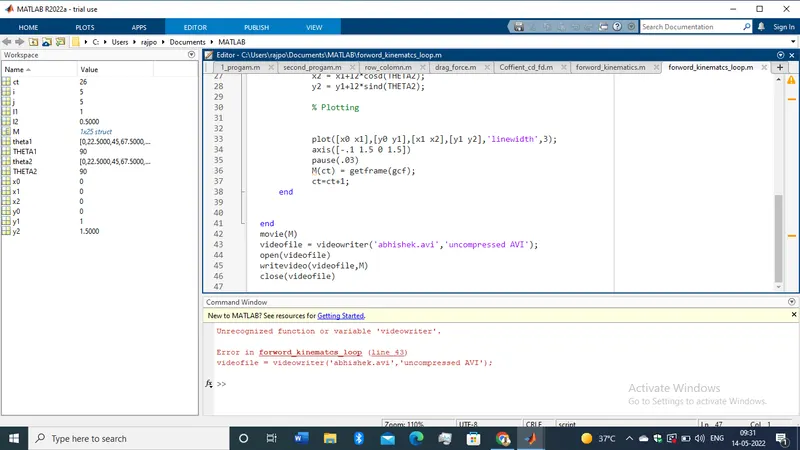
when i am going make the a error has been come in my program that is shown in the given image-
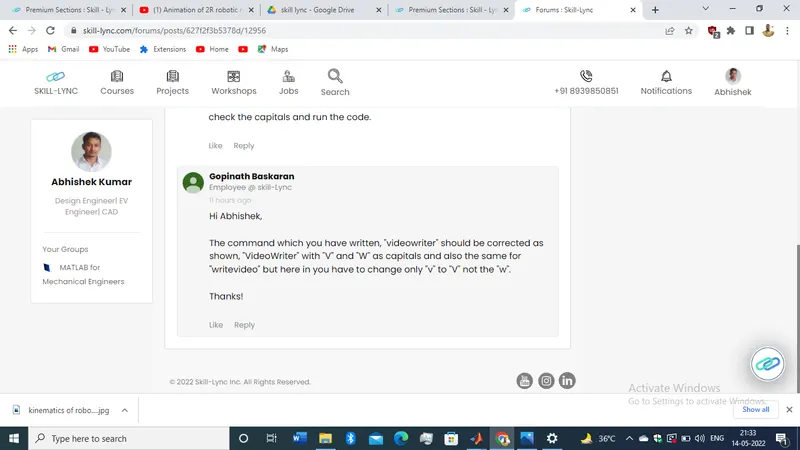
With help of our students group i am overcome from this problem.
Conclusion:-
now i can come to conclusion that i have used the matlab programmmind to create movie for the forward kinematics of a 2R robotic arm manipulator.
Also found out the required movie and plot, the link of the animation is also provided in the answer report.